[!IMPORTANT]
🤖 Read this with your AI agent — don't read it by hand.
This repo is written agent-first. Point Claude Code, GitHub Copilot, Cursor, or any agent at it: "Read the README and AGENTS.md, then help me run / extend this." Structure +
AGENTS.mdare optimized for agent comprehension.

Floor plans as code — like Typst/LaTeX, but for architecture.
Text in, a precise architectural drawing out. Deterministic, zero-dependency, and built so an AI agent can verify its own plan without ever looking at an image.






▶ Live Playground · 📖 Docs · ⌨ CLI reference · 📦 npm · 🧩 VS Code
👀 See it
Here is a whole program, and below it the actual drawing it compiles to — not a mock-up. Walls join and hatch themselves, the door draws its own swing arc, the window draws its glazing, and the furniture is placed by anchor, never by hand-computed coordinates.
plan "Attached 1BR" {
  units mm
  grid 100
  north up

  strip right at (0,0) gap 0 height 4000 {          # a row of rooms, laid end to end
    room id=r_living size 4000 label "Living"  uses living
    room id=r_bed    size 3000 label "Bedroom" uses bedroom
  }

  wall id=w_north exterior  thickness 200 { (0,0) (7000,0) }
  wall id=w_south exterior  thickness 200 { (0,4000) (7000,4000) }
  wall id=w_west  exterior  thickness 200 { (0,0) (0,4000) }
  wall id=w_east  exterior  thickness 200 { (7000,0) (7000,4000) }
  wall id=w_part  partition thickness 100 { (4000,0) (4000,4000) }

  door id=d_main on w_south at 2000 width 1000 hinge near start swing into r_living
  door id=d_bed  on w_part  at 2000 width 900  swing into r_bed   # opens INTO the bedroom

  window on w_west at 50% width 1400                # centred on the wall, by construction
  window on w_east at 50% width 1200

  furniture sofa in r_living anchor top-left inset 300 size 2000x900  label "Sofa"
  furniture bed  in r_bed    anchor right    inset 300 size 1500x2000 label "Bed"
}
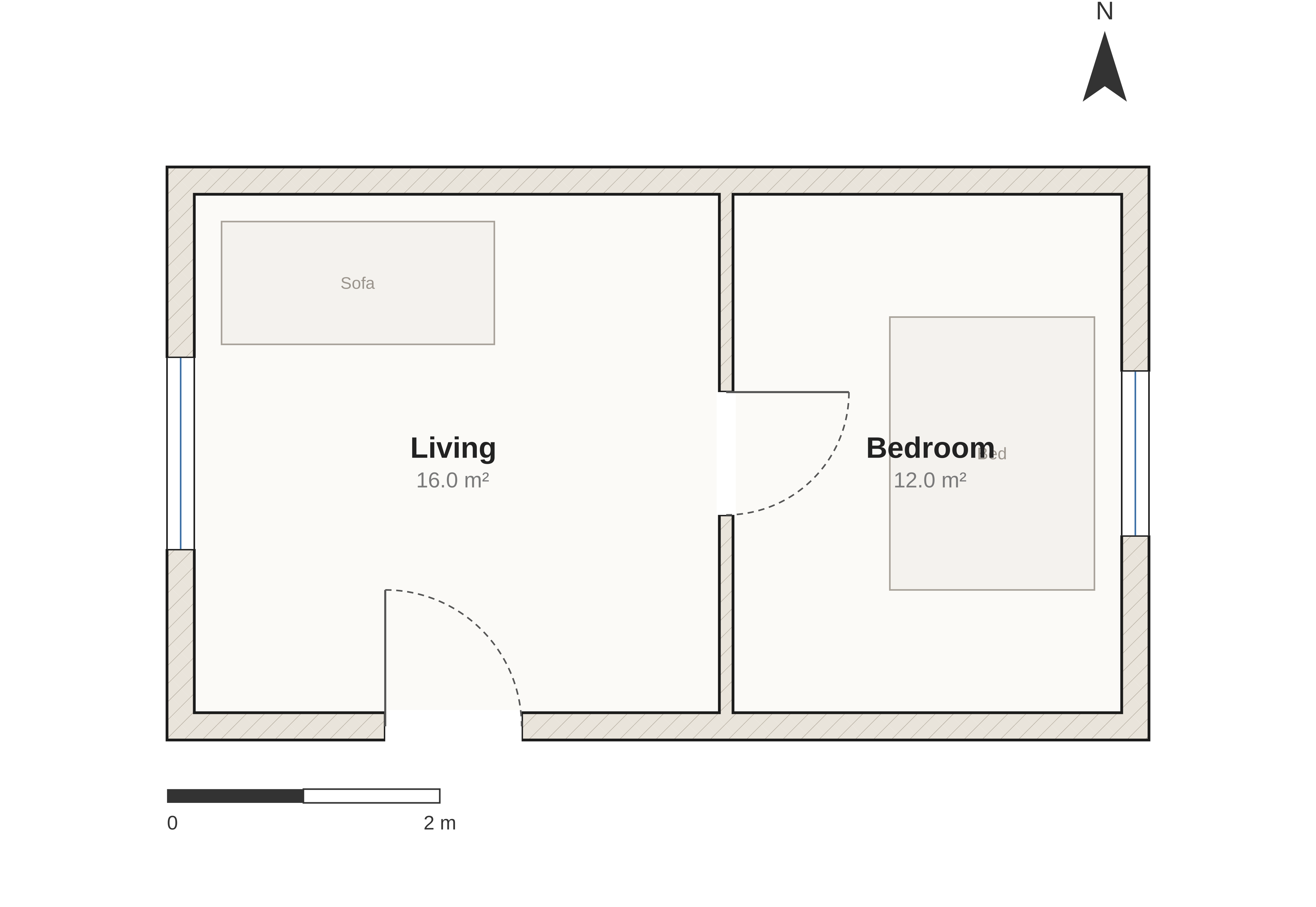
↑ arch compile attached.arch — that program, rendered. Nothing above places a wall corner,
a door leaf or a sofa by hand.
▶ Click the drawing — it opens the live playground with this exact plan already loaded. Change a number and watch it redraw; the compiler runs in your browser, nothing is sent to a server.
Why a link and not a live embed? ArchLang does ship an embeddable viewer — but GitHub's markdown sanitizer strips
<iframe>(it comes back as escaped text, exactly like<script>), so no README on GitHub can host one. The embed works everywhere GitHub isn't: see Embed a plan anywhere. Source:examples/attached.arch.
🌟 Introduction
ArchLang is a small declarative language for floor plans. You declare a plan — walls, rooms, doors, windows, furniture — and the compiler renders a clean, professional SVG (also DXF, PDF, PNG, and a zero-dependency ASCII plan).
Coordinates are integer millimetres, so output is deterministic: the same source always produces byte-identical bytes, and changing one number changes exactly one thing. "Make the bedroom 1 m wider" is a one-number diff — not a re-roll of a raster image that silently redraws the kitchen too.
The compiler is pure TypeScript with zero runtime dependencies and is isomorphic — the same code runs in Node and in the browser, which is why the playground is fully client-side.
ArchLang is the floor-plan engine behind ArchCanvas, an AI design agent — but it stands alone and is useful in any app or script.
💡 Why it is different
Most "AI floor plan" tools generate a picture. A picture cannot be checked, diffed, or reasoned about — and neither the model nor you can tell whether the bathroom is actually reachable.
ArchLang generates a program, and then lets you interrogate it as facts:
| Raster image generation | ArchLang | |
|---|---|---|
| Output | pixels | a .arch program → SVG / DXF / PDF / PNG / TXT |
| Edit "widen the bedroom" | re-roll the whole image | change one number |
| Same input twice | different image | byte-identical output |
| "Is the bath reachable?" | look at it and guess | arch describe --json → access graph |
| "Does it match the brief?" | eyeball it | arch validate --intent → exit code |
| Wrong syntax | — | errors returned as data, each carrying its own fix |
That last row is the whole design: compile() never throws. It returns diagnostics with byte
spans and a machine-applicable fix, which is what makes a tight self-correction loop possible.
🤖 The agent loop
An agent can author a plan, correct itself, and confirm the plan matches the brief without rendering an image at all — which is what makes ArchLang cheap to drive from a text-only model.
flowchart TD
    B([Brief]) --> S["<b>arch context</b> — the whole language, one call"]
    S --> W["Write <b>.arch</b>"]
    W --> C{"<b>arch compile --json</b>"}
    C -->|"ok: false"| F["<b>arch fix</b><br/><i>each diagnostic carries its own fix</i>"]
    F --> C
    C -->|"ok: true"| D["<b>arch describe --json</b><br/><i>rooms · areas · adjacency · access graph</i>"]
    D --> V{"<b>arch validate --intent</b><br/><i>does it meet the brief?</i>"}
    V -->|"no"| G["<b>arch suggest</b><br/><i>candidate door / window statements</i>"]
    G --> W
    V -->|"yes"| O([SVG · DXF · PDF · PNG])

    style B fill:#ede7f6,stroke:#6b3ae0,color:#1a1a1a
    style O fill:#e8f5e9,stroke:#2e7d32,color:#1a1a1a
    style C fill:#fff8e1,stroke:#7a6000,color:#1a1a1a
    style V fill:#fff8e1,stroke:#7a6000,color:#1a1a1a
    style D fill:#e8f5e9,stroke:#2e7d32,color:#1a1a1a
    style F fill:#fdecea,stroke:#b3261e,color:#1a1a1a
    style G fill:#fdecea,stroke:#b3261e,color:#1a1a1a
Cold start in one command. arch context prints the entire agent context — language spec,
workflow skill, CLI reference and every diagnostic code — as one system-prompt-ready document (the
same llms-full.txt the docs site serves).
npx @chanmeng666/archlang context                       # EVERYTHING: spec + skill + CLI + error catalog
npx @chanmeng666/archlang context --section errors      # …or one section of it (the catalog alone: 60 KB → 13 KB)
npx @chanmeng666/archlang spec                          # just the language, one page (~2k tokens)
npx @chanmeng666/archlang help describe                 # one command, with worked examples
npx @chanmeng666/archlang compile plan.arch --json      # render → { ok, diagnostics, summary }
npx @chanmeng666/archlang fix plan.arch --dry-run       # the exact unified diff it would write, applying nothing
npx @chanmeng666/archlang describe plan.arch --json     # VERIFY, without an image
npx @chanmeng666/archlang validate plan.arch --strict   # the ship gate
Every command takes --json (result on stdout, messages on stderr) with deterministic exit codes
(0 ok · 2 user-source error · 1 IO · 3 usage) — and a typo earns that 3: arch lint --jsn exits 3 with did you mean --json? rather than quietly reading --jsn as a filename, and
arch comple suggests compile.
One manifest, no drift. The per-command help (arch <cmd> --help), the flag parser, and the
generated CLI reference are all rendered from the same
manifest — which is why they cannot advertise a flag a command doesn't take. arch manifest --json
is that manifest as data, and arch <cmd> --help is the cheap way to read one row of it.
Reads are bounded, so a big plan can't flood a context window: describe --select/--room,
lint|validate --code/--severity, context --section. Filtering what you read never changes
what gates — the exit code always weighs every diagnostic. And because arch fix rewrites your
source, it prints the unified diff first and takes --backup.
See SKILL.md.
Machine-native artifacts — Plan JSON, a GBNF grammar, an intent schema, and an optional MCP server
| Artifact | Use |
|---|---|
/plan.schema.json | Emit structured JSON, compile it with arch compile --from-json |
/archlang.gbnf | Constrain a local model to parseable output |
/intent.schema.json | Write the brief down as a contract; gate on it with validate --intent |
/llms-full.txt | The whole context bundle (arch context) |
MCP server (optional). @chanmeng666/archlang-mcp is a stdio Model Context
Protocol shim over the library, listed on the official registry as io.github.ChanMeng666/archlang-mcp:
claude mcp add archlang -- npx -y @chanmeng666/archlang-mcp
Prefer the CLI when your agent has a shell — a CLI costs nothing in the context window until it is called, whereas an MCP tool schema sits there permanently. The server exists so MCP-native hosts can discover ArchLang. The core stays zero-dependency; the SDK lives only in that package (ADR 0012).
In CI: .github/actions/arch-render renders every ```arch
fence in your Markdown to images in one step.
✨ Features
It draws like an architect, not like a plotter
Poché-hatched walls (by material), door swing arcs, window glazing, computed room areas,
dimension lines, layers, line weights, a north arrow, a scale bar and a title block. Real fixture
symbols for WC, basin, shower, bathtub, sink, counter, fridge and stove — plus dims auto to
synthesize dimension strings for you.
It checks architectural soundness, not just syntax
arch lint encodes tacit professional knowledge: a bathroom reachable only through a bedroom, a
wet room that isn't fully walled in, a door whose swing hits furniture or another door, a windowless
bedroom, an unenterable room, a too-narrow door, a bath/kitchen with no fixtures, and a room whose use
was merely inferred from an indirect label (W_ALIAS_MATCH — with a fix that pins the explicit
uses). All tunable via the ruleset.
It models how a person actually walks the plan
arch describe runs a clearance-eroded nav grid: per-room walk distance, the narrowest pinch on
the way in, and how circuitous the route is — with advisory lint for a too-tight
(W_PATH_TOO_NARROW) or roundabout (W_CIRCUITOUS_PATH) walk, and an opt-in
arch compile --overlay circulation that draws the routes on top of the plan.
Facts and advice — never an invisible auto-arranger (ADR 0005).
arch repair is the one explicit corrector: it pushes furniture out of walls, doorways and swing
arcs, and emits a change log you review.
Errors are data, and many carry a machine-applicable fix
compile() never throws on bad source — it returns diagnostics with byte spans, a catalogued
E_*/W_* code, and a fix. Where the edit is mechanical, the diagnostic also carries applicable
fixes that arch fix applies for you. --error-svg even turns a plan that won't compile into a
self-describing error card an agent can look at.
Parametric, scriptable, and still deterministic
Values, arithmetic, arrays, for/if/while and pure functions — plus relational placement
(right-of / below / …) and room strips, resolved by deterministic topological arithmetic, not
an optimizer. All of it expands at compile time: no runtime, no clock, no I/O. Optional metric unit
suffixes (4m / 40cm / 20mm) fold exactly to millimetres at lex time.
Five output formats · accessible SVG · IDE-grade tooling
SVG, DXF and a TXT ASCII plan with zero dependencies; PDF (vector, selectable text)
and PNG (deterministic raster) via optional, lazily-loaded add-ons the default install never
pulls. arch compile --accessible stamps the SVG with <title>/<desc> + role="img".
A full LSP (hover, completion, go-to-definition, rename, signature help), an arch fmt
formatter, an arch explain <CODE> catalog, a self-documenting CLI (arch <cmd> --help, rendered
from the manifest, worked examples included), and a
VS Code extension.
🚀 Quick start
npx @chanmeng666/archlang new -o plan.arch          # scaffold a starter plan
npx @chanmeng666/archlang compile plan.arch -o plan.svg
Or install it:
npm install @chanmeng666/archlang
As a library (zero dependencies, runs in Node and the browser):
import { compile } from "@chanmeng666/archlang";

const { svg, diagnostics } = compile(`
plan "Tiny" {
  units mm
  grid 50
  wall exterior thickness 200 { (0,0) (4000,0) (4000,3000) (0,3000) close }
  room id=r at (0,0) size 4000x3000 label "Studio"
  door at (2000,3000) width 900 wall exterior hinge left swing in
  window at (0,1500) width 1200 wall exterior
}`);

// compile() never throws — errors come back as data, each with a span and a fix.
if (diagnostics.some((d) => d.severity === "error")) console.error(diagnostics);
else writeFileSync("tiny.svg", svg);
Also exported, all pure: describe() (facts), lint() (soundness), validateIntent() +
projectSubscores() (does it match the brief?), repair(), applyFixes(), suggestTopology(),
renderAscii(), toDxf(), and the LSP core (completion, hover, …).
Develop this repo
npm install          # one install bootstraps every workspace
npm run build        # build the library + CLI into dist/
npm run check        # typecheck + lint + the full test suite
npm run check:drift  # every generated artifact must match its source
npm run playground:dev   # build the core, then open the playground
🖼️ Gallery
Every one of these is a real, compiled example from examples/ — click through to the
source.
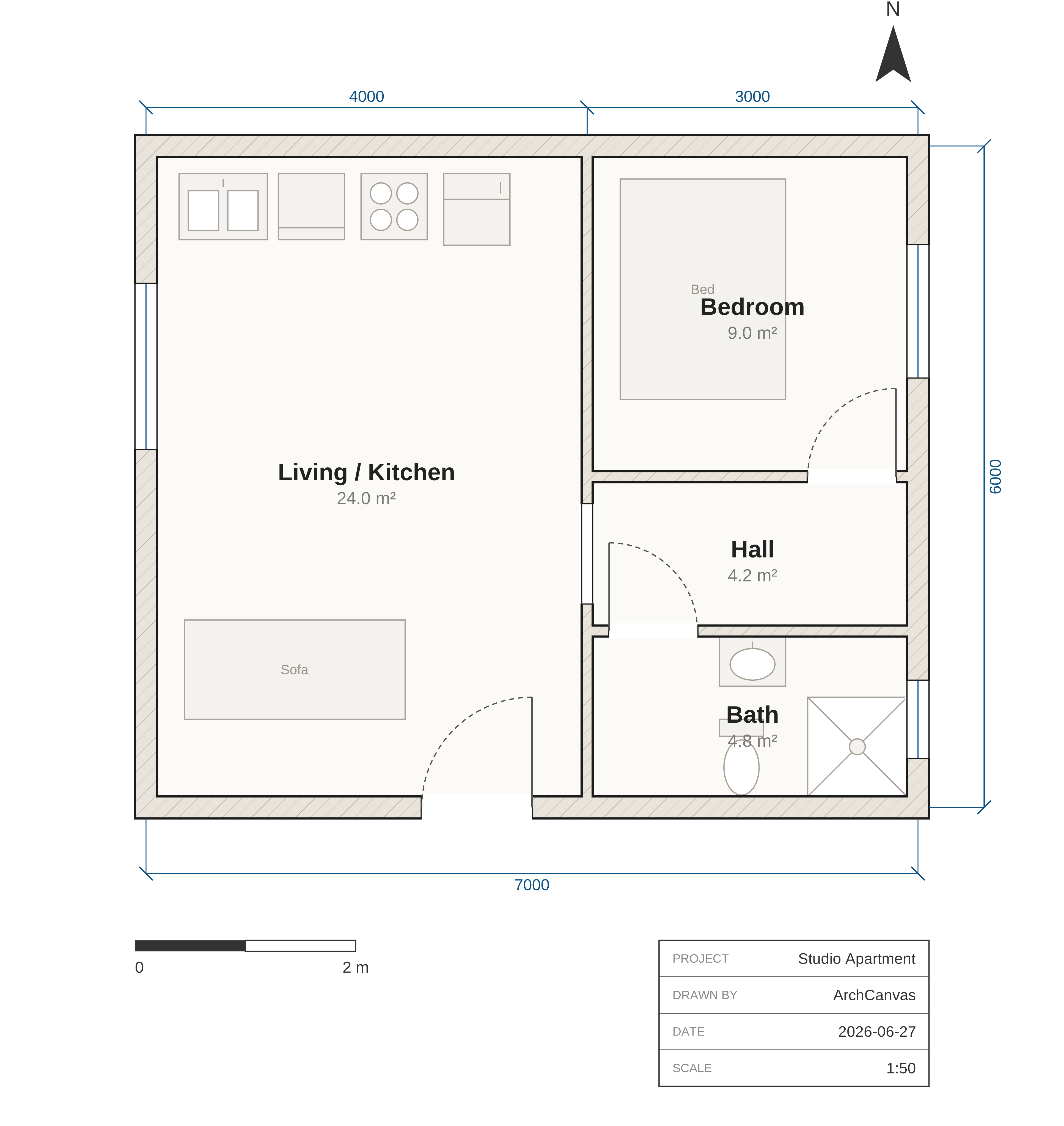 studio The flagship: fitted kitchen & bath, enclosed bath off a central hall. Lint-clean. |
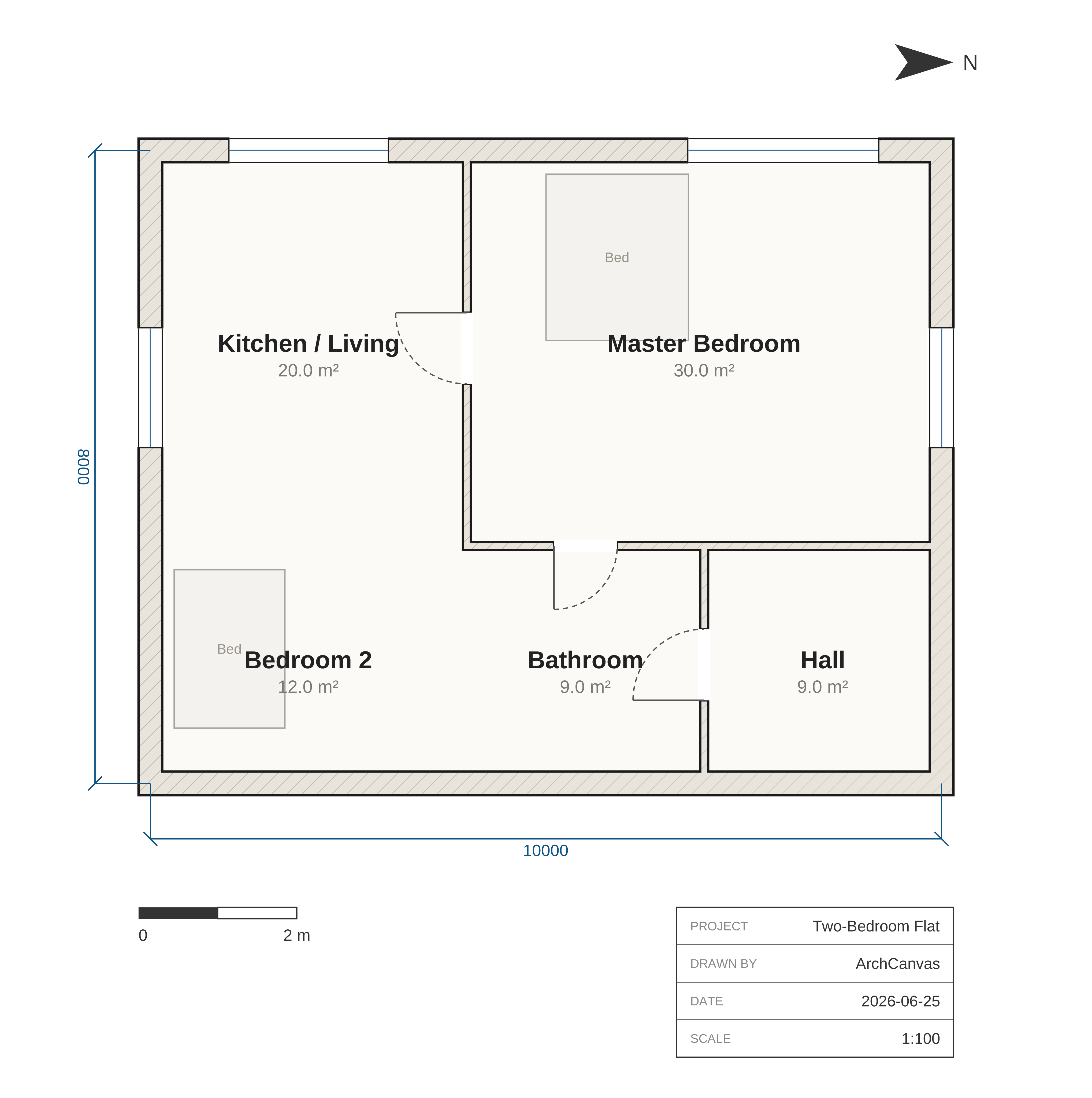 two-bed A larger plan: central corridor, multiple rooms and openings. |
attached No hand-computed coordinates: strips, on-wall openings, anchors. |
Also in examples/: parametric (a for loop that generates units), themed (a custom
theme + brick hatch), relational (right-of / below), and accessible (accTitle/accDescr).
The docs gallery renders all of them live and
editable in the browser.
🏗️ How it works
ArchLang is a compiler pipeline. Source text becomes a backend-neutral Scene IR, and every backend is a pure serializer of that scene — which is why adding a format never touches the language.
flowchart TD
    SRC["<b>.arch</b> source"] --> LEX["<b>lexer</b><br/><i>hand-written → tokens with byte spans</i>"]
    LEX --> PAR["<b>parser</b><br/><i>recursive descent → AST · recovers, never throws</i>"]
    PAR --> IR["<b>resolve()</b><br/><i>expand scripting · grid-snap<br/>relational placement · host openings</i>"]

    IR -->|"render"| SCN["<b>toScene()</b><br/><i>wall union · hatches · page</i>"]
    IR -->|"read back"| DESC["<b>describe() · lint() · validateIntent()</b><br/><i>the SAME resolved plan, as FACTS —<br/>no rendering required</i>"]

    SCN --> SVG["<b>SVG</b><br/><sub>zero-dep</sub>"]
    SCN --> DXF["<b>DXF</b><br/><sub>zero-dep</sub>"]
    SCN --> TXT["<b>TXT</b><br/><sub>zero-dep</sub>"]
    SCN --> PDF["<b>PDF</b><br/><sub>optional</sub>"]
    SCN --> PNG["<b>PNG</b><br/><sub>optional</sub>"]

    DESC --> FACTS(["rooms · areas · adjacency<br/>access graph · intent score"])

    style SRC fill:#ede7f6,stroke:#6b3ae0,color:#1a1a1a
    style IR fill:#eceef2,stroke:#464d59,color:#1a1a1a
    style SCN fill:#eceef2,stroke:#464d59,color:#1a1a1a
    style DESC fill:#e8f5e9,stroke:#2e7d32,color:#1a1a1a
    style FACTS fill:#e8f5e9,stroke:#2e7d32,color:#1a1a1a
    style SVG fill:#fbfbfc,stroke:#464d59,color:#1a1a1a
    style DXF fill:#fbfbfc,stroke:#464d59,color:#1a1a1a
    style TXT fill:#fbfbfc,stroke:#464d59,color:#1a1a1a
    style PDF fill:#fbfbfc,stroke:#8a8f98,color:#1a1a1a
    style PNG fill:#fbfbfc,stroke:#8a8f98,color:#1a1a1a
The dotted branch is the point: describe, lint and the intent check read the same resolved
plan the renderer does — so what an agent verifies is exactly what gets drawn, and it costs no
pixels to check.
compile() is pure, synchronous and deterministic — no I/O, no Date.now(), no Math.random().
The only place Node APIs are allowed is the CLI; everything else gets its environment through a
World seam. See AGENTS.md and the ADRs.
📦 Ecosystem
| Package / surface | What it is |
|---|---|
@chanmeng666/archlang | The core: compiler, CLI, analysis. Zero runtime deps, isomorphic. |
@chanmeng666/archlang-mcp | Optional stdio MCP server (the SDK is quarantined here). |
| VS Code extension | Syntax + live diagnostics, hover, completion, rename. |
| Playground | Client-side editor: preview, describe, lint, intent scoring, apply-fix, embed. |
| Docs site | Guide, reference, CLI reference, ADRs, live examples. |
| 🤗 Dataset | Synthetic, self-verifying repair trajectories + authoring pairs. CC0. |
| GitHub Action | Render ```arch fences in any repo's Markdown. |
Embed a plan anywhere
A live, editable plan in any blog, wiki or docs page — one <iframe>, no build step, nothing
sent to a server (the source rides in the compressed #z= hash, so the page is self-contained):
<iframe src="https://playground.archlang.uk/embed.html#z=…" width="720" height="480"></iframe>
The playground's Embed button generates the snippet. Optional params: editable=1 (show a
compact editor that re-renders as you type) and theme=blueprint|dark|mono|presentation.
Not on GitHub, though. GitHub's markdown sanitizer strips
<iframe>— it renders as escaped text, the same way<script>does — so a README (here or anywhere on github.com) cannot host a live embed, no matter how it's written. The honest substitutes GitHub does allow are what this README uses: a static SVG the compiler really produced, linked to a playground permalink that opens the same plan live. On the docs site, where the sanitizer doesn't apply, every plan is live and editable in place.
📚 Documentation
- 📖 Docs site — guide, reference, error catalog, ADRs, and a live, editable examples gallery. Every
```archfence on a docs page is itself an editable plan. - ⌨ CLI reference — every command, flag and exit code (generated from the manifest, so it can't fall behind).
- spec.llm.md — the whole language in one page (~2k tokens) for AI agents; also
arch spec. - SKILL.md — the agent Skill: the
spec → compile → fix → describe → validateloop. - Language Reference · Error catalog · The intent contract · ADRs
- AGENTS.md — orientation for AI agents working in this repo.
🤝 Contributing
Contributions are welcome! Please read the Contributing Guide and our Code of Conduct. Use the issue and pull-request templates when you open one.
❤️ Support & Sponsor
- Questions? Open a Discussion or see SUPPORT.md.
- Found a security issue? Follow SECURITY.md.
- If this project helps you, consider sponsoring ☕.
📄 License
Released under the MIT license.

Chan Meng
Need a custom app like this one? I build them — let's talk.

