Claude Code Plugins
Version: 2.31.0 | Last Updated: 2025-12-02
⚠️ Important Notice (>= v2.0.17) There is a known issue where hook logs stack in the chat window. Until this is resolved, PostToolUse hook outputs are hidden using
suppressOutput: truein hooks.json. Stop hook messages can be controlled via.plugin-config/[plugin-name].jsonwith"showLogs": false(default). Set totrueto enable. See Configuration for details.
A collection of powerful productivity plugins for Claude Code to automate common development workflows.
Included Plugins
1. 🔄 Git Auto-Backup
📖 Plugin Details (Click to expand)
Automatically creates git commits after each Claude Code session to prevent work loss.
Quick Info: Auto-commits all changes with timestamps when session ends | Hook: Stop
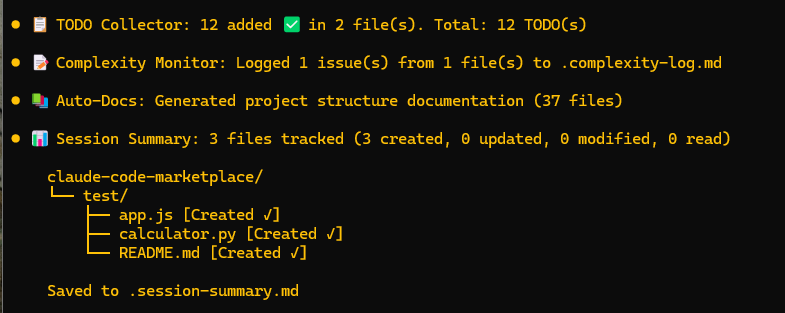
2. 📋 TODO Collector
📖 Plugin Details (Click to expand)
Scans your entire project and collects all TODO, FIXME, HACK, XXX, NOTE, and BUG comments into a detailed report.
Quick Info: Supports multiple languages, generates markdown report | Hooks: PostToolUse (Write|Edit|NotebookEdit), Stop
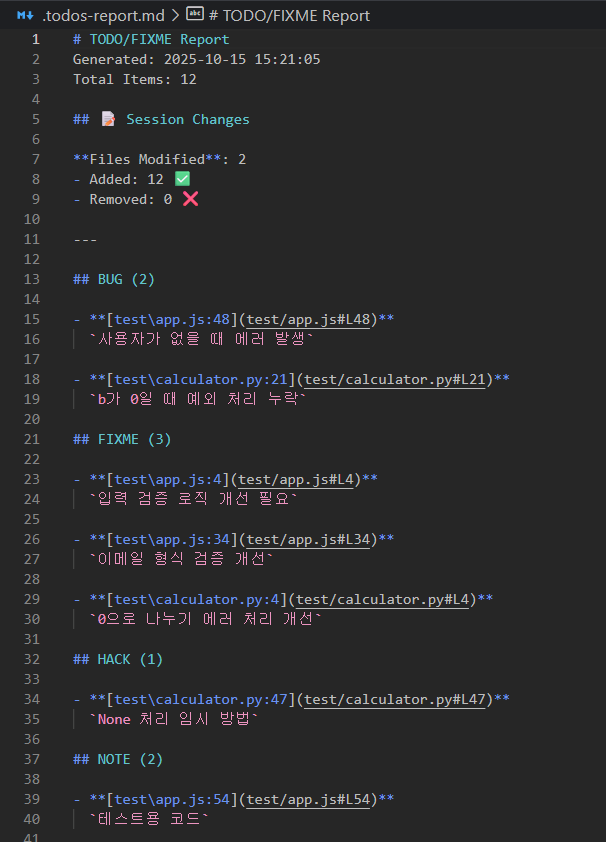
3. 📊 Code Complexity Monitor
📖 Plugin Details (Click to expand)
Monitors code complexity metrics and warns when thresholds are exceeded.
Quick Info: Tracks cyclomatic complexity, function/file length, nesting depth | Hook: PostToolUse (Edit|Write)
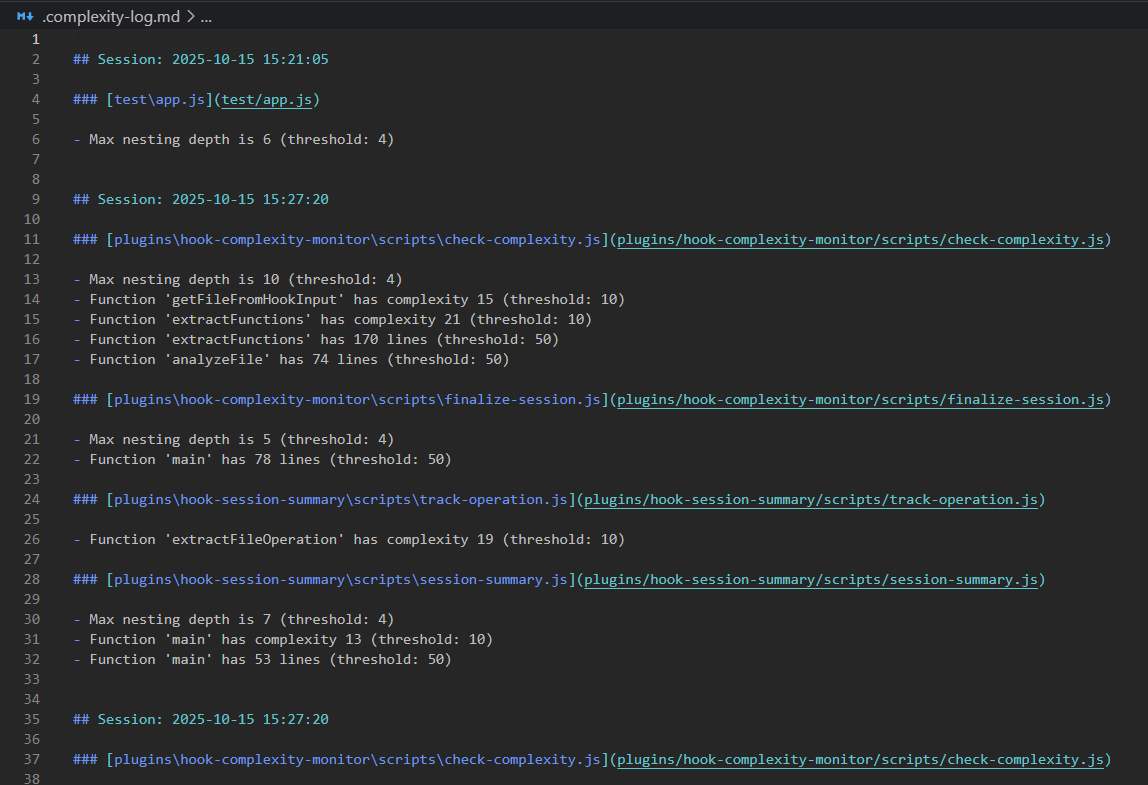
4. 📝 Auto Documentation Generator
📖 Plugin Details (Click to expand)
Automatically scans and documents your project structure with directory tree, scripts, and dependencies.
Quick Info: Generates project structure documentation, tracks file changes, extracts package.json info | Hooks: PostToolUse (Write), Stop
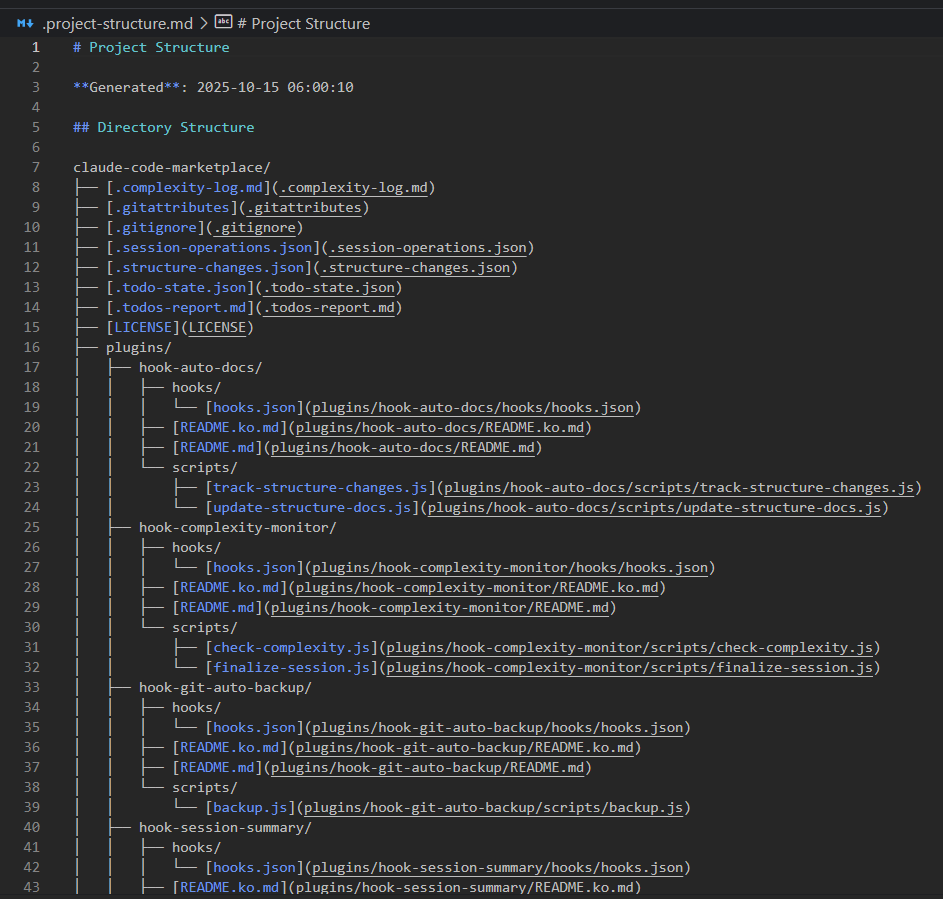
5. 📊 Session File Tracker
📖 Plugin Details (Click to expand)
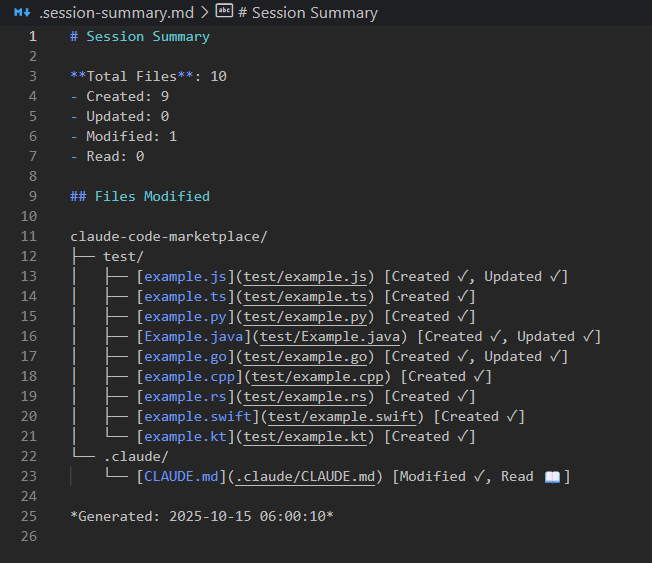
Tracks all file operations during a session and generates a summary report with directory tree visualization.
Quick Info: Classifies files by operation type (Created, Modified, Read) | Hooks: PostToolUse (Write|Edit|Read|NotebookEdit), Stop
6. 🤖 AI Pair Programming Suite
📖 Plugin Details (Click to expand)
Complete AI pair programming experience with slash commands, expert agents, and intelligent hooks integrated together.
Quick Info: 5 slash commands + 4 expert agents + 3 intelligent hooks | Commands: /pair, /review, /suggest, /fix, /explain | Agents: @code-reviewer, @bug-hunter, @architect, @performance-expert
7. 📋 Spec-Kit Integration
📖 Plugin Details (Click to expand)
GitHub Spec-Kit integration for Specification-Driven Development (SDD). Define WHAT and HOW before coding.
Quick Info: 10 slash commands for structured development workflow | Commands: /spec-kit:init, /spec-kit:constitution, /spec-kit:specify, /spec-kit:plan, /spec-kit:tasks, /spec-kit:implement | Workflow: Constitution → Specification → Plan → Tasks → Implementation
8. 🎮 Unity Dev Toolkit
📖 Plugin Details (Click to expand)
Comprehensive Unity game development toolkit with intelligent scripting assistance, code refactoring, performance optimization, UI Toolkit support, compile error resolution, and test automation.
Quick Info: 4 expert agents + 7 Agent Skills + 3 slash commands + 10 production templates | Commands: /unity:new-script, /unity:optimize-scene, /unity:setup-test | Agents: @unity-scripter, @unity-refactor, @unity-performance, @unity-architect | Features: UI Toolkit templates (Editor + Runtime), automated code validation, compile error detection & fixing, test automation, scene optimization
9. 🔧 Claude Dev Helper
📖 Plugin Details (Click to expand)
Development assistant with auto-open files, git diff review, and enhanced workflow integration with VS Code Extension.
Quick Info: Auto-opens files in VSCode when Claude creates/edits them | Git diff review with CodeLens | VS Code Extension for enhanced workflow | Hooks: SessionStart, PostToolUse | Features: Auto-open files, Git integration, VS Code integration
10. 🔔 Sound Notifications
📖 Plugin Details (Click to expand)
Audio notifications for Claude Code hook events with customizable sounds and volume control.
Quick Info: Sound notifications for 9 hook types with volume control | Cross-platform support (Windows, macOS, Linux) | Duplicate execution prevention | Hooks: SessionStart, SessionEnd, PreToolUse, PostToolUse, Notification, UserPromptSubmit, Stop, SubagentStop, PreCompact | Features: Global & per-hook volume settings, Custom sound files, MP3/WAV support
11. 🚀 Auto Release Manager
📖 Plugin Details (Click to expand)
Automate version updates and releases for any project type with intelligent detection and cross-platform support.
Quick Info: Universal project type detection (Node.js, Python, Rust, Go, Unity, Unreal, etc.) | Cross-platform version management | CHANGELOG auto-generation | Git workflow automation | Features: Semantic versioning, Unity dual-file sync, Conventional Commits parsing, Zero external dependencies (Python 3.11+)
12. 🌐 Browser Pilot
📖 Plugin Details (Click to expand)
Chrome DevTools Protocol (CDP) based browser automation, web scraping, and crawling for Claude Code.
Quick Info: Headless browser automation, Screenshot capture, PDF generation, Form automation, Web scraping | Skills: Browser automation via CLI | Features: Bot detection bypass (navigator.webdriver = false), Multi-step workflows with human-like delays, Tab management, JavaScript execution
14. 🎨 Blender Toolkit
⚠️ Experimental Plugin - Blender automation toolkit with CLI-based geometry creation, materials, modifiers, collections, animation retargeting, and WebSocket-based real-time control.
Quick Info: CLI commands for geometry, materials, modifiers & collections | WebSocket control (port 9400-9500) | Fuzzy bone matching (60+ bones) | Vertex editing | Status: 🧪 Experimental (v1.3.0) | v1.3.0 Features: Material management (Principled BSDF), Advanced modifier control (30+ modifiers), Collection management, 30+ new CLI commands | Previous: Geometry creation, Object manipulation, Animation retargeting with quality reports
15. 🎮 Unity Editor Toolkit
📖 Plugin Details (Click to expand)
⚠️ Experimental Plugin - Real-time Unity Editor control via WebSocket with SQLite database integration, GUID-based persistence, comprehensive automated testing and security hardening.
Quick Info: WebSocket-based Unity Editor control (auto-assigned port 9500-9600) | SQLite database with GUID-based GameObject tracking | Multi-scene synchronization | Command Pattern Undo/Redo | 66 automated tests with Unity Test Framework | Status: 🧪 Experimental (v0.7.0) | Unity Compatibility: Unity 6+ (embedded SQLite) | Setup: Editor Window-based (Tools > Unity Editor Toolkit > Server Window) with auto-start and optional database sync | Security: SQL injection prevention, path traversal protection, transaction safety, enhanced input validation | Features: Real-time editor communication, JSON-RPC 2.0 protocol, Persistent GameObject tracking, Auto migration, Batch operations (500/batch), Thread-safe operations | APIs: GameObject.Find/Create/Destroy/SetActive, Transform.Get/SetPosition/Rotation/Scale, Scene.GetCurrent/GetAll/Load, Console.GetLogs/Clear, Hierarchy.Get, Database.Connect/Sync/Analytics
Installation
Quick Start (Recommended)
-
Add the marketplace in Claude Code:
/plugin marketplace add https://github.com/Dev-GOM/claude-code-marketplace.git -
Install plugins:
/plugin install hook-git-auto-backup@dev-gom-plugins/plugin install hook-todo-collector@dev-gom-plugins/plugin install hook-complexity-monitor@dev-gom-plugins/plugin install hook-auto-docs@dev-gom-plugins/plugin install hook-session-summary@dev-gom-plugins/plugin install ai-pair-programming@dev-gom-plugins/plugin install spec-kit@dev-gom-plugins/plugin install unity-dev-toolkit@dev-gom-plugins/plugin install claude-dev-helper@dev-gom-plugins/plugin install hook-sound-notifications@dev-gom-plugins/plugin install auto-release-manager@dev-gom-plugins/plugin install browser-pilot@dev-gom-plugins/plugin install unity-editor-toolkit@dev-gom-plugins -
Restart Claude Code to load the plugins:
claude # or claude -r # Resume last session # or claude -c # Continue in current directory -
Check plugin installation:
/plugin
Local Installation (For Development)
- Clone this repository and navigate to it
- Add the local marketplace:
/plugin marketplace add dev-gom-plugins ./path/to/.claude-plugin/marketplace.json - Install plugins as shown above
Usage
Once installed, the plugins work automatically:
- Git Auto-Backup: Commits after each Claude session ends
- TODO Collector: Scans and reports TODOs when session ends
- Complexity Monitor: Checks code after Edit/Write operations
- Auto-Docs: Updates documentation when session ends
- Session File Tracker: Summarizes file operations when session ends
- AI Pair Programming Suite: Provides intelligent assistance with commands, agents, and hooks
- Spec-Kit Integration: Use
/spec-kit:*commands to guide specification-driven development workflow - Unity Dev Toolkit: Use
/unity:*commands, invoke expert agents with@unity-*, and get automatic script validation through Agent Skills - Claude Dev Helper: Automatically reviews git diffs, stages changes, and collects feedback; enhanced with VS Code Extension integration
- Auto Release Manager: Ask Claude to "update version" or "create release" for automated version management and release workflow
Configuration
Plugin-Specific Settings
Each plugin automatically creates a configuration file in .plugin-config/[plugin-name].json when first run. These files are preserved across plugin updates.
Common settings:
showLogs: Control Stop hook log visibility (falseby default to reduce chat clutter)
Example - Enable logs for TODO Collector:
Create or edit .plugin-config/hook-todo-collector.json:
{
  "showLogs": true,
  "outputDirectory": "",
  "supportedExtensions": null,
  "excludeDirs": null,
  "commentTypes": null,
  "outputFormats": null
}
For detailed configuration options:
- Git Auto-Backup Configuration →
- TODO Collector Configuration →
- Complexity Monitor Configuration →
- Auto-Docs Configuration →
- Session Tracker Configuration →
- AI Pair Programming Configuration →
- Spec-Kit Documentation →
- Claude Dev Helper Documentation →
Quick Examples
Disable a specific plugin:
/plugin uninstall hook-git-auto-backup@dev-gom-plugins
Enable hook logs for a specific plugin:
Edit .plugin-config/[plugin-name].json and set "showLogs": true
Customize complexity thresholds: See Complexity Monitor Configuration
Add custom TODO patterns: See TODO Collector Configuration
Output Files
The plugins generate the following files in your project root:
.todos-report.md- Detailed TODO report.todos.txt- Simple TODO list.complexity-log.txt- Complexity issues log.project-structure.md- Project structure documentation.session-summary.md- Session file operations summary.pair-programming-session.md- AI pair programming session report
Plugin configuration files (auto-generated in project root):
.plugin-config/- Plugin-specific configuration files (preserves settings across plugin updates)
Tip: Add output files to .gitignore if you don't want to commit them. Configuration files in .plugin-config/ should be committed to share settings with your team:
# Plugin output files
.todos-report.md
.complexity-log.md
.project-structure.md
.structure-state.json
.structure-changes.json
.session-summary.md
.pair-programming-session.md
.state/

# Optional: Uncomment to exclude plugin configs (if you don't want to share settings)
# .plugin-config/
Requirements
- Claude Code CLI
- Node.js (for running plugin scripts)
- Git (for git-auto-backup plugin)
Troubleshooting
Plugins not running?
-
Check plugin installation:
/plugin -
Verify hooks are enabled in settings
-
Check Node.js is in PATH:
node --version
Git commits not working?
-
Ensure you're in a git repository:
git status -
Check git is configured:
git config user.name
git config user.email
Complexity monitor showing false positives?
Adjust thresholds in the plugin configuration file to match your project's needs.
Development
For Plugin Developers
Each plugin has detailed technical documentation in its README:
- Git Auto-Backup Technical Details
- TODO Collector Technical Details
- Complexity Monitor Technical Details
- Auto-Docs Technical Details
- Session Tracker Technical Details
- AI Pair Programming Technical Details
- Spec-Kit Integration Guide
- Claude Dev Helper Technical Details
Contributing
Feel free to customize these plugins for your needs:
- Fork/copy the
.claude-plugindirectory - Modify plugin scripts in
plugins/[plugin-name]/ - Update
plugin.jsonif changing hook behavior - Test with
/plugin validate .claude-plugin
License
Apache License 2.0 - see LICENSE and NOTICE for details.
Credits
Created for Claude Code to enhance developer productivity through automation.
Happy Coding! 🚀
For issues or suggestions, please open an issue on GitHub.