
Self-hosted AI agents you do not have to trust.
Each one runs sealed in a sandbox that provably cannot phone home, read your host, or rewrite its own rules.















IronClaw runs autonomous AI agents on infrastructure you control, reached through the chat apps
you already use. Each agent can read, write, schedule, and reply like any assistant, but it lives
inside a sealed sandbox with network=none: it reaches the model only through a host proxy, and it
cannot change its own configuration. It is for anyone who wants what agents can do without
handing an autonomous program the keys to their machine.
Now on the GitHub Marketplace. The
ironctl scancontainment grader ships as a GitHub Action: drop one line into a workflow and every pull request gets a 0 to 100 sandbox isolation scorecard as a sticky comment. Local, read-only, credential-free.# .github/workflows/scan.yml - uses: IronSecCo/ironclaw@v1 with: target: my-container # a container, compose service, or k8s manifestReport-only by default; set
min-score: 90to gate merges. See scan in CI.

Watch it catch a real escape. A fully-jailbroken agent inside a real sandbox tries to phone home, read the host filesystem, and seize the host through the Docker socket. Each attempt is denied at the isolation boundary, then a containment summary prints. One command, zero credentials, reduced-motion friendly. examples/live-containment/run.sh
⭐ Like the idea of agents you do not have to trust? Star the repo so it is one click to follow along and easier for the next person to find. Then run the exact demo above in 30 seconds, no signup and no API key.
Try it in 30 seconds (zero credentials)
Make sure the Docker daemon is running (start Docker Desktop, or sudo systemctl start docker
on Linux), then paste one block:
git clone https://github.com/IronSecCo/ironclaw.git && cd ironclaw
examples/live-containment/run.sh   # builds the sandbox once, engages a real sandbox, proves it holds
That single command runs the whole secured path on your laptop: it starts the offline mock-agent
control-plane (no API key), engages a real per-session sandbox, lets a jailbroken agent try
to break out, and prints the containment summary you saw above. Want to chat with an agent in a
browser first? Run hello-ironclaw or the
zero-credential quickstart. Production seals each sandbox with gVisor and
network=none.
[!WARNING] Alpha software, work in progress. Please read before relying on it.
- It's an alpha. Flags, the on-disk format, and the HTTP/contract surfaces can still change without notice or a migration path. Don't point it at anything you can't afford to lose.
- Not every feature is tested end-to-end. The control-plane, gateway, and encrypted-queue core have real coverage (800+ Go tests plus a black-box parity suite); channel adapters, some tools, multi-provider routing, and a live sandbox launch are exercised more lightly. Treat anything outside the tested core as experimental.
macOS gets a weaker sandbox boundary than Linux+gVisor, and native Windows can't run the agent sandbox at all (use WSL2). See Platform support.
The security model, in one line: each sandboxed agent runs with
network=none, reaches the model only through a host proxy, and cannot change its own configuration. Every capability change is held at a gateway for a human decision. The full design is in the architecture overview and the threat model.
See the whole journey, end to end
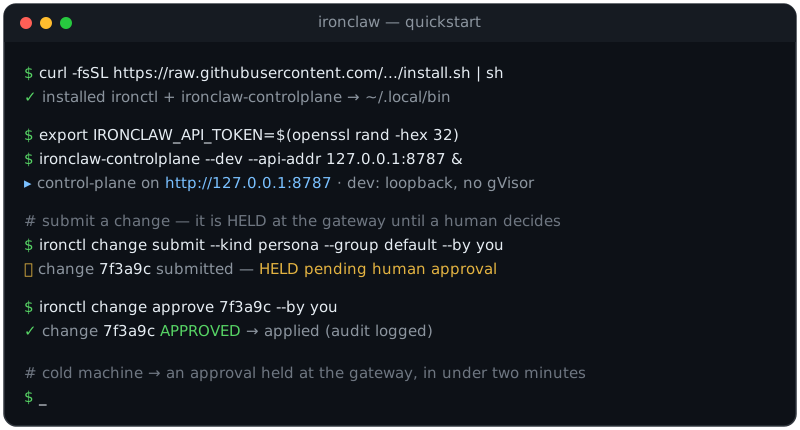
Zero credentials, one command. The offline mock-agent runs the full chat to per-session sandbox to reply path with no API key. Production seals each sandbox with gVisor and network=none. Quickstart
Zero-cred demo, connect a real provider, first approved task. The one credential step keeps the key host-side; every agent change is held at the gateway for a human, then written to the append-only audit log. Animation freezes on the final frame under prefers-reduced-motion. Quickstart
Get running in under two minutes
One command installs the two host binaries (ironctl + ironclaw-controlplane); in dev mode the
control-plane serves its API at http://127.0.0.1:8787. From a cold machine, you'll have a
capability change waiting at the security gateway in under two minutes:
# 1. Install — detects your OS/arch and verifies the SHA-256 checksum before installing
curl -fsSL https://raw.githubusercontent.com/IronSecCo/ironclaw/main/scripts/install.sh | sh

# 2. Start the control-plane in dev mode — API base URL: http://127.0.0.1:8787
export IRONCLAW_API_TOKEN=$(openssl rand -hex 32)
ironclaw-controlplane --dev --api-addr 127.0.0.1:8787 &

# 3. Your first command — submit a change; it is HELD at the gateway for a human decision
ironctl change submit --kind persona --group dev-agent --by you
ironctl change pending                       # see it waiting
ironctl change approve <change-id> --by you   # apply it
On Windows, irm https://raw.githubusercontent.com/IronSecCo/ironclaw/main/scripts/install.ps1 | iex
installs the host binaries (ironclaw-controlplane.exe + ironctl.exe) and --dev runs, but the
agent sandbox needs WSL2 or Linux — see Windows via WSL2.
Version pinning, system-wide installs, and building from source are all in Installation.
One-click cloud deploy
Run the hardened control-plane on a PaaS in ~2 minutes with zero local tooling — the approval gateway, encrypted per-session queues, host-side credential custody, and the web console:



These PaaS paths run the control-plane only — a single container has no gVisor and no Docker socket, so agent sandboxes don't launch there (same boundary as the hardened Compose path). For full agent isolation use a gVisor host or k8s node. Details + env in the deployment guide (Path D).
CLI-first and API-first
This is a feature, not a missing dashboard. Every capability is a documented HTTP endpoint and an
ironctl subcommand, so IronClaw is scriptable, auditable, and CI-friendly from the first command —
with no public web surface to phish, misconfigure, or leave exposed. (There is now a private,
mesh-only web console at /ui/ — but it's additive, never the only way in, and rides the same
Tailscale-bound API, so it adds no public port.)
Table of contents
- Get running in under two minutes
- CLI-first and API-first
- Why it's different
- How it works
- Platform support
- Project status
- Prerequisites
- Installation
- Quickstart
- Audit your own sandbox
- Examples
- Usage
- Model providers
- Configuration
- Development
- Repository layout
- Security
- Roadmap
- Community
- Contributing
- License
Why it's different
| Pillar | What it is | Attack surface it removes |
|---|---|---|
| Sealed runtime | The agent ships as a compiled Go binary | Agent self-modification — there's no source inside the box to rewrite |
| Approved by humans | Every change to the harness clears a deterministic gateway | Silent setting changes — nothing changes without a human seeing and approving it |
| Encrypted queues | Per-session encrypted message queues; read-only inbound | Data theft at rest, and cross-session reads |
| Sealed sandbox | gVisor container, no network, host-proxied model calls | Data exfiltration and sandbox escape |
| Private control panel | Admin access over a private mesh (Tailscale) only | Remote attacks on the controls |
The throughline: treat the agent as untrusted, and make the security boundary something you can verify — not something you take on faith.
⚖️ Weighing your options? See Why IronClaw / vs. the alternatives for an honest comparison against hosted agent platforms, raw container + LLM glue, and other self-hosted agent runtimes.
Audit your own sandbox in 10 seconds
Do not take our word for any of that. ironctl scan grades the containment posture of
any running container, docker-compose service, or Kubernetes pod on a 0 to 100 scale.
It works on your own setups, not just IronClaw's, so you can measure how much isolation you
actually have before you hand a sandbox to untrusted code. It is fail-closed: any boundary
it cannot observe is scored insecure, never waved through.
ironctl scan my-container
It also grades a Dockerfile statically, at authoring or CI time, with no daemon and no image pull, so you catch a leaked credential, an unpinned base, or a root default in review instead of in production:
ironctl scan --dockerfile Dockerfile --min-score 80
Grade Dockerfiles automatically on every commit with the
pre-commit hook, which builds ironctl from source, so
there is nothing to install first:
# .pre-commit-config.yaml
repos:
  - repo: https://github.com/IronSecCo/ironclaw
    rev: v0.1.x
    hooks:
      - id: ironclaw-scan-dockerfile
        args: [--min-score=80]   # fail the commit below grade B
Walkthrough: How to scan a Dockerfile for security issues takes a deliberately bad Dockerfile from 5/100 (F) to 100/100 (A), one fix at a time.
A container started the usual way (root user, default caps, bridge network, docker.sock
mounted in) grades 23/100, F. An IronClaw ic-sbx-* session sandbox grades a clean
100/100, A:
| Target | Score | Grade | Posture |
|---|---|---|---|
Typical docker run container | 23/100 | F | runs as root, docker.sock mounted, writable rootfs, bridge egress |
| IronClaw session sandbox | 100/100 | A | non-root, all caps dropped, seccomp on, network=none, read-only rootfs, gVisor |
Every failing line names the specific hole and why it matters. Drop the grade into your own
README with ironctl scan --badge scan.svg, or gate CI with ironctl scan --min-score 90.
See the scan reference for all seven dimensions and every flag. Or browse the Container Isolation Scores directory: the default-config grade for 150+ of the most-pulled public images, so you can see how the containers you already run stack up. Rankings live on the Container Isolation Leaderboard (Hall of Fame vs worst offenders), and the interactive scores explorer lets you filter and grab a badge for your repo.
Head-to-head reads backed by the same scan data: Alpine vs Debian vs Ubuntu (does the base image change isolation?), Docker default vs hardened (the 48-point gap, flag by flag), and gVisor vs runc (when a shared host kernel is the weak link).
Per-image hardening walkthroughs, the default grade, the dimensions that fail, and the exact
ironctl scan --fix flags that close the gap. Start at the
hardening guides hub, or jump to one:
Postgres,
MySQL,
MariaDB,
MongoDB,
Cassandra,
ClickHouse,
Redis,
Memcached,
Elasticsearch,
Kafka,
RabbitMQ,
Vault,
Consul,
MinIO,
nginx,
Grafana,
Prometheus,
Traefik,
InfluxDB,
CockroachDB,
TimescaleDB,
Valkey,
HAProxy,
ZooKeeper and
untrusted Node.js.
Grade every pull request
The same grader is published on the GitHub Marketplace as IronClaw sandbox scan. One line in a workflow and every pull request gets a containment scorecard as a sticky comment that updates in place:
# .github/workflows/scan.yml
- uses: IronSecCo/ironclaw@v1
  with:
    target: docker-compose.yml
    mode: compose
    min-score: 90        # omit / 0 = report-only, never blocks the check
It runs on a stock ubuntu-latest runner with no credentials and no control-plane. mode: k8s
adds policy-check: true to fail the check on any rule --emit-policy would generate, and
upload-sarif: true sends failed dimensions to the Security tab. Full inputs and outputs:
scan in CI.
Show your score
Put your containment grade in your README, the same way a coverage or build badge does. Generate a shields.io endpoint file, commit it (no server, so a badge hit never triggers a remote scan), and embed it:
ironctl scan my-container --badge-json .ironclaw/sandbox-isolation.json
git add .ironclaw/sandbox-isolation.json && git commit -m "chore: add sandbox isolation badge"
[](https://ironsecco.github.io/ironclaw/scan/)
The badge at the top of this README is IronClaw's own, graded 100/100 A from
.ironclaw/sandbox-posture.yml. Full walkthrough:
Add a live Sandbox Isolation Score badge to your repo.
How it works
Two compiled Go programs that never share memory and talk only through a pair of encrypted SQLite files per conversation:
flowchart TB
  CHAT["Chat platforms<br/>12 channel adapters"]
  CLI["ironctl CLI"]
  WEB["Web console"]

  subgraph host["Trusted host — control-plane (cmd/controlplane)"]
    API["HTTP API<br/>Tailscale mesh-only + bearer"]
    GW["Gateway<br/>deterministic verifiers · human approval"]
    CORE["Router · delivery · sweep · key custodian"]
    CHAD["Channel adapters"]
    MP["Model proxy<br/>holds provider keys"]
    ISO["Isolation launcher<br/>gVisor / runsc"]
  end

  subgraph queues["Encrypted SQLCipher queues · per session"]
    INQ[("inbound.db<br/>read-only to agent")]
    OUTQ[("outbound.db<br/>append-only by agent")]
  end

  subgraph box["Agent sandbox · gVisor · network=none"]
    LOOP["Agent loop · tools · model provider"]
  end

  PROV["Model providers<br/>Anthropic · OpenAI · OpenRouter"]

  CHAT <--> CHAD
  CLI -->|mesh only| API
  WEB -->|mesh only| API
  CHAD --> CORE
  API --> GW --> CORE
  CORE -->|write| INQ
  OUTQ -->|read| CORE
  ISO -->|launch| LOOP
  INQ -->|ro bind mount| LOOP
  LOOP -->|append| OUTQ
  LOOP -->|unix socket| MP -->|HTTPS · key injected host-side| PROV

  classDef host fill:#eaf2ff,stroke:#1d4ed8,stroke-width:1px,color:#0b1124;
  classDef store fill:#b9d4ff,stroke:#1d4ed8,stroke-width:1px,color:#0b1124;
  classDef box fill:#1d4ed8,stroke:#63a0ff,stroke-width:2px,color:#ffffff;
  classDef control fill:#16224a,stroke:#63a0ff,stroke-width:2px,color:#ffffff;
  classDef ext fill:#f4f9ff,stroke:#8fb4ff,stroke-width:1px,color:#16224a;

  class API,CORE,CHAD,MP,ISO host;
  class GW control;
  class INQ,OUTQ store;
  class LOOP box;
  class CHAT,CLI,WEB,PROV ext;
- The control-plane receives chats, routes them, holds the keys, runs the approval gateway, and performs every privileged action on the agent's behalf — after its own checks.
- The sandbox — one per conversation, wrapped in gVisor with no network of its own — reads its encrypted inbox (read-only), calls the AI model through the host proxy, and writes its encrypted outbox. It can request a capability change but can never apply one.
- The frozen contract (
internal/contract) is the only package both sides import: typed IDs, row shapes, the embedded SQL schema, pinned cipher params, and the gateway protocol.
A single message rides a clean loop; anything that would change what the agent can do takes the separate dashed path through the human-approval gateway:
flowchart LR
  SENDER["External sender<br/>Slack · email · …"]
  ADAPTER["Channel adapter"]
  ROUTER["Router<br/>authorize + fan-out"]
  INQ[("inbound.db")]
  LOOP["Agent loop"]
  MODEL["Model provider"]
  OUTQ[("outbound.db")]
  DELIVERY["Delivery"]
  GW{"Gateway<br/>human approval"}
  APPLY["Control-plane<br/>applies change"]

  SENDER -->|message| ADAPTER --> ROUTER
  ROUTER -->|write · encrypted| INQ
  INQ -->|ro| LOOP
  LOOP <-->|model call via host proxy| MODEL
  LOOP -->|reply · append| OUTQ
  OUTQ --> DELIVERY --> ADAPTER
  ADAPTER -->|reply| SENDER
  LOOP -.->|capability-change request| GW
  GW -.->|approved| APPLY

  classDef host fill:#eaf2ff,stroke:#1d4ed8,stroke-width:1px,color:#0b1124;
  classDef store fill:#b9d4ff,stroke:#1d4ed8,stroke-width:1px,color:#0b1124;
  classDef box fill:#1d4ed8,stroke:#63a0ff,stroke-width:2px,color:#ffffff;
  classDef control fill:#16224a,stroke:#63a0ff,stroke-width:2px,color:#ffffff;
  classDef ext fill:#f4f9ff,stroke:#8fb4ff,stroke-width:1px,color:#16224a;

  class ADAPTER,ROUTER,DELIVERY,APPLY host;
  class INQ,OUTQ store;
  class LOOP box;
  class GW control;
  class SENDER,MODEL ext;
For the full design, see docs/architecture.md,
docs/threat-model.md, and the plain-language tour in
docs/ironclaw-explained.md.
📚 Full documentation site: ironsecco.github.io/ironclaw — quickstart, architecture, threat model, channels, skills, the OpenAPI reference, and security, all in one navigable place (built from
docs/and published on every push tomain).🧭 New here? The hands-on tutorials take you from
git cloneto a running agent: your first sandboxed agent in 5 minutes, connecting Slack, and writing a custom channel adapter.
Platform support
IronClaw's security model rests on gVisor (runsc) — a user-space kernel that intercepts the
agent's Linux syscalls and is the layer that actually enforces network=none, the seccomp
syscall allowlist, dropped Linux capabilities, and a read-only rootfs. gVisor is Linux-only, and
that one fact drives the whole platform story:
| Capability | Linux + gVisor (production target) | macOS / Windows |
|---|---|---|
Host side — control-plane, gateway, API, ironctl, web console | ✅ native | ✅ native (incl. native Windows) |
| Real agent sandbox | ✅ gVisor (runsc) | ⚠️ --runtime docker only — runc in Docker Desktop's Linux VM. macOS: Docker Desktop. Windows: WSL2 (native Windows can't reach it — see below) |
| Per-sandbox syscall interception | ✅ | ❌ not available |
| Seccomp syscall allowlist | ✅ enforced | ❌ not applied on the Docker path |
network=none | ✅ enforced by the OCI spec | ⚠️ not auto-enforced — you must point IRONCLAW_DOCKER_NETWORK at a no-egress network |
| Dropped capabilities · read-only rootfs | ✅ enforced by the runtime | ⚠️ only as strong as the Docker Desktop VM kernel |
On macOS you can build, script, demo, and develop against the entire system natively, and you
can even run agents through Docker Desktop — but understand that the sandbox boundary then comes from
runc inside the Docker Desktop Linux VM, not gVisor. There is no per-sandbox syscall
interception, the curated seccomp profile is not applied, and network=none is not enforced for you
(the Docker isolator passes whatever network you configure straight through — set
IRONCLAW_DOCKER_NETWORK to a no-egress bridge yourself). That is weaker than the posture the
threat model assumes.
Windows via WSL2
The install.ps1 PowerShell installer gives you the host plane natively on Windows:
ironclaw-controlplane.exe and ironctl.exe run, the encrypted SQLCipher queue works, and --dev
mode (no real sandbox) runs end-to-end. A real agent sandbox does not run on native Windows —
gVisor (runsc) is Linux-only, and the Docker fallback talks to the Docker Engine over a Unix
socket (/var/run/docker.sock), which native Windows Docker Desktop does not expose (it serves a
Windows named pipe instead). So on native Windows you get the control plane and ironctl, but the
agent runtime has nowhere to launch.
To actually run agents on Windows, use WSL2:
wsl --install -d Ubuntu # one-time: install WSL2 + Ubuntu, then reboot
Then, inside the WSL2 Ubuntu shell, install the Linux build and run it exactly as on Linux:
curl -fsSL https://raw.githubusercontent.com/IronSecCo/ironclaw/main/scripts/install.sh | sh
Inside WSL2, /var/run/docker.sock is present (Docker Desktop's WSL integration, or Docker installed
in the distro), so IRONCLAW_RUNTIME=docker launches real Linux sandbox containers. For the full
gVisor posture, install runsc inside the WSL2 distro just as you would on bare-metal Linux. Treat a
WSL2 host the same as the Linux row above.
For anything past local development, run the sandbox host on Linux with gVisor (bare-metal, a VM, or WSL2). The control plane can live wherever you like — including native Windows — but it's the agent sandbox that needs the Linux + gVisor substrate to give you the boundary IronClaw is built around.
Project status
Alpha. The architecture is settled and the full control-plane and sandbox pipelines are implemented and tested. The encrypted-queue binding is now wired:
- Encrypted-SQLite queue binding — ✅ wired (RFC-0001 applied).
contract.Open*open per-session SQLCipher databases via cgo (github.com/mutecomm/go-sqlcipher/v4); a round-trip test covers write→read, read-only-write rejection, wrong-key failure, and no-plaintext-on-disk. The build now requiresCGO_ENABLED=1(a C toolchain).internal/host/queueuses the live binding; in-memory backends remain for--devand tests. - Sandbox rootfs provisioning — ✅ wired via a pluggable provisioner:
isolationbuilds the hardened OCI spec, provisions the bundle rootfs (with image digest/signature verification against a trust policy), and execsrunsc. A real launch still needsrunscand a provisioned/signed image present in the environment. - Production hardening (Wave 4) — durable/pluggable master-key custody, a Prometheus
/metricssurface, structured logging, host respawn + sandbox provider backoff, and model-proxy rate caps/audit/redaction have landed and are composed intocmd/controlplane. The API-server hardening knobs (optional TLS, rate-limit, body limits,/readyzreadiness gate) exist asapi.With*options but aren't attached in the entrypoint yet (see the roadmap).
See the roadmap for what remains. You can build, test, and run the control-plane today;
a live sandbox launch needs runsc plus a provisioned image.
Prerequisites
| Requirement | For | Notes |
|---|---|---|
| Go 1.23+ and a C toolchain | building everything | CGO_ENABLED=1 is required — the encrypted-SQLite binding builds via cgo |
containerd + gVisor (runsc) | production sandboxing | runtime io.containerd.runsc.v1; not needed for --dev |
| Tailscale | remote admin access | the control-plane API binds to the tailnet IP; no public port |
| SQLCipher (vendored) | encrypted queues | the SQLCipher C amalgamation is vendored by the driver; no system lib needed |
| A model credential | live model calls | an Anthropic / OpenAI / OpenRouter key, or a gateway like OneCLI — injected host-side into the model proxy, never into the sandbox (Model providers) |
The three external runtime dependencies (gVisor, Tailscale, the encrypted-SQLite binding) are
intentionally not vendored. See deploy/README.md for host setup.
Installation
Homebrew (macOS / Linux)
brew tap IronSecCo/ironclaw https://github.com/IronSecCo/ironclaw
brew install ironsecco/ironclaw/ironclaw
This installs ironctl, ironclaw-controlplane, and ironclaw-sandbox from the release the
formula currently pins. The formula pins each archive to the SHA-256 recorded in that release's
signed SHA256SUMS, so Homebrew verifies the download before installing. Confirm it with
ironctl version.
The tap carries exactly one version at a time. An automated pull request bumps the formula after
every release, and it lands only once a required CI check has re-derived the formula from that
release's cosign-verified SHA256SUMS, so the tap can briefly trail the newest release. Run
brew update first, and see
Releases for the newest version. To
install a specific version, including one the tap has not picked up yet, use the installer
script's IRONCLAW_VERSION (below).
Use the fully-qualified name. homebrew-core ships an unrelated formula also called
ironclaw, and core wins the bare name — so installironsecco/ironclaw/ironclaw, not bareironclaw. The explicit tap URL is required too: our tap lives in this repo, not ahomebrew-ironclawrepo.
In production the control plane usually runs as the GHCR container image (see the deployment guide); the native
ironclaw-controlplanebinary is convenient for local /--devruns.
Prebuilt binaries (installer script)
One command installs the latest release — ironctl and ironclaw-controlplane. The script
detects your OS/arch, downloads the matching archive from
GitHub Releases, and verifies its SHA-256
checksum before installing.
macOS / Linux
curl -fsSL https://raw.githubusercontent.com/IronSecCo/ironclaw/main/scripts/install.sh | sh
Windows (PowerShell)
irm https://raw.githubusercontent.com/IronSecCo/ironclaw/main/scripts/install.ps1 | iex
This installs the host binaries (
ironclaw-controlplane.exe+ironctl.exe) and runs--devnatively, but it cannot run a real agent sandbox — that needs Linux. To run agents on Windows, install inside WSL2; see Windows via WSL2.
A fresh release is published on every push to main, with prebuilt archives for:
| OS | Architectures |
|---|---|
| macOS | Intel (amd64) · Apple Silicon (arm64) |
| Linux | amd64 · arm64 |
| Windows | amd64 |
The installer reads a few environment variables (pass them on the sh side of the pipe):
# Pin a version instead of latest
curl -fsSL https://raw.githubusercontent.com/IronSecCo/ironclaw/main/scripts/install.sh | IRONCLAW_VERSION=v0.1.102 sh

# Install system-wide (a normal user defaults to ~/.local/bin)
curl -fsSL https://raw.githubusercontent.com/IronSecCo/ironclaw/main/scripts/install.sh | sudo sh

# Choose the install directory
curl -fsSL https://raw.githubusercontent.com/IronSecCo/ironclaw/main/scripts/install.sh | IRONCLAW_BINDIR="$HOME/bin" sh
Then confirm what you installed:
ironctl --version
Prefer to grab files by hand? Download the archive and SHA256SUMS for your platform from the
latest release.
Version managers (mise / asdf)
Pin IronClaw per project with mise or asdf, no
account and no sudo. The quickest path uses mise's ubi backend to install the ironctl CLI
straight from the GitHub release (no plugin repo):
mise use -g "ubi:IronSecCo/ironclaw[exe=ironctl]@latest"
ironctl --version
For both host binaries (ironctl + ironclaw-controlplane) and a pinned .tool-versions, use the
asdf-style plugin under packaging/asdf-ironclaw/. It downloads the
release tarball, verifies it against the published SHA256SUMS, and drops both binaries on the
managed PATH:
ironclaw 0.1.217
The plugin resolves as a standalone repo (asdf clones plugins by URL), so asdf plugin add ironclaw
and mise use asdf:... become available once the plugin lands in its own IronSecCo/asdf-ironclaw
repository. Until then the scripts in packaging/asdf-ironclaw/ are runnable directly (see that
directory's README.md).
Verifying a release
Releases are signed and attested — a keyless cosign
signature over SHA256SUMS, an SBOM (SPDX + CycloneDX), and build-provenance attestations for
every archive and the container image. For how releases are cut, verified, and yanked, see the
release runbook.
Verifying a signed release
Each release carries SHA256SUMS plus SHA256SUMS.sig + SHA256SUMS.pem (the cosign signature and
its certificate), *.spdx.json / *.cdx.json SBOMs, and per-archive + image attestations.
Verify the checksum signature (no key to manage — the identity is the release workflow):
cosign verify-blob SHA256SUMS \
  --signature SHA256SUMS.sig --certificate SHA256SUMS.pem \
  --certificate-identity-regexp '^https://github.com/IronSecCo/ironclaw/' \
  --certificate-oidc-issuer https://token.actions.githubusercontent.com
sha256sum -c SHA256SUMS        # then confirm your archive matches
Verify build provenance for an archive, an extracted binary, or the image:
gh attestation verify ironclaw_<version>_<platform>.tar.gz --repo IronSecCo/ironclaw
gh attestation verify ./ironctl --repo IronSecCo/ironclaw   # a binary extracted from the archive
gh attestation verify oci://ghcr.io/ironsecco/ironclaw-controlplane:latest --repo IronSecCo/ironclaw
The container image also carries a signed SBOM attestation (CycloneDX) you can verify and read anonymously:
gh attestation verify oci://ghcr.io/ironsecco/ironclaw-controlplane:latest \
  --repo IronSecCo/ironclaw \
  --predicate-type https://cyclonedx.org/bom
Every third-party GitHub Action is pinned to a commit SHA, builds use a pinned
toolchain + -trimpath and are checked for bit-for-bit reproducibility by a
double-build CI job (ironctl and sandbox are verified byte-identical; the larger
control-plane binary is reproducible under newer Go and tracked for the pinned toolchain),
and the project's supply-chain posture is scored continuously by
OpenSSF Scorecard (see the badge above).
From source
Requires Go 1.23+ and a C toolchain (CGO_ENABLED=1 — the encrypted-SQLite binding builds via cgo).
# Clone
git clone https://github.com/IronSecCo/ironclaw.git
cd ironclaw

# Build all binaries
make build            # == go build ./...

# Or install the two host binaries onto your PATH
go build -o /usr/local/bin/ironclaw-controlplane ./cmd/controlplane
go build -o /usr/local/bin/ironctl               ./cmd/ironctl
For a full system install — build and install the binaries, provision /etc/ironclaw
and /var/lib/ironclaw, and enable the service (systemd on Linux, launchd on macOS) —
run sudo deploy/install.sh. It needs root to write under /etc
and /var/lib. The external runtime dependencies it relies on (containerd + gVisor and
Tailscale) are set up separately — see deploy/README.md.
With Docker (docker compose)
Self-host the control-plane in one command. From a clone:
cp .env.example .env          # fill in ANTHROPIC_API_KEY (optional to boot)
docker compose up -d          # builds locally on first run, or pulls the GHCR image
docker compose logs -f controlplane   # CLAIM the admin token printed once on first run
The admin/API token is minted on first run and printed once in the logs (there is
no recovery) unless you set IRONCLAW_API_TOKEN yourself. The admin API is published
on 127.0.0.1:8787 only — front it with Tailscale for remote access.
Prefer the published image? It is pushed to GitHub Container Registry on every release:
docker pull ghcr.io/ironsecco/ironclaw-controlplane:latest
# or pin a release: docker pull ghcr.io/ironsecco/ironclaw-controlplane:v0.1.102
Set IRONCLAW_IMAGE in .env to pin that tag for docker compose. Every variable the
control-plane reads is documented in .env.example. The agent sandboxes
themselves are not compose services — the control-plane launches them as gVisor
(runsc) children with network=none; running real sandboxes needs a runsc-capable
host (see deploy/README.md).
Going to production? The deployment guide
covers the hardened, durable posture: locked-down deploy/docker-compose.prod.yml
(read-only rootfs, dropped caps, resource limits) behind a TLS reverse proxy
(deploy/Caddyfile), secrets via an env-file, encrypted-state
backup/restore, pinned-digest upgrades, and Prometheus /metrics.
Quickstart
A fuller local walkthrough — run the control-plane from source in dev mode (no gVisor, binds to loopback) and drive it with the admin CLI:
# Terminal 1 — start the control-plane in dev mode
export ANTHROPIC_API_KEY=sk-ant-...        # held host-side; never enters the sandbox
export IRONCLAW_API_TOKEN=$(openssl rand -hex 32)
go run ./cmd/controlplane --dev --api-addr 127.0.0.1:8787

# Terminal 2 — talk to the gateway with ironctl
export IRONCLAW_API_TOKEN=<same token as above>

# Submit a capability change — it is HELD pending a human decision (the gateway choke point)
ironctl change submit --kind persona --group dev-agent --by alice

# See what's waiting for approval, then approve or reject by id
ironctl change pending
ironctl change approve <change-id> --by alice

# Inspect the append-only audit log
ironctl audit --limit 20
Every mutation — persona, enabled tools, packages, wiring, permissions, mounts — flows through this same gateway. There is no file-edit path that bypasses it.
Examples
Two of them run end to end with zero credentials — no model key, no channel tokens, just Docker. Copy one line and watch it work:

hello-ironclaw — the canonical "it works." One command sends a chat through the real secured path (engage → per-session sandbox → encrypted queue → reply) and asserts the reply returns. Zero credentials; doubles as the CI smoke test. Animation freezes on the final frame under prefers-reduced-motion.
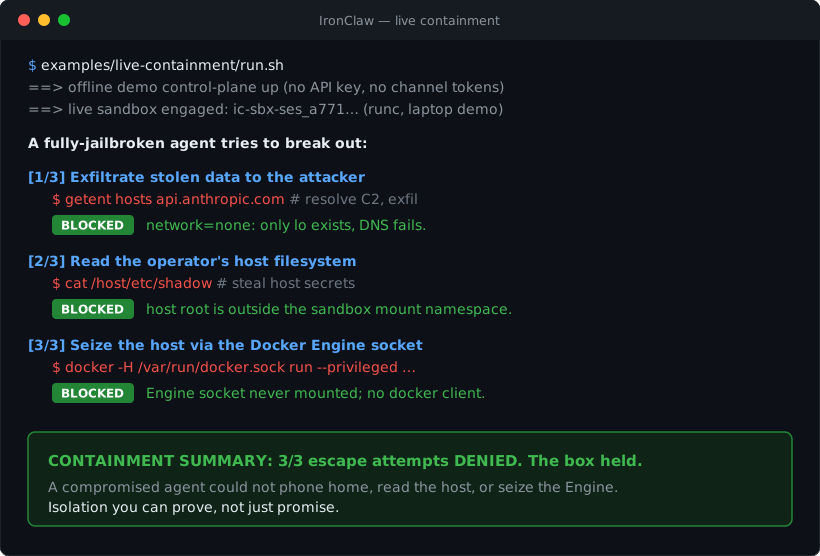
live-containment — watch it catch a real escape. The 60-second security aha: one command engages a real sandbox, a fully-jailbroken agent tries to break out (network exfil, host-filesystem breakout, host takeover via the Docker socket), and your terminal shows each attempt denied plus a containment summary. The curated cut of red-team-escape. Zero credentials.
red-team-escape — isolation you can prove. The full six-assertion battery behind live-containment: adds sibling-breakout and cross-session key-custody probes and emits a signed, versioned containment report; runs as the CI containment gate on every push. Zero credentials.
Runnable recipes live in examples/ — each is a directory with a README.md and a setup.sh.
Three of them ship a run-mock.sh that drives the whole inbound → agent → reply pipeline on the
offline mock provider, so a fresh clone runs them with no model key and no channel tokens:
docker compose -f docker-compose.demo.yml up -d --build   # seeds the offline mock-agent
./examples/scheduled-report/run-mock.sh                   # cron-style self-scheduling summary
./examples/webhook-responder/run-mock.sh                  # inbound webhook → agent reply
./examples/slack-triage/run-mock.sh                       # classify/label every message
scheduled-report/— wakes itself on a schedule (schedule_task), summarizes, posts to a channel. (credential-free demo)webhook-responder/— routes an inbound HTTP webhook to an agent that replies. (credential-free demo)slack-triage/— classifies/labels every incoming Slack message. (credential-free demo)personal-assistant/— a private 1:1 assistant on Telegram, plus a walk-through of the mandatory change-approval flow.channel-triage/— a Slack triage bot that engages only on@mention, only for known senders.multi-agent-team/— two agents sharing one channel, separated by engage mode and priority.
Usage
ironclaw-controlplane — the host daemon
ironclaw-controlplane \
  --api-addr "$(tailscale ip -4):8787" \            # bind to the tailnet IP (no public port)
  --model-proxy-socket /run/ironclaw/modelproxy.sock \
  --runtime runsc \                                 # container runtime for sandboxes
  --state-dir /var/lib/ironclaw \
  --sweep-interval 60s
| Flag | Default | Purpose |
|---|---|---|
--api-addr | 127.0.0.1:8787 | control-plane API address; set to the tailnet IP in production |
--model-proxy-socket | /run/ironclaw/modelproxy.sock | unix socket bound into each sandbox for model egress |
--state-dir | OS-specific | gateway change store, audit log, keystore |
--runtime | runsc | OCI runtime for sandboxes |
--bundle-root | <state-dir>/bundles | per-session OCI bundles |
--sweep-interval | 60s | stale-sandbox / due-message sweep cadence |
--egress-socket | "" (sealed) | opt-in: host unix socket for the egress broker, bound into each sandbox so an agent can reach approved external hosts (deny-by-default, audited) |
--egress-allow | "" | comma-separated hostnames the egress broker permits (only with --egress-socket) |
--search-backend | "" (off) | give each sandbox the web_search tool: duckduckgo (keyless) or brave[:cred] (keyed via the vault). Requires --egress-socket; the backend's host is auto-added to the allowlist |
--mcp-catalog | "" (off) | opt-in: enable MCP servers — a per-session host broker, the mcp_access change kind, and the MCP console tab. The 0600 JSON catalog of configured servers |
--mcp-isolation | container | how local (stdio) MCP servers run: container (hardened, network=none — production) or none (bare host process — dev only) |
--mcp-runtime / --mcp-image | "" | OCI runtime (e.g. runsc for gVisor) and default image for isolated local MCP servers |
--dev | false | loopback bind, no gVisor — local development only; also opens a DuckDuckGo-only egress path so web_search works out of the box, and enables MCP with --mcp-isolation=none |
MCP servers
Extend an agent with the tools of a Model Context Protocol server — local (a stdio
subprocess) or remote (an HTTPS endpoint) — without weakening the sandbox. MCP runs
host-side only: a local server is isolated in a hardened network=none container, a
remote one is dialed over TLS, and the sandbox reaches neither directly — it talks to a
per-session broker socket where every call is checked against a per-tool,
human-approved grant and audited. This closes the "blind MCP approval" gap the
reference design had. Enable it with --mcp-catalog, add servers + grant agents on the
console's MCP tab, and try it end to end with the bundled cmd/mcp-sample server.
Full guide: docs/mcp.md.
To expose IronClaw's sandbox_exec tool to Claude Desktop, Cursor, or Windsurf
as an MCP server, see docs/mcp-server/.
Environment: ANTHROPIC_API_KEY (model proxy credential, host-only) and IRONCLAW_API_TOKEN
(bearer token required on every API call when set).
Web search
The sandbox is network=none; it can only reach hosts through the host-mediated, audited
egress broker. The web_search tool rides that broker, so it is off by default and turns
on only with both --egress-socket and --search-backend:
duckduckgo— keyless, no secret. The quickest way to a working search, but DuckDuckGo's keyless API returns instant answers / related topics rather than a full ranked web index, so specific lookups (e.g. a person's name) can come back thin.brave[:cred]— Brave Search reached by name through the credential vault (vault://<cred>/…), so the API key stays host-side in the injector and never enters the sandbox. Requires--vault-endpointwith a matching credential.
--dev enables the DuckDuckGo backend automatically (placing the egress socket next to the
model-proxy socket so it rides the same sandbox mount). Under the Docker isolator, make sure the
directory holding those sockets is in IRONCLAW_DOCKER_BINDS so the sandbox can reach it.
ironctl — the admin CLI
A thin client of the control-plane API. --addr defaults to http://127.0.0.1:8787; the bearer
token comes from IRONCLAW_API_TOKEN or --token.
ironctl change submit  --kind <k> --group <g> --by <user>   # k: persona|enabled_tools|packages|wiring|permissions|mounts
ironctl change pending                                       # list changes awaiting a decision
ironctl change history                                       # all changes and their outcomes
ironctl change approve <id> --by <user>
ironctl change reject  <id> --by <user>
ironctl audit [--limit N]                                    # append-only gateway audit log
Define an agent the easy way
You don't have to know tool names or hand-write JSON. Pick a starter template, tweak it, and go — in one step, from the CLI or the web console's Agents → Create builder:
ironctl tools                                  # browse every built-in tool, grouped, with descriptions
ironctl agent templates                        # list starter presets (assistant, researcher, …)

# Guided wizard (run in a terminal with no flags): name → template → persona → tools → confirm
ironctl agent create

# Or one-shot/scriptable — template + a couple extra tools, persona override, default model:
ironctl agent create --name "Research Bot" --template researcher --tool schedule_task
ironctl agent create --name "Helper" --template assistant --all-tools --yes

ironctl agent list                             # all agents, with model + live session/channel counts
ironctl agent show research-bot                # persona, model, enabled tools, installed skills
Persona as separate documents. Rather than one opaque prompt, an agent's persona is split by concern — IDENTITY.md (who it is), SOUL.md (personality/voice), and AGENTS.md (how it works) — which compose into the system prompt. Set them inline, or point at a directory of those files (the builder shows the same three fields):
ironctl agent create --name "Atlas" \
  --identity "You are Atlas, a research assistant for the data team." \
  --soul     "Curious and precise. You cite sources and admit uncertainty." \
  --instructions "Search before answering; prefer primary sources; summarize with links."

ironctl agent create --name "Atlas" --persona-dir ./atlas/   # loads IDENTITY.md / SOUL.md / AGENTS.md
This defines the agent (name + persona docs + model + tools) in a single operator-direct write. Enabling a web/API tool only makes it visible to the agent — actual egress still requires an approved host through the gateway, so the network posture is unchanged.
sandbox — the in-sandbox agent
Launched by the control-plane's isolator, not by hand. It receives its session key and queue paths
and runs the reasoning loop. Key flags (cmd/sandbox): --inbound, --outbound, --key,
--workspace, --heartbeat, --model-socket, --model-host, --model.
Control-plane HTTP API
| Method & path | Purpose |
|---|---|
GET /healthz | liveness (unauthenticated) |
POST /v1/changes | submit a ChangeRequest |
GET /v1/changes/pending | list pending changes |
GET /v1/changes/history | list all changes |
POST /v1/changes/{id}/decision | record an approve/reject decision |
GET /v1/audit | read the audit log |
Model providers
By default every agent talks to Anthropic (Claude). You can point an agent at OpenAI or
OpenRouter instead, or — without IronClaw holding any model key at all — route through an
operator-run credential gateway such as OneCLI, which injects the real credential at request
time. In every case the sandbox stays network=none and credential-free: it reaches the model
only through the host model-proxy unix socket, and the host proxy authenticates the call and enforces
the egress allowlist. The backend is chosen per agent group, host-side — a sandbox can never pick
or change its own provider.
Direct provider keys
Set one or more keys host-side (daemon env, or .env for docker compose). A provider's upstream
host is allowlisted only when its key is present:
export ANTHROPIC_API_KEY=sk-ant-...     # default / primary
export OPENAI_API_KEY=sk-...            # optional
export OPENROUTER_API_KEY=sk-or-...     # optional
Via a credential gateway like OneCLI (ChatGPT/Codex — no key inside IronClaw)
A credential gateway is a host-local HTTP CONNECT proxy that holds the real credential and injects
it per request, so neither the control-plane nor the sandbox ever sees a model key. This is how
you power an agent with a ChatGPT/Codex account via OneCLI: IronClaw's codex provider
speaks the ChatGPT Codex Responses API (chatgpt.com) and OneCLI attaches the OAuth credential.
Run OneCLI on the host (its default address is 127.0.0.1:10255), then point the model-proxy at it
and allowlist the host it serves:
# The gateway URL carries your per-agent OneCLI token as Basic userinfo — Go's HTTP
# client sends it as Proxy-Authorization on CONNECT. The gateway terminates TLS with
# its own CA, so upstream TLS verification is skipped (intended for a loopback gateway).
export IRONCLAW_MODEL_GATEWAY_URL="http://x:aoc_<your-onecli-agent-token>@127.0.0.1:10255"
export IRONCLAW_MODEL_GATEWAY_HOSTS="chatgpt.com"

# No ANTHROPIC_API_KEY needed — the gateway is the only credential path. Make the
# default backend Codex so every agent uses it out of the box:
export IRONCLAW_DEV_PROVIDER=codex
export IRONCLAW_DEV_MODEL=gpt-5.5

ironclaw-controlplane --api-addr 127.0.0.1:8787   # (+ your other flags)
When a gateway is set, don't also set a key for the host it serves — the gateway is the credential
path, and the control-plane injects nothing for the gateway's hosts. Under docker compose the
gateway must be reachable from the container, so use host.docker.internal:10255 (Docker Desktop)
or put OneCLI and the control-plane on a shared Docker network instead of 127.0.0.1.
Run a 100% local model (Ollama, LM Studio, vLLM) — no cloud key
Point IronClaw at a self-hosted OpenAI-compatible endpoint and the whole stack runs on your own
box with zero cloud credentials — nothing leaves the machine. Ollama, LM Studio, vLLM, and
llama.cpp all expose the OpenAI /v1 API (Ollama at http://localhost:11434/v1).
ollama pull llama3.2                                # 1. run a model locally
export IRONCLAW_LOCAL_MODEL_URL=http://localhost:11434/v1
export IRONCLAW_LOCAL_MODEL=llama3.2                # 2. point IronClaw at it
ironclaw-controlplane --dev --api-addr 127.0.0.1:8787   # 3. chat — no API key
This allowlists the local host, forwards to it over plain HTTP (these servers serve no TLS), and
makes it the deployment-default model, so every agent group without a pinned provider runs local. No
key is required; set IRONCLAW_LOCAL_MODEL_KEY only for the rare local server (e.g. a guarded vLLM)
that requires one. Under docker compose the server must be reachable from the control-plane
container, so use http://host.docker.internal:11434/v1 (Docker Desktop) instead of localhost.
Full walkthrough: Run IronClaw with a 100% local model (Ollama).
Choosing the provider per agent
IRONCLAW_DEV_PROVIDER / IRONCLAW_DEV_MODEL set the deployment-wide default for any agent group
that doesn't pin one (the env names keep their DEV_ prefix but apply deployment-wide). To choose
per agent instead — a gateway-approved change, like any other config:
ironctl agent create --name "Codex Bot" --provider codex  --model gpt-5.5
ironctl agent create --name "GPT Bot"   --provider openai --model gpt-4o
ironctl agent create --name "Local Bot" --provider local  --model llama3.2   # uses IRONCLAW_LOCAL_MODEL_URL
Valid --provider values: anthropic (default), openai, openrouter, codex, gemini,
vertex, local (a self-hosted OpenAI-compatible endpoint — Ollama/LM Studio/vLLM/llama.cpp), and
mock (a deterministic, offline backend for demos and tests). Each maps to a model-proxy-allowlisted
upstream; codex targets chatgpt.com and defaults to the gpt-5.5 model, and local inherits the
loopback host from IRONCLAW_LOCAL_MODEL_URL.
Configuration
- State lives under
--state-dir: the durable gateway change store (survives restart), the append-only JSONL audit log, and the host keystore. - Secrets are host-only. The model credential (an Anthropic / OpenAI / OpenRouter key, or a
credential gateway like OneCLI — see Model providers) is applied to outbound
model calls by the host
modelproxy; the sandbox never sees it and hasnetwork=none. Per-session 256-bit keys are generated and held by the host and handed to the sandbox via tmpfs at launch — never via an env var, never baked into the image. - Mesh. Bind
--api-addrto the Tailscale interface and firewall the API port on every other interface. Seedeploy/README.md.
Development
make build     # go build ./...
make test      # go test ./...
make vet       # go vet ./...
make fmt       # gofmt -w .
All tests pass on a stdlib-only tree (the encrypted-SQLite CGo path is gated). The black-box
behavioral suite lives in test/parity/ and exercises routing fan-out, engage
modes, session resolution, delivery dedup, the gateway's mandatory-approval flow, and a cross-mount
live-poll spec — over the observable surfaces (the two queues + the API) only.
The frozen contract. internal/contract/** is the single seam both sides import and is
frozen: changing it requires a dated RFC in docs/contract.md and both
CODEOWNERS' approval. Drift here surfaces at runtime as a silent decrypt or routing failure, not a
build error — which is why the freeze is strict. See CONTRIBUTING.md.
Repository layout
ironclaw/
  cmd/
    controlplane/   # host daemon entrypoint
    sandbox/        # in-sandbox agent entrypoint
    ironctl/        # admin CLI
  internal/
    contract/       # FROZEN SEAM — shared types, schema, crypto, gateway protocol
    host/           # control-plane: api gateway isolation router delivery sweep keys channels modelproxy registry scheduling queue
    sandbox/        # sandbox: loop provider tools queue
  api/              # control-plane API reference
  deploy/           # host install script + notes (gVisor, containerd, Tailscale, systemd)
  docs/             # architecture, threat-model, contract (+ RFC log), building
  test/parity/      # black-box behavioral suite over the queues + API
Security
IronClaw assumes the sandboxed agent is potentially compromised and designs the boundary so it
cannot escalate. The full threat-and-mitigation table is in
docs/threat-model.md. Highlights:
- Compiled Go, no interpreter in the sandbox → the agent cannot read or edit its own source.
- All config mutations flow through the mandatory gateway → deterministic verifier chain → human
approval → idempotent apply. There is no unapproved action path (the legacy
script-field RCE class is designed out). - Per-session encrypted queues; least-privilege access enforced three ways (Go interface
segregation,
PRAGMA query_only, read-only OS bind mount). network=nonesandboxes; model calls only via the host proxy with a destination allowlist.
Supply chain, written up in the negative: one of our published container images carries two
green SLSA provenance statements and only one of them is true. We could not retract it, so we
documented it instead:
One of our container images carries two green provenance statements. Only one of them is true.
covers the digest, why a green gh attestation verify is necessary and not sufficient, and what
to go check on your own release pipeline.
To report a vulnerability, please open a private security advisory rather than a public issue.
Roadmap
The living roadmap is on the docs site: Road to 1.0 — the single source of truth. It tracks the product road to 1.0 (public launch, web UI, channels, and supply-chain trust) with a status-at-a-glance table and a comparison against the category. For the short, contributor-facing view — direction, what 1.0 means, and help-wanted themes — see
ROADMAP.md. The checklist below is the engineering build-log for the security backend (Waves 0–5) and the hardening that followed.
- Architecture and threat model
- Compiling skeleton: frozen contract, control-plane and sandbox stubs, CI
- Control plane (routing, gateway, isolation spec, key custody, delivery, sweep) on in-memory backends
- Sandbox (agent loop, model provider, queue access, tools)
- Encrypted-SQLite queue binding (RFC-0001) — live encrypted per-session queues
- Cross-mount live-poll integration on the encrypted backend
- Sandbox rootfs provisioning (pluggable) + durable per-group workspace/memory + image trust-policy verification
- Concrete channel adapters: Telegram, Slack, Discord
- Registry admin HTTP API +
ironctlresource subcommands - Interactive
ask_user_question+ task-management tools (list/cancel/pause/resume/update) - End-to-end lifecycle integration test (fake isolator/provider over the real stack)
Production hardening (Wave 4) — composed into the daemon:
- Durable / pluggable master-key custody (file-sealed keystore + KMS seam) — wired
- Prometheus metrics (
/metrics) and structured (slog) logging — wired - Host respawn crash-loop backoff + sandbox provider backoff/circuit breaker — wired
- Model-proxy rate caps + audit logging + secret redaction — wired
- Daemon wiring — the subsystems above are composed into
cmd/controlplane - Production deployment units: systemd service + launchd plist, installer, container image,
docker compose - Attach the API-server hardening knobs (TLS, rate-limit, body limits,
/readyzgate) in the entrypoint — theapi.With*options exist but aren't wired yet - Real
runsclaunch in a provisioned, signed-image environment
Beyond the reference design — landed:
- Egress broker for approved external hosts — deny-by-default, audited, and the sandbox stays sealed
network=none(host-brokered over a unix socket); powers theweb_searchtool - Kata Containers isolation backend behind the same hardened
Isolatorinterface - Agent-to-agent (a2a) messaging + approval-gated
create_agent(RFC-0004) - Multiple model providers — Anthropic, OpenAI, OpenRouter — selectable per agent group
- MCP servers — host-brokered, with per-tool human-approved grants
- Private, mesh-only web console at
/ui/ - Channel breadth beyond the first three — WhatsApp, Email/SMTP, Matrix, Google Chat, Microsoft Teams, Signal, iMessage, and Webhook, plus the in-product web chat playground (twelve delivery surfaces in all)
Design-gated (built, off by default):
- Gateway auto-approval policy + RBAC — implemented as a verifier/approver, but inert by default: the mandatory-human floor is the only active path until an operator opts in
Community
Questions, ideas, "is this a bug or am I holding it wrong?" — bring them to GitHub Discussions. It's the project's home for Q&A, design discussion, and show-and-tell, and it's where maintainers answer first.
- New to the project or want the full picture? Read the documentation site — architecture, threat model, quickstart, channels, and skills, all in one navigable place.
- Found a bug or have a feature request? Open an issue.
- Security report? Do not open a public issue — follow
SECURITY.md. - Want to contribute code? Start with a
good first issue,
or narrow to the ones
ready to claim
(
good first issue+help wanted). They are small, self-contained, and mentored, and every one carries the standard labels that contributor boards such as up-for-grabs.net and goodfirstissue.dev index by. The friendliest starting points are the two most self-contained subsystems —ironctl scan(containment scoring;internal/host/scan/) and the isolation scores dataset (examples/isolation-survey/, a data-only change). See Contributing for the workflow. - First time here? Everyone interacting with the project is expected to follow our Code of Conduct — be excellent to each other.
We keep the whole community on GitHub — no Discord or Matrix to sign up for. Discussions is the live channel: subscribe to a category to follow along, and watch the repo for Announcements.
Contributing
See CONTRIBUTING.md for the contract-freeze rule, the code layout
(the control-plane and sandbox trees build against the frozen seam), how to report a vulnerability
(SECURITY.md), our Code of Conduct, and how to open a pull request.
New here? Pick up a good first issue
(or the help wanted subset that is ready to claim).
No account or sign-up needed beyond GitHub itself.
License
IronClaw is dual-licensed — see LICENSING.md:
- GNU AGPLv3 for open-source use. Running a modified IronClaw as a network service triggers the AGPL's copyleft — you must offer your users the corresponding source.
- Commercial license for closed-source / proprietary use without the AGPL obligations — contact a maintainer on LinkedIn (Omer Zamir or Topaz Aharon).
© 2026 IronSecCo