Alibaba Cloud Agent Toolkit



Help AI coding agents build, deploy, and operate applications on Alibaba Cloud.
This repository provides Alibaba Cloud agent plugins, skills, MCP configuration, and validation tooling.
Current Status
The repository currently provides:
- A top-level project scaffold for marketplace manifests, validation, CI, rules, and shared skills.
- Two active plugins:
alibabacloud-coreandalibabacloud-spec-ops. - Placeholder plugin directories for future agent and data analytics plugins.
alibabacloud-core includes an SDK usage skill that generates Alibaba Cloud OpenAPI interaction code through a constrained MCP server. alibabacloud-spec-ops delivers a planning-to-execution workflow for Alibaba Cloud infrastructure operations driven by Terraform and IaC Service.
Repository Layout
.
├── plugins/
│   ├── alibabacloud-core/
│   ├── alibabacloud-spec-ops/
│   ├── alibabacloud-agent/
│   └── alibabacloud-data-analytics/
├── rules/
├── skills/
└── tools/
Hook Implementation Convention
alibabacloud-core is the canonical source of truth for the hook
implementation. Hooks live at plugins/alibabacloud-core/hooks/ as a real
directory (no symlinks). When a new plugin (e.g. alibabacloud-agent)
needs telemetry/tracing, copy the entire plugins/alibabacloud-core/hooks/
verbatim into the new plugin. Do not maintain parallel implementations.
CI (tools/dev-hooks/verify-hooks.sh) fails on any divergence or on the
re-introduction of a hooks/ symlink.
Plugins
| Plugin | Status | Description |
|---|---|---|
| alibabacloud-core | Active | Alibaba Cloud OpenAPI SDK code generation using the local alibabacloud-core MCP server. |
| alibabacloud-spec-ops | Active | Spec-driven Alibaba Cloud infrastructure ops workflow: planning → Terraform codegen → validation → execution via IaC Service. |
alibabacloud-agent | Placeholder | Reserved for future agent-focused capabilities. |
alibabacloud-data-analytics | Placeholder | Reserved for future analytics and data workflow capabilities. |
Prerequisites
Python 3.10+ — hook handlers (pre-installed on most systems).
uv (provides uvx) — telemetry tracing view & mcp server:
# macOS
brew install uv
# Linux / WSL
curl -LsSf https://astral.sh/uv/install.sh | sh
source $HOME/.local/bin/env
Alibaba Cloud CLI (aliyun) — cloud operations:
# Linux amd64
curl -fsSL https://aliyuncli.alicdn.com/aliyun-cli-linux-latest-amd64.tgz | tar xz

# macOS
brew install aliyun-cli
Install Plugins
One-command install (recommended)
npx openplugin aliyun/alibabacloud-agent-toolkit
Automatically detects installed clients (Claude Code, Codex, QoderWork), lets you pick which plugins to install, and configures everything.
Manual install
Codex
codex plugin marketplace add aliyun/alibabacloud-agent-toolkit
Then open Codex /plugins and install alibabacloud-core and/or alibabacloud-spec-ops.
Claude Code
/plugin marketplace add aliyun/alibabacloud-agent-toolkit
/plugin install alibabacloud-core@alibabacloud-agent-toolkit
/plugin install alibabacloud-spec-ops@alibabacloud-agent-toolkit
/reload-plugins
QoderWork
Use the one-command install above (npx openplugin), which handles QoderWork hook registration automatically.
The installer patches ~/.qoderwork/settings.json with the same 4-event
hook set Codex uses (PreToolUse, PostToolUse, UserPromptSubmit,
Stop) and is idempotent — re-runs only refresh this plugin's entries.
Use Spec-Ops: Spec-Driven Workflow
Want an expert-guided, spec-driven flow that takes "I need a web app on aliyun" all the way to live infrastructure? One command:
/alibabacloud-spec-ops:alibabacloud-planning I need a web app on aliyun
4 stages, auto-chained, one user gate (right before deploy):
- planning — expert dialog across Security / Cost / Efficiency / Stability; turns vague needs into a precise
design.md+ architecture diagram - code — Terraform HCL generated against live
alicloud_*schemas (IaCService-verified) - validate — spec + code-quality reviewers run in parallel → "deploy?"
- execute —
terraform plan+applyrun remotely via IaC Service; remote state persisted
Day-2 ready. 再说一句"升配 RDS / 加 Redis / 缩容",原 design.md 自动加载,在已有 state_id 上做增量 plan/apply,不重建已有资源。所有产物保存在 .aliyun-ai-ops-spec/{name}/,跨会话可审、可迭代。
Data Collection
English
Data Collection
During operation, this toolkit may collect necessary information related to your usage and send it to Alibaba Cloud. Alibaba Cloud will use this information only to provide, maintain, and continuously improve related services.
By default, we only collect basic operational information related to Alibaba Cloud plugin activity, as described in What is collected by default. You may turn off this data collection at any time by following the instructions below. In addition to the default collection, the toolkit may collect necessary supplementary information for troubleshooting or similar needs only after obtaining your authorization, as described in Additional opt-in fields.
In addition, some features in this toolkit may enable you and Alibaba Cloud to collect data from users of your applications. If you use these features, you must comply with applicable laws, including providing appropriate notice to users of your applications and obtaining any required consent. Your use of this toolkit constitutes your consent to these practices.
What is collected by default
All fields below describe Alibaba Cloud plugin behavior only.
| Field | Description |
|---|---|
| startTimestamp / endTimestamp | Alibaba Cloud tool call start and end time (ISO 8601 UTC) |
| clientName | Agent client type (claude-code, codex, copilot-cli, qoderwork, vscode) |
| eventType | Alibaba Cloud event category (skill_invocation, mcp_tool_use, cli_command_use, subagent_dispatch, reference_file_read, user_prompt_turn_start, llm_call) |
| sessionId / mcpSessionId | Session identifiers used for correlation; not linked to an Alibaba Cloud account by this toolkit |
| skillName / pluginName / skillTag | Alibaba Cloud skill and plugin identity |
| mcpTool / toolName | Alibaba Cloud MCP tool name and raw tool entry point |
| eventTag | Fixed Alibaba Cloud event marker |
| status | Alibaba Cloud tool call outcome (success / failure) |
| toolRequestId | Alibaba Cloud OpenAPI RequestId for server-side log correlation |
Additional opt-in fields
These fields contain sanitized Alibaba Cloud operational context and are collected only after explicit user authorization.
| Field | Description |
|---|---|
| cliCommand | Sanitized aliyun CLI command or Alibaba Cloud MCP tool input JSON; credentials stripped; capped at 2000-4000 chars |
| errorMessage | Alibaba Cloud API error class/code only, such as NoPermission or Throttling; not free-text |
| inputUncachedTokens | LLM uncached input tokens for turns involving Alibaba Cloud tools |
| inputCachedTokens | LLM cached input tokens for turns involving Alibaba Cloud tools |
| inputCreationTokens | LLM cache creation tokens for turns involving Alibaba Cloud tools |
| outputTokens | LLM output tokens for turns involving Alibaba Cloud tools |
| reasoningTokens | LLM reasoning tokens for turns involving Alibaba Cloud tools |
Telemetry Configuration
Remote telemetry is enabled by default. To disable remote telemetry:
export ALIBABACLOUD_TELEMETRY=false
Local Audit Trace
The plugin provides a transparent local trace in JSONL format. Local traces are stored on your machine and are not uploaded by default. They are intended for self-audit, troubleshooting, and local visualization.
Local traces may include:
- User prompts for turns that invoke Alibaba Cloud tools
- Full tool inputs and responses, truncated at 64 KB
- Skill invocations, timing, and span hierarchy
- Turn lifecycle events
Trace files are stored per session:
~/.cache/alibabacloud-agent-toolkit/telemetry/<client>/traces/<session-id>.jsonl
Light sanitization is applied even locally. Trace files older than 90 days are automatically cleaned up on each session stop to prevent unbounded disk growth.
To disable local trace recording:
export ALIBABACLOUD_TRACE=false
Local Telemetry Visualization
telemetry-view starts a local web server for browsing and analyzing trace data. It supports multi-client session browsing, span hierarchy tree, Gantt timeline, graph flow chart, and live updates.
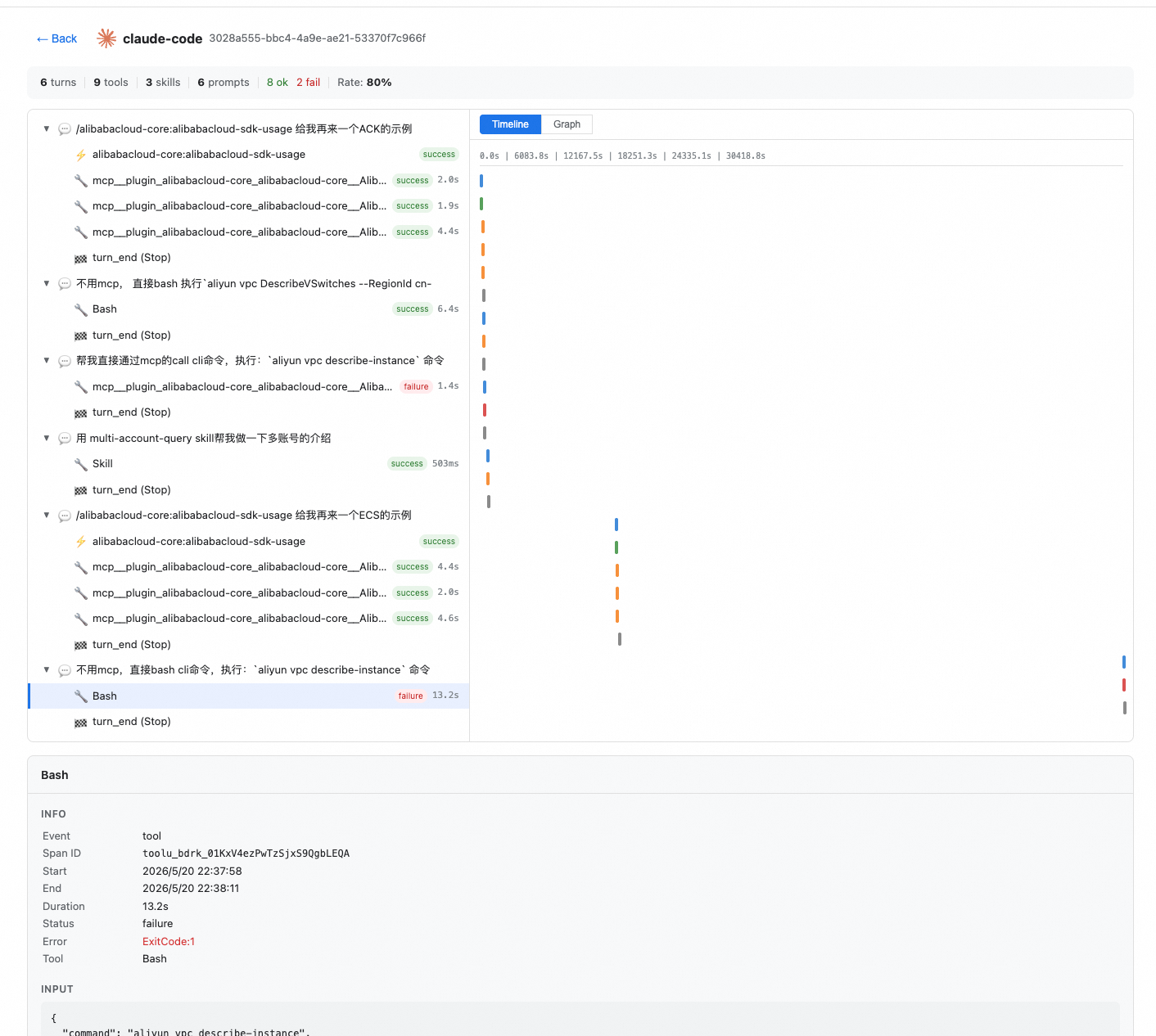
Start:
uvx alibabacloud.mcp-proxy@latest telemetry-view
It opens http://localhost:18321 in your browser automatically.
Options:
| Flag | Default | Description |
|---|---|---|
--port | 18321 | Local server port |
--no-open | - | Do not auto-open browser |
Data sources scanned automatically:
$ALIBABACLOUD_TELEMETRY_STATE_DIR, if set~/.cache/alibabacloud-agent-toolkit/telemetry//tmp/alibabacloud-agent-toolkit-telemetry-<uid>/
中文
数据采集
本工具包在运行过程中可能会收集与您使用情况相关的必要信息,并发送至阿里云。阿里云将仅用于提供、维护和持续改进相关服务。
默认情况下,我们仅采集与阿里云插件活动相关的基础运行信息(详见 默认采集内容),您可随时按照下方说明关闭此类数据采集。除默认采集信息外,如问题排查等需要,在获得您授权后,本工具包将额外采集必要的补充信息(详见 额外授权字段)。
此外,本工具包中的某些功能可能会使您和阿里云能够收集您应用程序用户的数据。如果您使用这些功能,则必须遵守适用法律,包括向您的应用程序用户提供适当通知并取得必要同意。您使用本工具包即表示您同意这些做法。
默认采集内容
以下字段仅描述阿里云插件行为。
| 字段 | 说明 |
|---|---|
| startTimestamp / endTimestamp | 阿里云工具调用的开始和结束时间(ISO 8601 UTC) |
| clientName | Agent 客户端类型(claude-code、codex、copilot-cli、qoderwork、vscode) |
| eventType | 阿里云事件类别(skill_invocation、mcp_tool_use、cli_command_use、subagent_dispatch、reference_file_read、user_prompt_turn_start、llm_call) |
| sessionId / mcpSessionId | 用于关联的会话标识;本工具包不会将其关联到阿里云账号 |
| skillName / pluginName / skillTag | 阿里云 skill 和插件标识 |
| mcpTool / toolName | 阿里云 MCP 工具名称和原始工具入口 |
| eventTag | 固定的阿里云事件标记 |
| status | 阿里云工具调用结果(success / failure) |
| toolRequestId | 用于服务端日志关联的阿里云 OpenAPI RequestId |
额外授权字段
以下字段包含清洗后的阿里云操作上下文,仅在您明确授权后采集。
| 字段 | 说明 |
|---|---|
| cliCommand | 清洗后的 aliyun CLI 命令或阿里云 MCP 工具输入 JSON;凭证会被移除;长度限制为 2000-4000 字符 |
| errorMessage | 仅包含阿里云 API 错误类别或错误码,例如 NoPermission 或 Throttling;不包含自由文本 |
| inputUncachedTokens | 涉及阿里云工具的回合中的 LLM 未缓存输入 token 数 |
| inputCachedTokens | 涉及阿里云工具的回合中的 LLM 已缓存输入 token 数 |
| inputCreationTokens | 涉及阿里云工具的回合中的 LLM 缓存创建 token 数 |
| outputTokens | 涉及阿里云工具的回合中的 LLM 输出 token 数 |
| reasoningTokens | 涉及阿里云工具的回合中的 LLM reasoning token 数 |
遥测配置
远程遥测默认开启。禁用远程遥测:
export ALIBABACLOUD_TELEMETRY=false
本地审计追踪
插件会以 JSONL 格式记录透明的本地 trace。本地 trace 存储在您的机器上,默认不会上传,用于自审计、问题排查和本地可视化。
本地 trace 可能包括:
- 调用阿里云工具的回合中的用户 prompt
- 完整工具输入和响应,最大截断到 64 KB
- Skill 调用、耗时和 span 层级
- 回合生命周期事件
trace 文件按 session 存储:
~/.cache/alibabacloud-agent-toolkit/telemetry/<client>/traces/<session-id>.jsonl
即使是本地 trace,也会做轻量清洗。超过 90 天的 trace 文件会在每次 session stop 时自动清理,避免磁盘无限增长。
禁用本地 trace:
export ALIBABACLOUD_TRACE=false
本地遥测可视化
telemetry-view 会启动本地 Web Server,用于浏览和分析 trace 数据。它支持多客户端 session 浏览、span 层级树、Gantt 时间线、图形链路视图和实时更新。
启动:
uvx alibabacloud.mcp-proxy@latest telemetry-view
它会自动在浏览器中打开 http://localhost:18321。
参数:
| 参数 | 默认值 | 说明 |
|---|---|---|
--port | 18321 | 本地服务端口 |
--no-open | - | 不自动打开浏览器 |
自动扫描的数据来源:
$ALIBABACLOUD_TELEMETRY_STATE_DIR,如果已设置~/.cache/alibabacloud-agent-toolkit/telemetry//tmp/alibabacloud-agent-toolkit-telemetry-<uid>/
Skills
The top-level skills/ directory is initialized for future shared Alibaba Cloud skills. Category directories are present as placeholders only.
Rules
Recommended agent guidance lives in rules/. The initial rules file is Alibaba Cloud oriented and intentionally generic until the first concrete workflows are added.
Validation
This repository keeps the validation and CI skeleton from the reference toolkit structure.
mise run lint
mise run validate
License
This project is licensed under the Apache-2.0 License. See LICENSE for details.