Microsoft Graph Atlas MCP
An MCP server that tracks schema changes across the Microsoft Graph API — both the changes Microsoft documents and the ones it doesn't. Covers the full Entra ID, Entra ID Governance, Identity & Access Management, Entra Agent ID, and Information Protection surface, seeded with a year of history at launch. Ships with an interactive schema visualiser rendered inside the MCP client via MCP Apps.



Why
Microsoft Graph evolves continuously across v1.0 and beta. The official changelog is curated and incomplete — undocumented schema changes (new properties, removed relationships, new enum values) land in production before they're announced. This MCP closes that gap by diffing the actual $metadata CSDL daily, and backfills a year of history from both a public community tracker and the official changelog.
Data sources
| Source | What it is | Granularity |
|---|---|---|
seed-entra-ms | One-time import of changes.entra.ms's historical CSDL diffs | Property-level |
backfill-graph-changelog | One-time scrape of Microsoft's official "What's New" history, classified into 8 IAM object families | Feature-level |
self | Daily $metadata fetch + diff, ongoing from first collection | Property-level |
Two further tables enrich every change with real-world permission/role context: permissions (1,036 scopes scraped from Merill's Graph Permissions Explorer) and roles (135 Entra built-in roles and their microsoft.directory/* actions, from the Microsoft Learn permissions reference), cross-referenced into role_permission_map.
Quick start (npx)
Requires Node.js 22+ (uses the built-in node:sqlite). Add to your MCP client — e.g.
Claude Desktop's claude_desktop_config.json:
{
  "mcpServers": {
    "graph-atlas": {
      "command": "npx",
      "args": ["-y", "graph-atlas-mcp"]
    }
  }
}
That's the whole setup: on first launch the server auto-downloads the latest published
database (change history, permissions, roles, embeddings) from this repo's GitHub Releases
into ~/.graph-atlas-mcp/, and keeps it current against the daily release cadence.
Developing from source
git clone https://github.com/darrenjrobinson/graph-atlas-mcp.git
cd graph-atlas-mcp
npm install
npm run build
Populate the database (first run)
npm run seed                # one-off: import changes.entra.ms's ~1,600 historical records
npm run backfill            # re-runnable: scrape the official changelog for the 8 IAM families
npm run collect             # fetch v1.0 + beta $metadata, establish today's baseline snapshot
npm run collect-permissions # re-runnable, ~9 min: scrape ~1,036 Graph permission pages
npm run collect-roles       # re-runnable, ~1 min: scrape 135 Entra built-in roles + actions
npm run build-role-map      # re-runnable: cross-reference roles <-> permissions (see limitations)
This produces graph-atlas.db in the project root. npm run seed uses a gitignored,
one-off local script (scripts/seed-from-entra-ms.js) — it isn't part of the committed repo.
The DB uses WAL journal mode so these collection scripts can run concurrently with an MCP client that already has the file open (e.g. Claude Desktop) without lock contention.
Optional: semantic search
search_changes runs in hybrid (keyword + semantic) mode automatically if OPENAI_API_KEY
is set, and degrades to keyword-only otherwise:
export OPENAI_API_KEY=sk-...
npm run embed      # generates embeddings for any change records that don't have one yet
Re-running npm run embed after a collect only embeds new records — it's incremental, not a full re-embed.
Connect a source checkout to an MCP client
When developing, point the client at your build and local DB instead of the npm package:
{
  "mcpServers": {
    "graph-atlas": {
      "command": "node",
      "args": ["--experimental-sqlite", "/absolute/path/to/graph-atlas-mcp/dist/index.js"],
      "env": {
        "GRAPH_ATLAS_DB": "/absolute/path/to/graph-atlas-mcp/graph-atlas.db"
      }
    }
  }
}
GRAPH_ATLAS_DB points the server at an explicit DB file. Without it, the server looks for
~/.graph-atlas-mcp/graph-atlas.db (auto-downloaded from the latest GitHub Release), then
falls back to ./graph-atlas.db in the current working directory.
Tools
| Tool | Purpose |
|---|---|
search_changes | Natural-language or keyword search across all sources. Hybrid (keyword + semantic via Reciprocal Rank Fusion) when an OpenAI key is configured, keyword-only otherwise. |
get_recent_changes | Structured query — filter by date, endpoint, object type/name, change kind, source. |
get_object_history | Full change history for one object (e.g. group, accessPackage), oldest to newest. Matches case-insensitively across sources. |
get_change_detail | Full detail for a single change record, plus related changes from the same day/object. |
get_snapshot_summary | Entity/property/enum counts per snapshot — "how big is Graph API right now?" |
get_server_info | About the server itself — running version, changelog entry, data freshness, and the two release channels (daily calendar-tagged database releases vs semver npm server releases). |
get_permission_context | Which permissions touch a Graph object, what each unlocks, who can grant them (heuristic — see limitations), and its recent changes. |
schema_change_report | Structured JSON (no UI) of the schema/permission/role graph — nodes + edges + change-activity counts, for reasoning over. |
visualize_schema_graph | Opens the interactive Graph Atlas visualiser inside the MCP client (via MCP Apps) — a D3 force-directed graph with search, expand, and per-node detail. See below. |
expand_schema_node | Expands one node of the open visualiser (or feeds the model a one-node neighborhood delta) — powers the app's double-click/Expand interactions. |
search_schema_objects | Name search across entity types, permissions, and roles — resolves fuzzy names to canonical node ids; powers the app's search box. |
get_node_timeline | App-only: compact change timeline for the visualiser's detail panel (the model uses get_object_history instead). |
Example queries
- "What are the recent changes to Agent ID Graph APIs?"
- "Have there been changes to groups APIs for nesting?"
- "What's the history of the accessPackageSuggestion resource?"
- "What changed in the last 7 days on the beta endpoint?"
- "Show me sensitivity label or DLP policy changes"
Schema visualiser
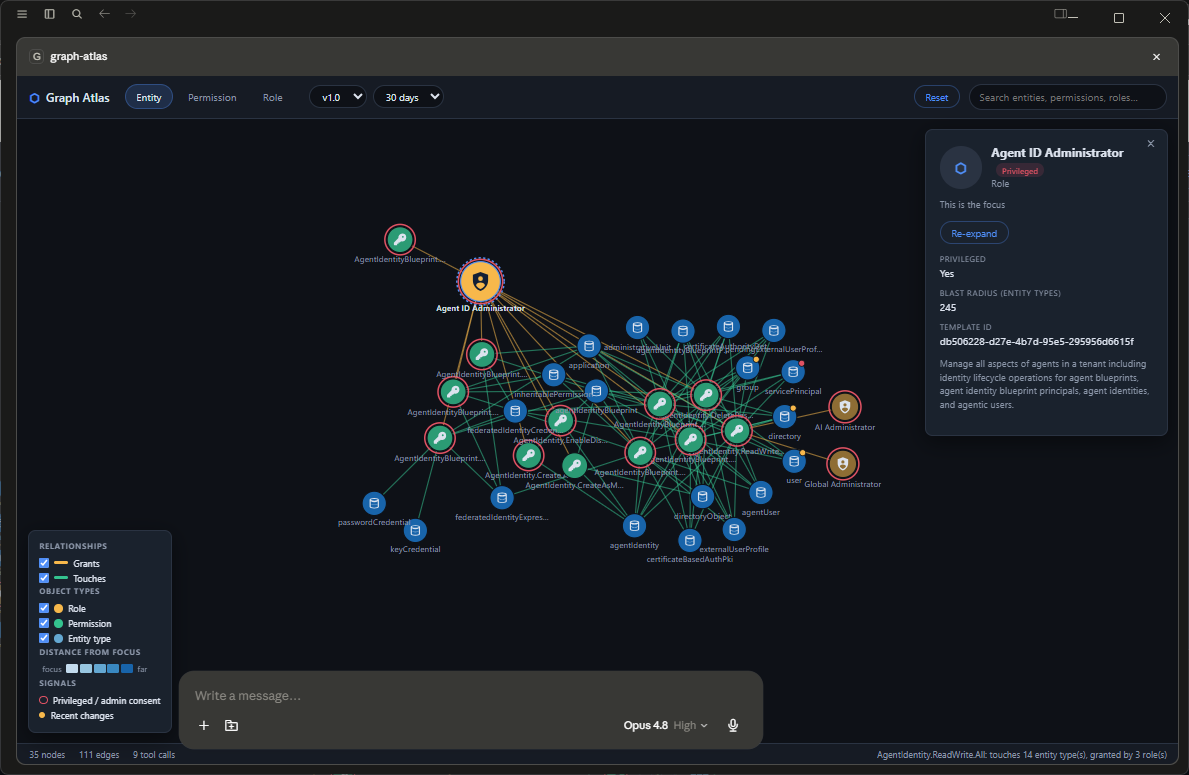
visualize_schema_graph opens the Graph Atlas visualiser — a d3 force-directed SVG graph rendered
directly inside the MCP client via MCP Apps
(Claude Desktop, ChatGPT, VS Code, and other compliant hosts). Its architecture and look & feel are
ported from EntraPulse Polyarchy:
- Dark-themed chrome (light theme follows the host): pill view tabs, glass panels, a bottom status bar with live node/edge/tool-call counts.
- Additive canvas + session cache — the graph accumulates as you explore. Double-click any node (or the panel's Set as focus button) to flip context to it: hop distances re-anchor, the canvas glides to center it, and its neighborhood expands. Anything already fetched this session re-expands instantly from cache with zero repeat tool calls. Reset clears the canvas but keeps the cache.
- Search — the toolbar search box (backed by
search_schema_objects) matches entity types, permissions, and roles by name and flips focus to your pick. - Detail panel — per-kind fields (properties/navigations/changes for entities, split
app/delegated consent + description for permissions, blast radius/published actions/template id
for roles), plus an in-panel change-history timeline (backed by
get_node_timeline). - Rearrangeable layout — drag a node and it stays pinned where you drop it, so you can pull clusters apart to read dense neighborhoods; new expansions bloom out of the node they came from.
- Color language — entity types shade by distance from the focus (blue ramp); permissions and roles wear their relationship colour (green touches / amber grants), faded with distance. Red is reserved as a signal: a solid red ring marks privileged roles and admin-consent permissions, and an amber/red activity dot marks recently-changed entities. A legend (bottom-left) doubles as a visibility filter — unchecking a relationship or object type dims it.
- Model awareness — the app pushes
updateModelContextafter every focus/expansion, so the assistant knows what's on screen without extra tool calls.
Three pivot dimensions, chosen via view (or the in-app tabs) so you can start wherever the
question starts — a Role, a Permission, or an entity/API:
entity— Graph entity types; edges are navigation properties and inheritance.focus_object= an entity likegroup. Expanding an entity on the Permission tab reveals the permissions that touch it; on the Role tab it goes two hops — those permissions plus the roles that grant them (so expandingusersurfaces User Administrator, Helpdesk Administrator, and friends).permission— a permission scope, the entities it touches, and the roles that grant it.focus_object= a permission likeUser.Invite.All.role— an Entra role, the permissions it grants, and the entities those touch (two hops).focus_object= a role likeUser Administrator. This is the one that answers "what can this role actually do" / least-privilege comparison questions.
Build it with npm run build (server tsc, an app-ui typecheck, then esbuild bundles
app-ui/atlas-app/ into a single self-contained dist/app-ui/atlas-app.html — MCP App resources
must be one blob with no external network dependencies; the resource URI is
ui://graph-atlas/atlas-app.html). The server reads the built HTML once at startup, so restart
your MCP client (or the server connection) after rebuilding.
Testing with MCP Jam
# published package
npx @mcpjam/inspector@latest npx -y graph-atlas-mcp

# or a source checkout
GRAPH_ATLAS_DB=/absolute/path/to/graph-atlas.db \
  npx @mcpjam/inspector@latest node --experimental-sqlite /absolute/path/to/dist/index.js
For source checkouts all paths must be absolute — MCP Jam spawns the server from its own
working directory. Two
MCP Jam (v2.34) quirks to know about: widgets only render under the MCP Jam host profile
(the "Claude" host-emulation profile leaves the widget iframe stuck at "loading"), and the
widget's Sandbox tab / debug/widget-visibility trace events are the fastest way to diagnose a
blank widget.
Note: entity node ids are lowercase everywhere (accessreview), with display labels keeping CSDL
casing (accessReview) — entity names aren't consistently cased across the CSDL and the
permission source data, and a canonical id is what lets one entity stay one node across all views.
Real bugs caught and fixed while building this:
- CSDL's short
graph.namespace alias wasn't stripped (silently produced zero edges). permissions.resourcesentity names aren't consistently cased across Merill's pages (would have silently split one entity into two duplicate-looking nodes with a dangling edge between them).- MCP Apps'
autoResize(on by default) sizes the iframe off the app's own document content height — useless for a full-height flex app. The app now disables it and claims space explicitly (fullscreen where supported, a tall inline frame otherwise). - The original force-graph (canvas) implementation called
zoomToFitsynchronously aftergraphData()— before the debounced layout had assigned node positions — producing a NaN zoom transform and a permanently blank canvas on every re-render after the first. The d3/SVG port eliminates the bug class: the simulation is synchronous and centering guards unplaced nodes. - The UI sent its change-window picker values (
"30") where the server compares ISO dates lexicographically, silently zeroing every change count.sincenow accepts both (day counts are normalized server-side) and the UI converts to ISO dates anyway. - Browsers freeze
requestAnimationFramein hidden iframes, so a graph seeded while the host had the widget hidden never got laid out by d3's simulation — every node rendered stacked at the origin. New nodes now get explicit starting positions next to their expansion source, every structural render ticks the layout synchronously once, and anIntersectionObserverreheats the simulation when the canvas becomes visible again. - With
autoResizeoff, some hosts (Claude Desktop's app surface) still size the iframe from the app's reported height — the app now always reports a size after display-mode negotiation, using the host'scontainerDimensionswhen published, and re-reports on host-context changes.
How it works
- Daily collection (
.github/workflows/collect.yml, 02:00 UTC) fetches$metadatafor both endpoints — both are publicly accessible, no Entra app registration required. scripts/parse-csdl.jsparses the CSDL XML into structured JSON (entity/complex/enum types, properties, navigation properties, entity sets, singletons, functions/actions).scripts/diff-snapshots.jscompares today's parse against the most recent stored snapshot insnapshots/v1.0/andsnapshots/beta/(committed to the repo as the audit trail).- Detected changes are inserted into
graph-atlas.dbwithsource = 'self'; if any changes were found,scripts/create-release.jspublishes an updated GitHub Release. - MCP clients auto-download the latest release on startup if newer than their local cache.
Known limitations
- Keyword search uses
LIKE-based matching, not real BM25 — Node's bundlednode:sqlitedoesn't ship the FTS5 extension. Ranking is a simple term-coverage/frequency heuristic. - Semantic search requires
OPENAI_API_KEY; vector storage uses sqlite-vec (bundled, no external vector DB). $metadatadiffing covers schema-level changes only — not behavioral, permission, or endpoint-level changes that don't show up in the CSDL itself.- Backfilled changelog records are feature-level ("Added the X resource type"), not property-level like the seed and self-collected data — the official changelog doesn't include CSDL fragments.
get_permission_contextcaps response size. A common object likeusermatches 190+ permissions, and broad permissions likeDirectory.ReadWrite.Alllist 300+ endpoints — an uncapped response hit 417KB in testing and caused a real MCP transport disconnect. Object-name queries are capped to 25 permissions (narrowest-first by resource count,limitparam up to 50) withtotal_matching_counttelling you if more exist; each permission'sgraph_endpointsis capped to 10 withgraph_endpoints_total_count/graph_endpoints_truncated. Filter to a specificpermission_nameto get one permission's full, untruncated detail.grantable_by(role<->permission mapping) is a heuristic correlation, not an authoritative mapping. Microsoft doesn't publish an official crosswalk between Entra RBAC actions (microsoft.directory/*) and OAuth permission scopes (User.Read.All, etc.) — they're two separate authorization systems that happen to govern overlapping resource types.scripts/build-role-permission-map.jsmatches a permission's primary resource (derived from its own name, e.g.AdministrativeUnit.Read.All->administrativeUnit) against roles' actions on that same resource. Verifygrantable_byresults before treating them as authoritative. Matching is by operation category (read/create/update/delete/restore/enable/disable/invite/ license/session/all), not a coarse read-vs-write binary — an earlier binary version produced a confirmed false positive ("Directory Writers" has create/update/enable/disable actions onusersbut no delete/restore action, yet appeared grantable_by forUser.DeleteRestore.Allsimply because both were "write-tier"). Graph's own granular permission names (DeleteRestore,EnableDisableAccount,Invite,ReadUpdate, ...) are operation-specific by design, sopermissionRequiredCategories()maps each verb segment to the specific action categories that satisfy it — verified against Microsoft's built-in roles reference across the full guest-lifecycle operation set (invite/create/update/enable-disable/delete-restore × Guest Inviter/Directory Writers/User Administrator, all 15 combinations exact). Unrecognized/ long-tail verbs (ReadWrite,Write,Manage,FullControl, and ~75 rarer Teams/Chat-specific variants) fall back to "any mutate action satisfies" — a broad permission genuinely is satisfied by partial write capability, so this remains a coarser signal for those specific verbs.- A few Entra roles publish no RBAC actions at all (currently the three Purview Workload Content roles) — their permissions are managed outside Entra via Microsoft Purview role groups and a first-party sync app, so no role↔permission mapping is possible. The visualiser and search label these "no published actions — managed outside Entra" rather than showing a misleading "grants 0 permissions".
- Roles' Graph API route (
GET /roleManagement/directory/roleDefinitions) requires an app registration withRoleManagement.Read.Directory+Application.Read.Allthat this project doesn't have configured —collect-roles.jsuses the PRD's documented fallback (scraping the public Microsoft Learn permissions reference) instead. permissions.combined_with(some endpoints require multiple scopes together, e.g.Application.Read.All and Policy.Read.All) isn't populated — Merill's page structure doesn't expose this reliably enough to scrape.
Acknowledgments
This project builds on data and design work from others in the Entra community — credited here as data sources and inspiration, not as project co-authors:
- Eric — creator of changes.entra.ms, the CSDL-diff tracker that seeds our historical change data
- Merill Fernando — creator of the Graph Permissions Explorer, the data source for permission enrichment (§6)
- EntraPulse Polyarchy — Darren Robinson's own prior MCP; its d3 force-graph / MCP Apps architecture (design system, session cache, context-flip interaction model) is the foundation of the Graph Atlas visualiser
License
MIT