Unity Video Playtest
Record it. Watch it. Debug what screenshots miss.
An installable Agent Skill for reviewing Unity animation, timing, transitions, cameras, particles, combat, and UI motion.




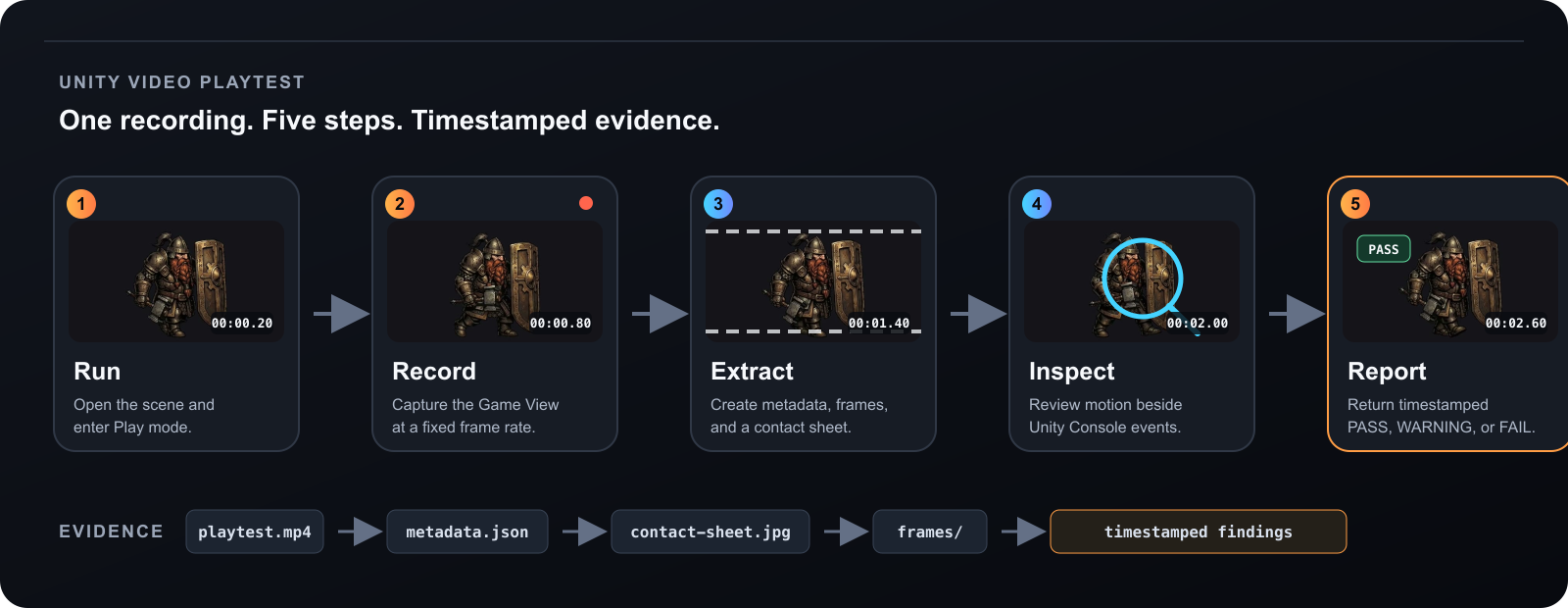
The skill records a real playtest, turns the recording into inspectable evidence, and reports problems with timestamps.
Install
The repository ships one canonical skill with native packages for Codex, Claude Code, and Cursor.
Codex
codex plugin marketplace add enoch3712/unity-video-playtest && \
codex plugin add unity-video-playtest@unity-video-playtest
Start a new task after installation.
Claude Code
claude plugin marketplace add enoch3712/unity-video-playtest --scope user && \
claude plugin install unity-video-playtest@unity-video-playtest --scope user
Start a new session or reload plugins.
Cursor
git clone --depth 1 https://github.com/enoch3712/unity-video-playtest.git \
  ~/.cursor/plugins/local/unity-video-playtest
Restart Cursor or run Developer: Reload Window.
For requirements, updates, project-local installation, and manual installation, see the installation guide.
From Play mode to evidence
One workflow serves every host. Video-capable agents watch the MP4 directly; image-only agents inspect the contact sheet and a dense 12–30 fps window around suspicious motion.
Ask the agent
Use $unity-video-playtest to record the AnimationShowcase scene for 15 seconds.
Watch the dwarf walk cycle, check whether it is smooth, correlate visible
glitches with the Unity Console, and give me timestamped findings.
Natural language works too:
Record this Unity fight and find out why the camera snaps during the enemy turn.
Review paths
| Host capability | Review path | Evidence |
|---|---|---|
| Can inspect a local MP4 | Native-video adapter | Continuous playback plus timestamped frames |
| Cannot inspect a local MP4 | Extracted-frame adapter | Contact sheet plus a dense 12–30 fps interval |
Has a compatible /watch skill | Optional watch adapter | Generic video ingestion plus Unity-specific evidence |
The skill tests the current host's actual capabilities instead of guessing from a model name.
Evidence produced
playtest.mp4
playtest-analysis/
├── metadata.json
├── contact-sheet.jpg
├── frame-times.csv
└── frames/
    ├── frame-00001.jpg
    ├── frame-00002.jpg
    └── ...
Create an overview:
skills/unity-video-playtest/scripts/inspect_video.sh playtest.mp4
Then inspect a fast event at the animation's real cadence:
skills/unity-video-playtest/scripts/inspect_video.sh playtest.mp4 \
  --output walk-window \
  --start 4.0 \
  --duration 2.0 \
  --fps 12
Example report:
FAIL — Dwarf walk transition

00:04.42 — right foot reaches the contact pose
00:04.50 — sprite returns to frame 03 instead of frame 08
00:04.58 — character snaps forward by approximately 18 px

Console: no runtime exception; likely an animation frame-order/import issue.
Evidence: walk-window/frames/frame-00006.jpg through frame-00008.jpg
Capture priority
- Project-owned Game View or target-camera recorder
- Unity Recorder at a fixed frame rate
- Included macOS display-capture fallback
Sparse screenshots are deliberately excluded as a motion-testing backend because tool latency changes the cadence being measured.
What it catches
- frozen, duplicated, or misordered animation frames
- sprite snapping and root-motion jumps
- camera discontinuities and shake timing
- late UI feedback and transition races
- missing or mistimed particles
- draw-order changes during motion
- combat phase and resolution sequencing
- visible failures that align with Console errors
The skill reports its limitations when input automation, clean Game View capture, native video playback, or OS permissions are unavailable.