
QR Code Generator
Design a QR code you'd actually print.
Live preview, gradients, dot styles, logo overlays, and shareable links —
running entirely in your browser. No backend, no accounts, no tracking.
Your designs never leave your machine.


Features
- Five content types: URL, Email, Phone, Text, vCard
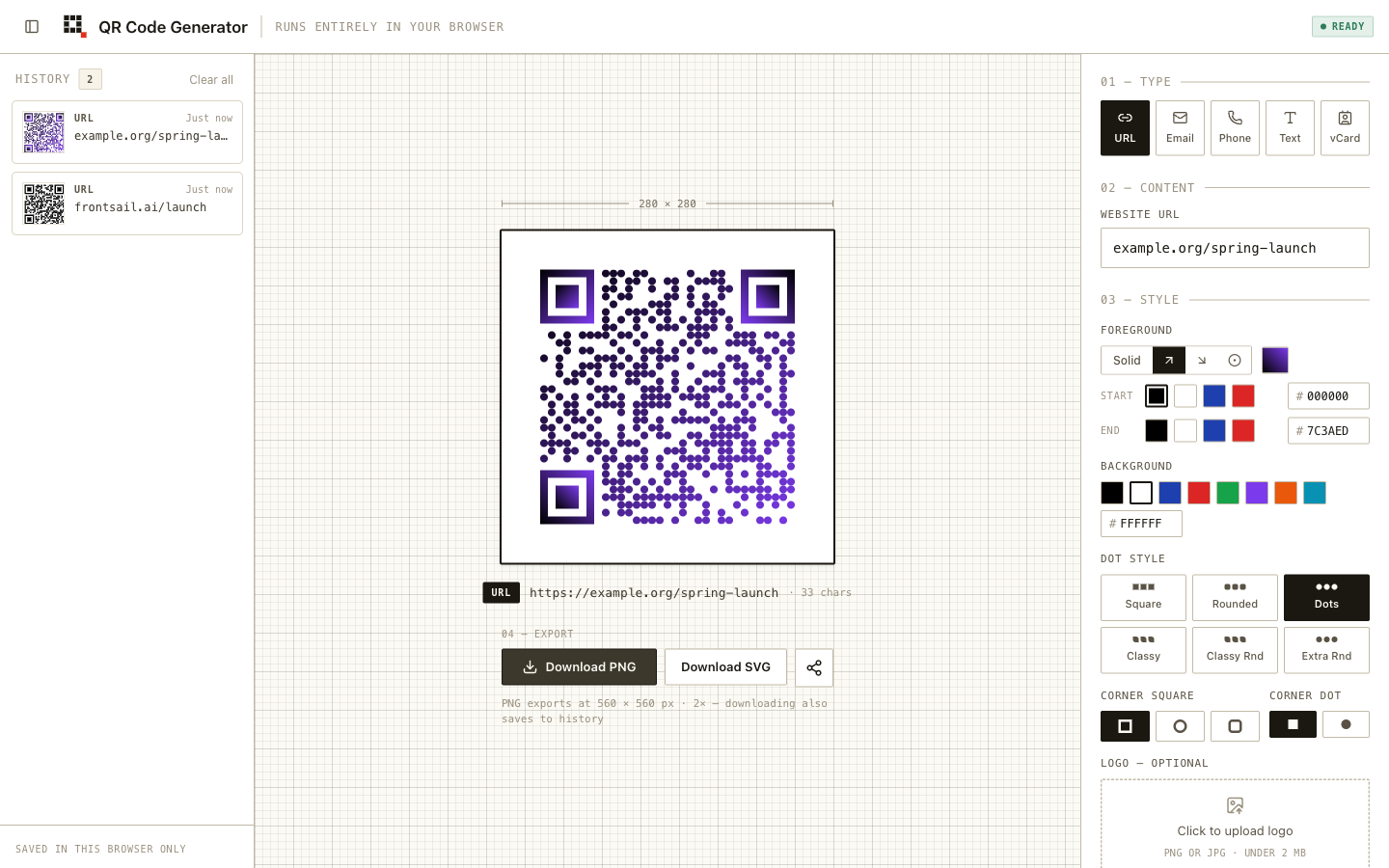
- Live preview: the code redraws as you type, with a capacity guard instead of silent failures
- Styling: solid or gradient foregrounds (linear/radial), background colors (or none, for a transparent export), 6 dot styles, corner styles, and logo overlays with a scannability warning
- History: every download is saved locally with a live thumbnail — restore, share, or delete any past design
- Sharing: designs encode into self-sufficient URLs; the recipient's browser rebuilds the design with nothing stored server-side
- Export: PNG at 2× resolution or SVG
- Workspace UI: three-pane desktop layout on an engineering-grid canvas; mobile gets a history drawer and a sticky export bar
Use it from your agent
One generator, three surfaces: design in the browser, generate from your code via @frontsail-ai/qr-mcp, or hand both to your agent. The MCP server generates the codes; the qr-code skill teaches the agent which designs will actually scan.
Claude Code
claude plugin marketplace add frontsail-ai/qr-code-generator
claude plugin install qr-code-generator@frontsail-qr   # the skill
claude mcp add qr -- npx -y @frontsail-ai/qr-mcp       # the generator
OpenAI Codex
$skill-installer https://github.com/frontsail-ai/qr-code-generator/tree/master/skills/qr-code
codex mcp add qr -- npx -y @frontsail-ai/qr-mcp
(Or copy skills/qr-code/ into ~/.codex/skills/ by hand. Working inside a clone of this repo, Codex discovers the skill automatically via .agents/skills/.)
Any other agent
The skill follows the Agent Skills spec — copy skills/qr-code/ to wherever your agent loads skills from, and register npx -y @frontsail-ai/qr-mcp as a stdio MCP server.
Repository layout
A Bun workspace monorepo:
apps/
  web/        the deployed app (React, Vite+, Playwright e2e)
packages/
  core/       @frontsail/qr-core — framework-free QR logic + vitest units
  mcp/        @frontsail-ai/qr-mcp — stdio MCP server for agents
skills/
  qr-code/    QR scannability skill for any agentskills.io-compatible agent
Install instructions for the skill and MCP server are under Use it from your agent above.
packages/core holds the parts that have nothing to do with React: types,
presets, data formatters, the qr-code-styling option mapping, and the
share-link codec. It renders nothing and its tsconfig omits the DOM lib, so a
stray window is a type error. The app consumes its TypeScript source
directly — there is no build step for the package. tools/* is reserved in
the workspace globs for later.
Tech stack
- React 19 + TypeScript
- Vite+ (dev server, build, lint, format, type checks)
- Bun (package manager, workspaces)
- Tailwind CSS v4
- Vitest (unit tests) and Playwright (E2E testing)
- qr-code-styling
Getting started
Prerequisites
- Vite+ (
vpCLI; manages Node.js and the package manager) - Bun 1.3+
- just (optional, for convenience commands)
Installation
vp install
Development
just run # or: vp run web#dev
Open http://localhost:5173 in your browser.
Production build
just build # or: vp run web#build
The built files will be in apps/web/dist/. Preview with vp run web#preview.
Development workflow
This project uses just as a command runner. See available commands:
just --list
Linting, formatting & type checks
just lint        # Format, lint, and type-check with auto-fix
just lint-ci     # Check-only mode (what CI runs)
Testing
just test                          # Core unit tests + the full Playwright suite
vp run '@frontsail/qr-core#test'   # Unit tests only
vp run web#test:ui                 # Playwright UI mode
vp run web#test:headed             # Visible browser
The e2e suite starts its own dev server on port 5177 and never reuses a running one, so it can't accidentally test whatever else is on 5173.
CI
GitHub Actions runs on every push/PR to master/main: install, lint & type-check, test, build.
About
Developed and maintained by FrontSail AI.
License
MIT