Unified AI System: Self-Hosted AI Gateway & MCP Server
Open-source AI gateway for deterministic prompt enhancement, governed execution, and reproducible verification.
English | zh-CN | Project Site




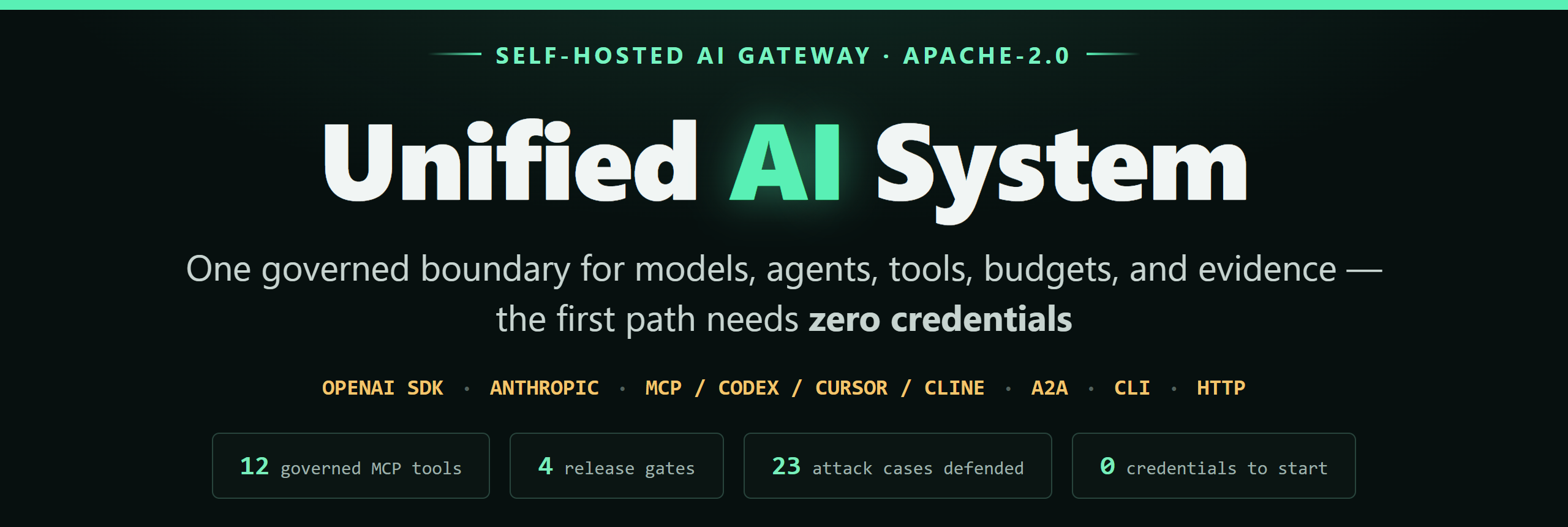
Unified AI System turns a rough request into a structured, reviewable prompt before execution. It gives teams one self-hosted surface for OpenAI-compatible SDKs, MCP, A2A, CLI, and HTTP while keeping provider calls explicit — with the feature set you'd expect from a commercial LLM gateway: virtual keys with token budgets, exact + semantic response caching, reverse MCP governance with REST→MCP generation, and production observability.
Try Before Installing
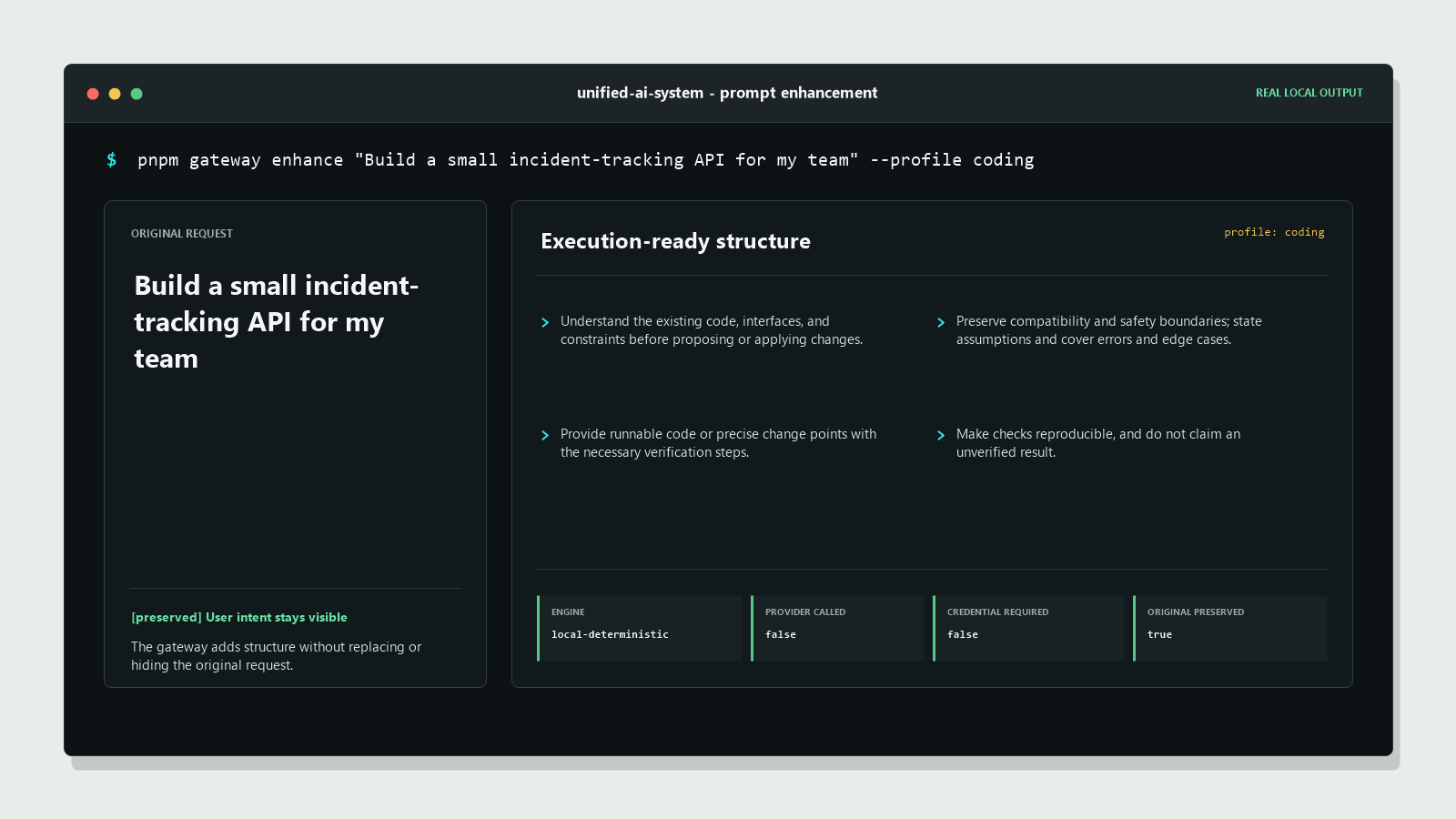
The original request stays visible. The local enhancer adds execution requirements, output requirements, and completion criteria.
Open a ready-to-run coding example in the browser Prompt Lab
The link loads a real request and renders the enhanced prompt locally. No account, API key, or provider call is required.
Run the same proof against the published container:
docker run --rm ghcr.io/happy520ai/unified-ai-system/ai-gateway-service:0.5.0 pnpm gateway demo "Build a small API for my team" --enhance --profile coding --evidence
The evidence confirms that the original request was preserved, the result is
deterministic, and providerCalled=false. Codex, VS Code, Claude Code, Gemini
CLI, OpenCode, Cursor, Cline, Continue, and generic stdio clients can reach the
same gateway through twelve governed MCP tools. The source build also provides a
protocol-tested MCP Streamable HTTP endpoint for clients that connect by URL.
Useful in a real workflow? Star the repository or share one reproducible result.
The Gateway at a Glance
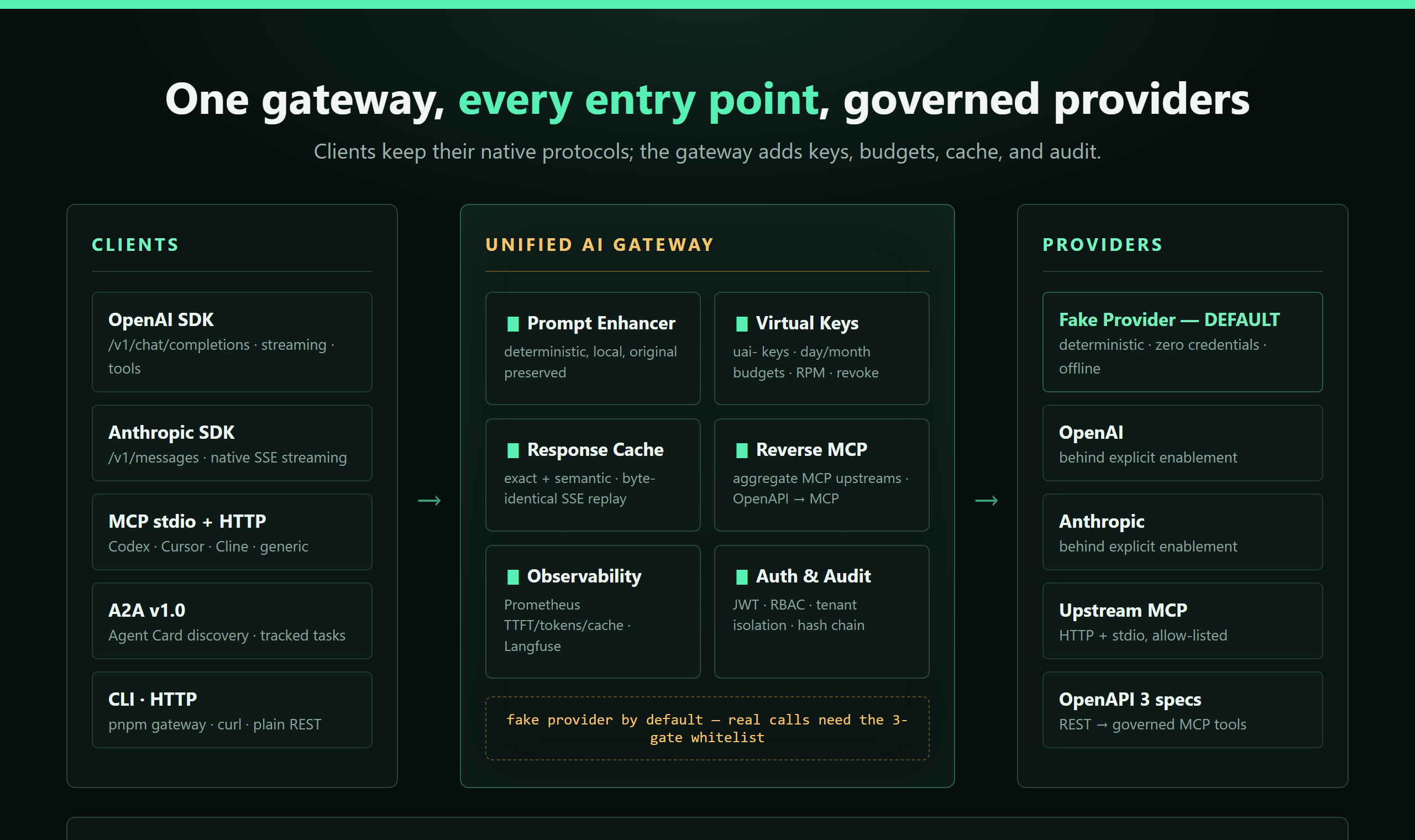
Clients keep their native protocols; the gateway adds keys, budgets, cache, and audit. Twelve governed MCP tools are inspectable from any MCP client.
Choose Your First Path
| Your goal | Start here | What you get |
|---|---|---|
| Try it before installing | Browser Prompt Lab | A local, deterministic preview with no account or API key. |
| Verify the published runtime | 60-second Docker demo | A disposable fake-provider run with visible evidence and cleanup. |
| Connect an agent client | Codex and MCP quickstart | A pinned MCP container and twelve inspectable tools. |
| Choose a client path | MCP compatibility matrix | Install commands, first checks, and honest evidence boundaries. |
| Integrate with an application | Prompt enhancement guide | CLI, HTTP, SDK, curl, Python, and JavaScript paths. |
| Keep an existing OpenAI client | OpenAI-compatible API | Point baseURL at /v1 for Chat Completions, function tools, Responses, streaming, and model discovery. |
| Connect another agent | A2A v1.0 gateway | Discover an Agent Card and execute tracked fake-provider tasks over JSON-RPC. |
| Check client runtime certification | Client runtime certification | Current evidence-backed catalog state: 52 verified, 2,084 pending manual evidence, and 0 failed across 2,136 unique entries. |
| Run mainstream certification one-by-one | Client runtime certification | Run node tools/verify-client-runtimes-serial.mjs --client tag:mainstream for sequential reports and explicit manual evidence states. |
| Run global protocol coverage | Client runtime certification | Run node tools/run-global-client-discovery.mjs --source-manifest docs/client-runtime-catalog-sources-worldwide.json --execute --serial --max 0. |
| Run strict global certification | Client runtime certification | Add --require-manual-evidence --manual-evidence docs/client-runtime-evidence.example.json to fail on missing manual proof. |
| Inspect the enhancement contract | Credential-free evaluation | Eight representative cases for profiles, languages, signals, determinism, and zero provider calls. |
| Diagnose a first-run problem | Troubleshooting matrix | Shell-specific checks without exposing credentials. |
| Verify an MCP client | MCP client report | Record one Codex, Cursor, Cline, or generic stdio run with a small evidence set. |
| Contribute or report a run | Usage report or good first issue #106 | A reproducible feedback path for users and maintainers. |
Gateway Capabilities
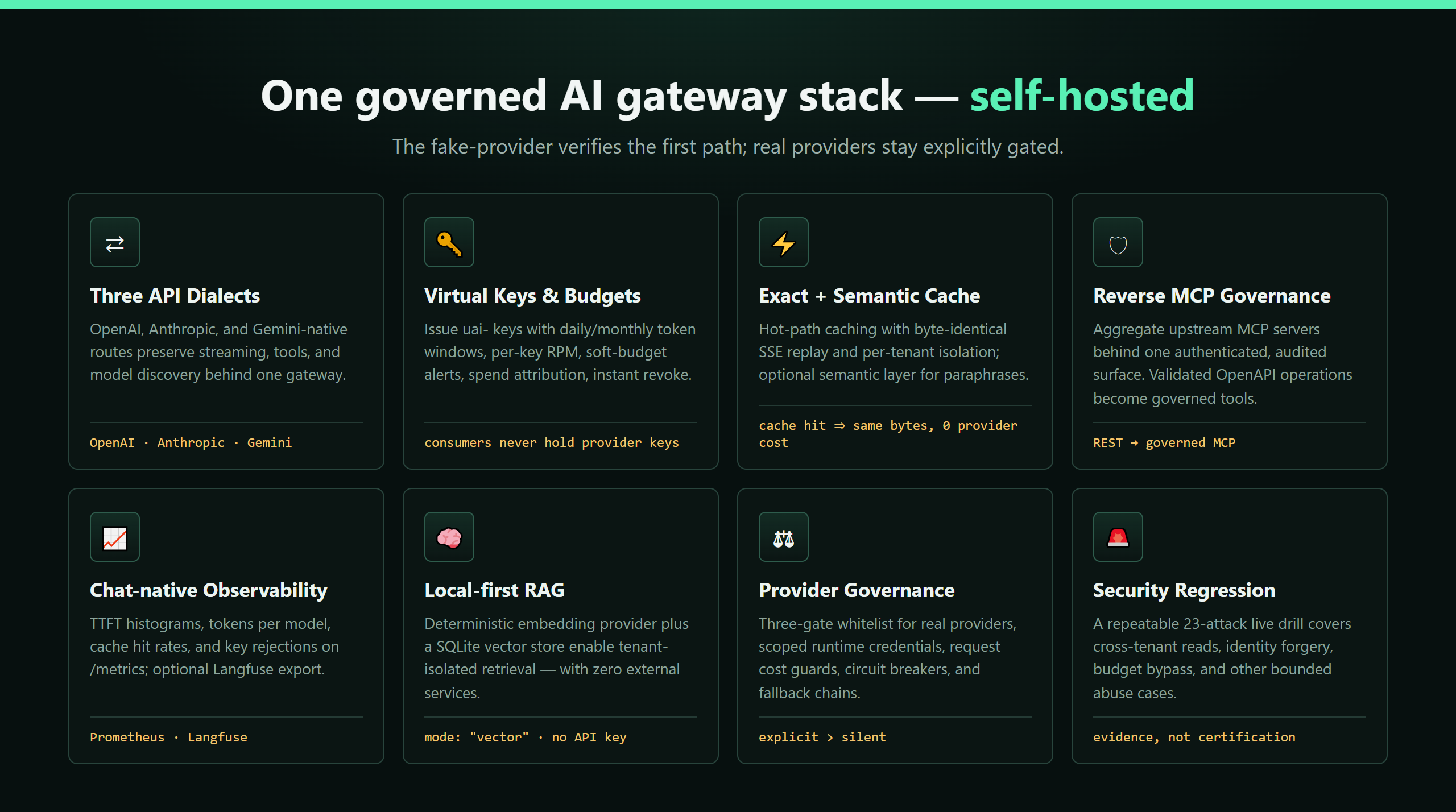
Everything below runs from the same self-hosted process — opt-in and fake-provider-first, so you can try every feature with zero credentials:
| Capability | What you get | Docs |
|---|---|---|
| OpenAI + Anthropic compatible APIs | /v1/chat/completions (SSE streaming, tools), /v1/messages with native Anthropic streaming, the Responses API, and model discovery — keep your existing SDK, change only the base URL. | OpenAI-compatible API |
| Virtual keys + budgets | Issue uai- keys with periodic token budgets (daily/monthly windows), per-key request limits, soft-budget alerts, spend attribution, and instant revocation. Consumers never hold provider keys. | Virtual keys |
| Response cache — exact + semantic | Tenant-scoped hot-path caching with byte-identical JSON/SSE replay, an opt-in semantic layer for paraphrased requests, TTL and size caps, and a full audit trail. | Response cache |
| Reverse MCP governance | Aggregate upstream MCP servers (Streamable HTTP and stdio) behind one authenticated, audited, allow-listed surface — plus REST→MCP: any OpenAPI 3 spec becomes governed MCP tools. | Reverse MCP governance |
| Observability | Chat-specific Prometheus metrics on /metrics — tokens per model, cache hit rates, TTFT histograms, virtual-key rejections — plus an opt-in Langfuse export. | Observability |
| Vector retrieval | A credential-free deterministic embedding provider and the SQLite vector store activate mode: "vector" RAG with strict tenant isolation. | Providers & knowledge |
| Provider governance | A three-gate whitelist matrix for real providers, a runtime credential store (SHA-256 at rest), request cost guards, circuit breakers, and fallback chains. | Provider enablement |
| Enterprise governance + security drills | JWT auth, RBAC, tenant isolation with audit hash chains — verified by a repeatable 16-attack live security regression. | Security drill |
Why People Use It
- Prompt enhancement for teammates who do not write perfect prompts.
- Clean-clone verification without credentials or hidden setup.
- Provider-free HTTP examples for curl and Python's standard library.
- OpenAI SDK, CLI, HTTP API, shared SDK, MCP, Codex, Cursor, Cline, and Continue entry points.
- Clear boundaries: no AGI claim, no L5 claim, no silent provider behavior.
- Protocol-first onboarding: any OpenAI-compatible MCP, A2A, or HTTP client can be onboarded via a short setup + reproducible report path; we prioritize verification over marketing claims.
Try It in 60 Seconds
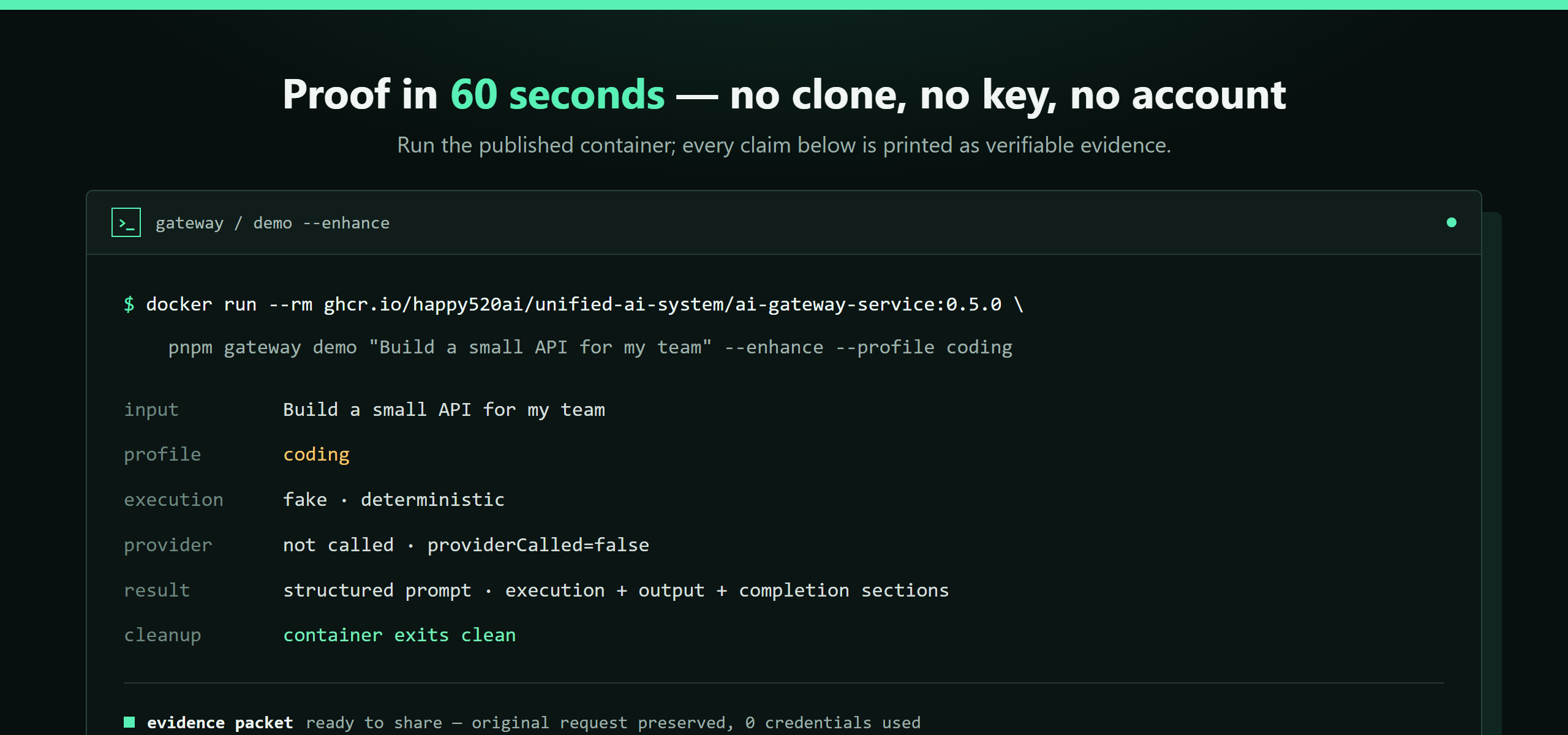
Verify the project without signing in:
docker run --rm ghcr.io/happy520ai/unified-ai-system/ai-gateway-service:0.5.0 pnpm gateway demo
Expected behavior:
- local fake-provider execution
- visible
execution: fake - deterministic output
- no API key or account needed
- container exits automatically
One-command natural-language enhancement preview:
docker run --rm ghcr.io/happy520ai/unified-ai-system/ai-gateway-service:0.5.0 \
  pnpm gateway demo "Build a small API for my team" --enhance --profile coding --evidence
This starts an isolated fake-provider gateway, enhances the request locally, prints the structured prompt, and cleans up without an API key.
You can also pipe a request directly into the published image without cloning the repository:
printf '%s' "Plan a launch for a small API" \
  | docker run --rm -i ghcr.io/happy520ai/unified-ai-system/ai-gateway-service:0.5.0 \
      pnpm --silent gateway demo --enhance --profile planning --language en --json
PowerShell equivalent for a request file:
Get-Content .\request.txt -Raw |
  docker run --rm -i ghcr.io/happy520ai/unified-ai-system/ai-gateway-service:0.5.0 `
    pnpm --silent gateway demo --enhance --profile planning --language en --json
The container still uses the disposable fake-provider path and exits after the result is printed.
Use --language zh-CN or --language en when the enhancement output should
follow an explicit language instead of automatic detection.
Prompt enhancement example:
Start the gateway first (from a source checkout):
pnpm gateway serve
Then, in another terminal:
pnpm gateway enhance "Build a small API for my team" --profile coding
pnpm gateway chat "Build a small API for my team" --enhance --profile coding
The CLI also accepts a request from stdin, which is useful for shell pipelines and text files:
printf '%s' "Plan a launch for a small API" \
  | pnpm gateway enhance --profile planning --language en
cat request.txt | pnpm gateway enhance --profile auto --json
PowerShell users can pipe the same path with Get-Content .\request.txt -Raw.
Existing OpenAI SDKs
Start the source gateway with pnpm gateway serve, then keep your existing
OpenAI client and change only its base URL:
import OpenAI from "openai";

const client = new OpenAI({
  baseURL: "http://127.0.0.1:3100/v1",
  apiKey: process.env.PME_AUTH_TOKEN || "local-development",
});

const result = await client.chat.completions.create({
  model: "local-fake-model",
  messages: [{ role: "user", content: "Build a small API for my team" }],
});

console.log(result.choices[0].message.content);
The credential-free gate verifies this path with the official OpenAI
JavaScript SDK 7.4.0. With the source gateway running, reproduce it with:
node docs/examples/openai-sdk-chat.mjs
The focused compatibility layer supports text completions, streaming, model listing, and optional local prompt enhancement. See the OpenAI-compatible API guide for Python, supported fields, auth behavior, and explicit limitations.
Prefer Node.js? The dependency-free example verifies the provider-free response before printing the enhanced JSON:
node docs/examples/prompt-enhancement.mjs "Help me plan a small API for my team" --profile planning --language en
Prefer Go? The standard-library example checks provider-free readiness and prints JSON evidence before showing the enhanced prompt:
go run docs/examples/prompt-enhancement.go "Help me plan a small API for my team" --profile planning --language en
For a no-clone prompt-enhancement walkthrough, start the published gateway image and follow the provider-free curl example:
read -rsp "Enter a random gateway token (32+ characters): " PME_AUTH_TOKEN
printf '\n'
export PME_AUTH_TOKEN
docker run --rm --publish 127.0.0.1:3100:3100 \
  --env AI_GATEWAY_SERVICE_HOST=0.0.0.0 \
  --env AI_GATEWAY_PROVIDER_MODE=fake \
  --env AI_GATEWAY_REAL_PROVIDER_ENABLED=false \
  --env PME_ENTERPRISE_AUTH_ENABLED=true \
  --env PME_AUTH_TOKEN \
  ghcr.io/happy520ai/unified-ai-system/ai-gateway-service:0.5.0
Keep that process running while you send the curl request. The response
includes metadata.providerCalled=false. For a credential-free HTTP stream,
use the curl SSE example to inspect
start, chunk, and done events with executionMode=fake.
The gateway refuses non-loopback listening when authentication is disabled;
see the critical attack-chain hardening report.
Use It
Terminal Workflow
After pnpm install:
pnpm gateway serve
pnpm gateway status
pnpm gateway doctor
pnpm gateway chat "Hello from Unified AI System"
MCP / Codex / Cursor / Cline
Published MCP command:
codex mcp add unified-ai-system -- docker run --rm -i ghcr.io/happy520ai/unified-ai-system/mcp-server:0.5.0
Restart Codex, run /mcp verbose to verify the twelve tools, then follow the
60-second Codex MCP quickstart for a safe first
prompt-enhancement call and removal command.
For MCP clients that connect by URL, the source build provides a loopback-only Streamable HTTP endpoint:
pnpm mcp:http
# http://127.0.0.1:3210/mcp
See the MCP server guide for remote-bind authentication and the published-release boundary.
Installable Agent Skill
codex plugin marketplace add happy520ai/unified-ai-system --ref master
npx skills add happy520ai/unified-ai-system --skill unified-ai-gateway --agent codex --copy --yes
The plugin pins the reviewed immutable v0.4.9 MCP image and starts it without container networking or Linux capabilities.
Skill hub: https://skills.sh/happy520ai/unified-ai-system/unified-ai-gateway
For local source work:
git clone https://github.com/happy520ai/unified-ai-system.git
cd unified-ai-system
corepack enable
corepack prepare pnpm@9.15.4 --activate
pnpm install --frozen-lockfile
pnpm verify:public-clone
pnpm gateway demo
For a prepared cloud workspace, use GitHub Codespaces. See the value first:
pnpm gateway demo "Build a small API for my team" --enhance --profile coding --evidence
For the complete credential-free clone check, run pnpm verify:public-clone
after the demo. The repository's devcontainer keeps the default path
provider-free. Codespaces availability and usage limits are controlled by
GitHub.
Docker Compose
For a source checkout, start the gateway with a readiness check:
docker compose up --build -d
docker compose ps
curl http://127.0.0.1:3100/health/check
The service becomes healthy only after /health/check responds successfully.
When finished, stop it with:
docker compose down
The Compose file treats .env as optional and leaves provider behavior explicit;
the credential-free fake-provider path remains the default.
Share a Verified Result
If the project helps your workflow, run one reproducible path, star the repository, and share the smallest useful result through the structured Usage Report.
For a ready-to-review CLI packet, append --evidence to the enhanced demo:
pnpm gateway demo "Build a small API for my team" --enhance --profile coding --evidence
Review the original request and output before sharing the generated JSON. The
packet also records detectedSignals and the item count for each
compiledSections entry, so a reviewer can see which request signals were
carried into the structured prompt without reading internal logs.
For the browser Prompt Lab, use its Copy evidence or Download evidence
action, then paste or attach the JSON in the optional Prompt Lab evidence field
of the same report.
Use Copy share link when you want another browser to reproduce the same local
input, profile, and language; review the prompt first because the URL fragment
contains the input text.
Next Steps
- Documentation for setup, the CLI, prompt enhancement, and providers.
- Codex MCP quickstart for the fastest agent-tool integration; the source guide is kept in the repository.
- Contributing guide for focused changes and safe verification.
- Usage Report template for reproducible feedback.
- Cite this project, Roadmap, and Support.
Honest Boundaries
We separate what is verified from what is not claimed:
- Clean clone + fake-provider path: Yes
- Hosted public API: No
- Real provider execution by default: No, must be explicitly enabled
- Browser chat UI in this repo: No (CLI/API/MCP are first-class)
- Production ready / AGI / L5: Not claimed
Real provider calls are disabled by default. Configure safely via .env.example and docs/providers.md.
Verify the Project
pnpm check
pnpm test
pnpm check:public
pnpm verify:public-clone
pnpm verify:mcp
CI on master runs Linux checks, container startup smoke tests, MCP discovery, and process-cleanup checks.
Project Links
Star History
If the gateway saves you a proxy migration or an afternoon of prompt cleanup, a star helps more people find it.