
Structured input. Professional output. To the power of X.




CVX turns plain YAML into a professionally designed CV PDF — one command, fully local, no accounts; your data never leaves your machine. Use it two ways: edit the YAML yourself, or have any AI assistant write it for you from your existing CV — CVX validates the files and tells the assistant exactly what to fix.
🤖 AI assistants: if a user asked you to create their CV with CVX, follow the default flow in the AI guide (section "Default flow (for assistants)"). Non-negotiables even if you skip the link: never invent facts — every entry must be truthful to the user's input; linkedin.com URLs are unfetchable even when public — don't infer, ask for the profile's More → Save to PDF export or pasted text instead; ask for a square photo in your first reply (it can't be generated; the CV renders fine without one); and CVX is the only renderer — never substitute another PDF generator.
No terminal? No problem. Paste this into any AI chat (Claude, ChatGPT, Gemini, …):
Create my CV with https://github.com/hrtips/cvx — open that page and follow its instructions for AI assistants.
Here is my LinkedIn profile: <your profile URL> (or attach your current CV and a photo instead).
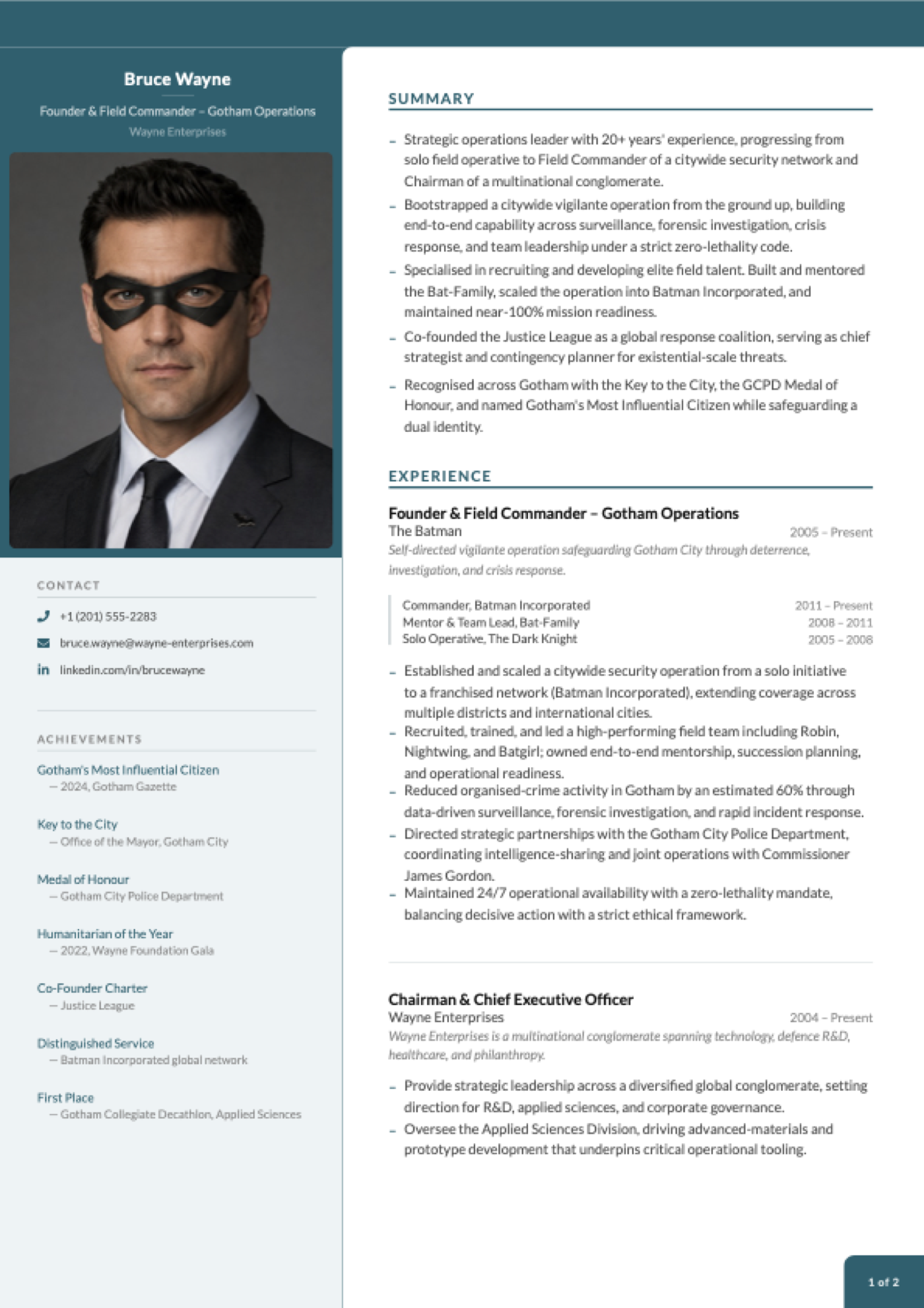
Page 1 of the scaffolded example CV — plus an ATS-safe single-column variant via --ats. Pagination has improved since these were captured; your build may split pages differently.

Create your CV in two minutes
npx @hrtips/cvx init     # scaffold cv-content/ with a complete example CV
npx @hrtips/cvx build    # render it to a PDF
init gives you a finished, working CV — Bruce Wayne's, and yes, really. Open bruce-wayne.pdf and you're looking at a designed two-page CV: photo, sidebar, achievements, the lot.
Now make it yours. Open the cv-content/ folder, and replace Bruce's details with your own, one file at a time:
cv-content/
  personal.yaml       ← start here: your name, title, contact details
  summary.yaml        ← the bullet points at the top of page 1
  experience.yaml     ← your work history (the bulk of the CV)
  education.yaml      ← degrees, institutions, years
  competencies.yaml   ← skill pills in the sidebar
  achievements.yaml   ← awards and recognitions
  referees.yaml       ← referees, or [] for "available upon request"
  images/profile.jpg  ← your photo (square, 400×400px or larger)
Re-run npx @hrtips/cvx build after each file and watch the PDF update — seeing Bruce's entry next to yours makes the format self-explanatory. The output file is named after you automatically (jane-doe.pdf).
Made a typo or unsure a file is right? npx @hrtips/cvx validate checks everything at once and tells you exactly what to fix:
cv-content/personal.yaml
  ⚠ unknown key "linkdin"
      ↳ did you mean "linkedin"?
Every scaffolded file also carries a $schema header, so editors with YAML support (VS Code + the YAML extension, JetBrains, …) autocomplete keys and flag mistakes as you type.
Applying through a job portal? Generate the ATS-safe variant too — single column, no colours, machine-friendly:
npx @hrtips/cvx build --ats
CLI reference
| Command | Does |
|---|---|
npx @hrtips/cvx init | Scaffold cv-content/ with the example CV (won't overwrite an existing one) |
npx @hrtips/cvx validate | Check cv-content/ — every problem at once, with file + field paths and fixes |
npx @hrtips/cvx validate --strict | Also fail on warnings (unknown keys); recommended for agents/CI |
npx @hrtips/cvx build | Render cv-content/ to <your-name>.pdf |
npx @hrtips/cvx build --ats | Render the ATS-safe single-column variant |
npx @hrtips/cvx list | Show available themes and layouts |
npx @hrtips/cvx --help / --version | Help / version |
All commands accept --json for machine-readable output (one JSON object on stdout, logs on stderr) and use semantic exit codes: 0 ok, 2 validation failed, 3 render failed, 64 usage error. init is a convenience, not a prerequisite — build renders any cv-content/ folder with valid YAML (built-in themes and layouts need no extra files).
Content schema: content files are versioned by schemaVersion in config.yaml (currently 1) and validated against the canonical JSON Schema. New keys may appear within a schema major. Keys can also be removed when they are measured to do nothing — page1ExperienceCount and page1SplitBullets were, in 1.8.0 — in which case builds keep working and validate names the removal, while validate --strict treats the now-unknown key as an error. The CHANGELOG says so at the release that does it.
What goes in each file
These are excerpts from the scaffolded example — build it once and you can see exactly where each snippet lands on the page.
personal.yaml — the header and contact block:
name: Bruce Wayne
title: Founder & Field Commander – Gotham Operations
company: Wayne Enterprises
phone: "+1 (201) 555-2283"
phoneHref: "tel:+12015552283"
email: bruce.wayne@wayne-enterprises.com
linkedin: linkedin.com/in/brucewayne
linkedinHref: "https://www.linkedin.com/in/brucewayne"
experience.yaml — one entry per role; progression (optional) renders a title history inside the entry:
- role: Founder & Field Commander – Gotham Operations
  company: The Batman
  period: 2005 – Present
  description: Self-directed vigilante operation safeguarding Gotham City through deterrence, investigation, and crisis response.
  progression:
    - title: Commander, Batman Incorporated
      period: 2011 – Present
    - title: Solo Operative, The Dark Knight
      period: 2005 – 2008
  bullets:
    - Established and scaled a citywide security operation from a solo initiative to a franchised network (Batman Incorporated).
    - Recruited, trained, and led a high-performing field team including Robin, Nightwing, and Batgirl.
    - Reduced organised-crime activity in Gotham by an estimated 60% through data-driven surveillance and rapid incident response.
summary.yaml — the bullet list at the top of page 1:
- "Strategic operations leader with 20+ years' experience, progressing from solo field operative to Field Commander of a citywide security network."
- "Co-founded the Justice League as a global response coalition, serving as chief strategist and contingency planner for existential-scale threats."
education.yaml
- degree: "Applied Sciences & Criminology (self-directed)"
  institution: League of Shadows
  period: 1998 – 2004

- degree: BSc, Criminology & Chemistry
  institution: Gotham University
  period: 1994 – 1998
competencies.yaml — rendered as skill pills in the sidebar:
- Strategic Planning
- Criminal Investigation
- Crisis Response
- Surveillance & Intelligence
achievements.yaml
- year: Gotham's Most Influential Citizen
  text: "— 2024, Gotham Gazette"

- year: Key to the City
  text: "— Office of the Mayor, Gotham City"
referees.yaml (use [] to print "available upon request"):
- name: Diana Prince
  title: Founding Member, Justice League
  company: Themysciran Embassy
  email: d.prince@justiceleague.org
  phone: "+1 (202) 555-0177"
Delete what you don't need — an empty file (or []) simply drops that section from the CV. Any new .yaml file you drop into cv-content/ is auto-discovered as a content key.
The complete field-by-field schema for every file lives in docs/cv-schema.md.
Let an AI write the YAML for you
The formats are deliberately LLM-friendly, and the schema is published for machines (llms.txt, docs/cv-schema.md). The AI guide has copy-paste prompts for every route; the short version:
Coding agent (Claude Code, Cursor, …) — lowest friction: run npx @hrtips/cvx init, then ask the agent to replace the example content with your details and build. The scaffolded cv-content/README.md documents the schema, so the agent edits, runs npx @hrtips/cvx build, and fixes errors itself.
Chat assistant (Claude, ChatGPT, …) — paste your existing CV or LinkedIn profile text along with this prompt:
Read the CVX content schema at https://raw.githubusercontent.com/hrtips/cvx/main/docs/cv-schema.md then convert my CV below into CVX cv-content/ YAML files. Output each file in its own fenced code block titled with the filename. Keep every fact truthful to my input — don't invent anything.
Save the generated files into cv-content/, drop in your photo, run npx @hrtips/cvx build. No web access in your assistant? Use the self-contained prompt.
Plug it into your agent (MCP)
CVX ships an MCP server — any MCP client (Claude Desktop, Claude Code, Cursor, VS Code, …) can drive the whole loop with five tools: get_schema, init_cv, validate_cv, build_pdf, and plan_layout (a dry run that reports how the CV paginates — page count, per-page column fills, what landed where — without writing a PDF). No API keys, fully offline.
CVX renders 100% of your YAML and never drops, clips, or hides text to fit a page — so an assistant driving it can't quietly cut a section to hit a page count either. If the CV runs longer than you want, it surfaces the trade-off and you decide what goes.
npx @hrtips/cvx mcp init --client claude          # Claude Code (.mcp.json, project)
npx @hrtips/cvx mcp init --client claude-desktop  # Claude Desktop (global config)
npx @hrtips/cvx mcp init --client cursor          # Cursor (.cursor/mcp.json)
npx @hrtips/cvx mcp init --client vscode          # VS Code (.vscode/mcp.json)
Then restart the client and ask it to make your CV — it fetches the schema, scaffolds, fills in your details, validates after every edit, and renders the PDF. The config writer merges into existing files; it never clobbers other servers. There's also a ready-made Agent Skill with the same loop for skill-capable agents.
Build it into a ChatGPT GPT
ChatGPT's sandbox has a Node runtime but usually cannot reach the npm registry, so npx does not work there. CVX therefore also ships as one self-contained file — schema, template, fonts and all — attached to every release as cvx.bundle.min.js. It needs nothing but Node 20+: no install, no node_modules, no further downloads.
In most ChatGPT sandboxes it can fetch the file itself, so you upload nothing — the Route D prompt gives it the four setup commands verbatim, which matters because an assistant left to work it out will try npx first and waste your turn. If the download is blocked, download the 0.92 MB zip and upload it instead; everything after that is identical.
The GPT does what a chat assistant otherwise cannot: it renders the PDF, opens it and looks at the pages, then fixes the layout before you ever see it.
Your photo
Drop it into cv-content/images/ as profile.<ext> — jpg, jpeg, png, or webp are auto-detected (that order wins if several exist). Square crop, at least 400×400px.
Themes, layouts, and page flow
Everything visual is controlled by cv-content/config.yaml:
theme: teal               # teal | coral | mono
layout: two-column        # two-column | single-column
Change a value, re-run npx @hrtips/cvx build, done.
Themes control colour and styling:
| Theme | Accent | Description |
|---|---|---|
teal | #1a6070 | Professional teal (default) |
coral | #c0534a | Warm coral red |
mono | #000000 | Black and white, ATS-optimised |
Layouts control page structure:
| Layout | Structure | Description |
|---|---|---|
two-column | Sidebar + main column | Designed CV with photo, identity block, achievements |
single-column | Full width | ATS-safe, no sidebar, no decorative elements |
Pagination — experience entries are distributed across pages automatically (greedy bin-packing), never overflowing a page, and an entry too tall for the remaining room is split at a bullet boundary and continued overleaf. There are no pagination settings: the layout follows the content. (The old page1ExperienceCount / page1SplitBullets keys were removed — measured, they never reduced the page count, and forcing them pushed content onto an unnumbered extra sheet. A config that still has them gets a validation message saying exactly that.)
Script support
CV rendering is English/Western-European Latin only. CVX bundles Lato and registers no fallback font, so scripts Lato doesn't cover — Cyrillic, Greek, Vietnamese, Turkish ş/ğ, Czech/Romanian diacritics, and all non-Latin scripts (Devanagari, Tamil, Sinhala, CJK, Arabic, …) — render invisibly. cvx validate and cvx build warn loudly when your content contains characters the bundled font cannot draw, so this fails visibly rather than silently.
This is a deliberate scope decision, not an oversight: shipping fallback fonts for those scripts would blow the package-size budget many times over. (The project website is multilingual; the renderer is not — the two are independent.)
Custom layouts
You can define your own page structure — drop a .yaml file into cv-content/layouts/ and reference it by filename:
# cv-content/layouts/compact.yaml
template: two-column

pages:
  first:
    sidebar:
      - identity-photo
      - contact
    main:
      - summary
      - spacer: 27
      - experience

  continuation:
    sidebar:
      - identity-compact
      - education
      - competencies
      - achievements
    main:
      - experience:continued

  last:
    sidebar:
      - identity-compact
      - referees
    main:
      - experience:continued
Then set layout: compact in config.yaml.
The sidebar's three lists are one ordered flow, not three page assignments.
first.sidebar + continuation.sidebar + last.sidebar are concatenated in
that order, and CVX measures the result to decide which page each section lands
on. last.sidebar: [referees] therefore means "referees comes last in the
sidebar", not "referees renders on the last page". Use the buckets to express
order; let pagination be measured. (identity-photo/identity-compact are
the exception — they are injected at the top of every page's sidebar rather than
packed.) The main lists remain per-page-kind: first.main on page 1,
last.main on the final page, continuation.main in between.
Available section keys:
| Key | Renders |
|---|---|
identity-photo | Name, title, company + profile photo (sidebar) |
identity-compact | Name, title, company without photo (sidebar) |
contact | Phone, email, LinkedIn, location with icons (sidebar) |
achievements | Year + description list (sidebar) |
education | Degree, institution, period (sidebar) |
competencies | Skill tags as pills (sidebar) |
referees | Referee contact details (sidebar) |
summary | Bullet point list (main column) |
experience | Experience entries for page 1 (main column) |
experience:continued | Continuation experience entries (main column) |
header-ats | Full-width name/title/contact header (single-column) |
spacer: N | Vertical spacer of N points |
ATS & AI-parser keywords
Both PDFs embed a keyword list into the standard Keywords metadata field — the field some applicant tracking systems (ATS) and AI CV parsers read. Keywords live in metadata, not as hidden text on the page.
Reality check: most mainstream ATS rank on text extracted from the CV body, and support for the PDF
Keywords/XMP field is inconsistent. Treat this as a best-effort supplement to a keyword-rich body — not a substitute, and not a reliable ranking lever on its own. Keep every keyword truthful; stuffing false or irrelevant terms causes a metadata/body mismatch that gets a CV auto-rejected.
Keywords come from two sources, merged and de-duplicated (body-derived terms first):
- Auto-derived from your
competencies.yamland job titles (company names are deliberately excluded as low-signal). - Curated in
cv-content/keywords.yaml— a flat list, or grouped under headings:
# cv-content/keywords.yaml
- Operations Management
- Risk Management
# …or grouped:
Leadership: [Executive Leadership, Team Building]
Configure in config.yaml:
atsKeywords:
  enabled: true       # master switch                                  (default: true)
  autoDerive: true    # also derive from competencies + job titles      (default: true)
  max: 40             # optional cap; body-derived terms are kept first (default: all)
For developers
Everything below is about hacking on CVX itself — custom themes, the rendering pipeline, and contributing. You don't need any of it to create a CV.
Working from a clone
git clone git@github.com:hrtips/cvx.git
cd cvx
npm install
npm run dev        # live browser preview at http://localhost:5173
npm run pdf        # generate PDF (same pipeline as `cvx build`)
npm run pdf:ats    # generate the ATS variant
npm test           # unit tests
npm run build:lib  # build the publishable lib/ (what the CLI runs)
The repo's cv-content/ carries the same Bruce Wayne example, so a clone builds out of the box. A photo crop helper is included: python3 scripts/crop-profile.py path/to/photo.jpg.
Custom themes
Themes ship inside the package, so custom themes currently require working from a clone — the
npxCLI offers the three built-ins.
Drop a .js file in src/pdf/themes/ — it's auto-discovered, no registration needed:
// src/pdf/themes/navy.js
import { tealTheme } from './teal.js'

export const navyTheme = {
  ...tealTheme,
  name: 'navy',
  palette: {
    ...tealTheme.palette,
    accent:    '#1e3a5f',
    sidebarBg: '#eef1f5',
    tagBg:     '#d0d8e8',
    tagText:   '#1e3a5f',
    divider:   '#b8c4d4',
  },
}
Set theme: navy in config.yaml. The theme object has five namespaces you can override:
| Namespace | Controls |
|---|---|
palette | All colours — accent, backgrounds, text, tags, dividers, semantic opacity colours |
typography | Font sizes, weights, letter spacing, line heights per element |
spacing | Gaps, margins, padding values used by all components |
chrome | Decorative dimensions — border radii, divider widths, photo size, corner badge |
geometry | Page dimensions, column fractions, padding objects |
Auto-discovery
Convention over registration — drop a file in the right folder and it's picked up:
| What | Where to drop it | How it's found |
|---|---|---|
| Content | cv-content/*.yaml | Any .yaml file (except config.yaml) becomes a content key matching its filename |
| Themes | src/pdf/themes/*.js | Any .js file exporting an object with a name property |
| Layouts | cv-content/layouts/*.yaml | Any .yaml file with a template and pages structure |
| Profile photo | cv-content/images/profile.* | First match of .jpg, .jpeg, .png, .webp |
To add a whole new content section (e.g. publications): create cv-content/publications.yaml (auto-available as content.publications), build a section component in src/pdf/sections/, register it in registry.js, then reference it from a layout.
Architecture
Three concerns, independently swappable:
Content (YAML)  ×  Theme (JS)  ×  Layout (YAML)
     ↓                ↓               ↓
  what to say    how it looks    where it goes
The rendering pipeline:
config.yaml → resolves theme + layout
    ↓
cv-content/*.yaml → auto-loaded into data bag
    ↓
layout.js → packs experience entries across pages (using theme metrics)
    ↓
CVDocument → picks template (TwoColumn or SingleColumn)
    ↓
template → renders slots from layout config via section registry
    ↓
sections → read theme from React context, render content
    ↓
@react-pdf/renderer → PDF buffer → file
Project structure
cv-content/                      ← content (the repo carries the example CV)
  *.yaml                         ← auto-discovered content files
  config.yaml                    ← theme, layout, pagination
  layouts/                       ← auto-discovered layout definitions
  images/profile.<ext>           ← photo (jpg/jpeg/png/webp)

src/pdf/                         ← framework
  CVDocument.jsx                 ← unified config-driven document
  ATSDocument.jsx                ← standalone ATS document
  ThemeContext.jsx               ← React context + useStyles hook
  render.js                      ← shared render pipeline (CLI + scripts)
  layout.js                      ← theme-aware page-packing + sidebar resolution
  keywords.js                    ← ATS/AI-parser keyword metadata
  reproducible.js                ← SOURCE_DATE_EPOCH support (see below)
  profilePhoto.js                ← shared profile-image extension precedence
  loadContent.js                 ← auto-discovers cv-content/*.yaml
  loadLayout.js                  ← normalizes layout YAML → slot config
  fonts.js                       ← Lato font registration
  *.test.js                      ← Vitest unit tests (co-located)
  themes/                        ← auto-discovered themes (teal, coral, mono)
  templates/                     ← page shells (TwoColumn, SingleColumn)
  sections/                      ← content sections + registry
  components/                    ← shared leaf components

scripts/
  export-pdf.js                  ← npm run pdf
  export-pdf-ats.js              ← npm run pdf:ats
  build-lib.js                   ← npm run build:lib (publishing build)
  crop-profile.py                ← photo crop helper

bin/cvx.js                    ← npx CLI (init / build)
template/cv-content/             ← starter content scaffolded by `cvx init`
lib/                             ← generated: published transform of src/pdf (gitignored)
Testing
npm test
Unit tests cover the pure logic modules — keyword building, page packing, sidebar resolution, reproducibility helpers, and the profile-photo picker. Tests live next to the code they cover (src/pdf/*.test.js) plus test/ for cross-cutting checks. CI runs the suite on Linux and macOS across Node 20/22/24 (plus Windows on Node 22), then packs the tarball and exercises the installed CLI end-to-end, including a byte-identical reproducibility gate.
Quality gates
The build is deliberately hostile — a change lands only if it clears every gate below with zero warnings. Run them all locally with npm run check (lint + types + coverage + dead-code); CI enforces them in the quality and security jobs.
| Gate | Command | Enforces |
|---|---|---|
| Lint + format | npm run lint | Oxlint (fast correctness/suspicious, incl. rules-of-hooks, no-focused-tests) + Biome (format, imports, deeper lint) — zero warnings |
| Types | npm run typecheck | tsc --noEmit with checkJs + full strict over the JS/JSX sources (types via JSDoc + src/pdf/types.d.ts, derived from the JSON schema) |
| Coverage | npm run test:cov | Vitest v8, per-file ≥ 90% lines/functions/statements, ≥ 85% branches — no global averaging, no per-file waivers |
| Dead code | npm run knip | no unused files, exports, or dependencies |
| Package | npm run publint · npm run attw | publint packaging + arethetypeswrong resolution |
| Supply chain | security CI job | actionlint · zizmor (SHA-pinned actions, least-privilege) · gitleaks · osv-scanner |
Formatting/lint autofix: npm run lint:fix. GitHub Actions are pinned to commit SHAs and kept current by Dependabot.
Reproducible builds
Set SOURCE_DATE_EPOCH (seconds since the Unix epoch) to make PDF output byte-identical run after run — useful for CI checks and for verifying that a content change is the only thing that changed:
SOURCE_DATE_EPOCH=$(git log -1 --format=%ct) npx @hrtips/cvx build # or npm run pdf
This pins the PDF's CreationDate (and with it the trailer file ID), the font-subset names, and the object write order — the things that otherwise vary per run. Unset, builds behave normally and stamp the current time.
Byte-identical output is guaranteed for the same platform and Node version. Builds from different OSes or Node majors are visually identical but not byte-identical (font subsets embed in a platform-dependent order, and zlib output varies across Node versions).
Tech stack
- @react-pdf/renderer — renders React to PDF (no headless browser)
- Vite + React — live browser preview
- js-yaml — YAML parsing (pinned to 4.x to match
@rollup/plugin-yaml) - esbuild — transform-only build of
lib/for publishing - tsx — runs the repo export scripts
- Vitest — unit tests
- Lato — embedded font (Light 300, Regular 400, Bold 700)
License
Apache-2.0 © ramith.
The bundled Lato fonts are licensed separately under the SIL Open Font License 1.1.