Tesseract Skills
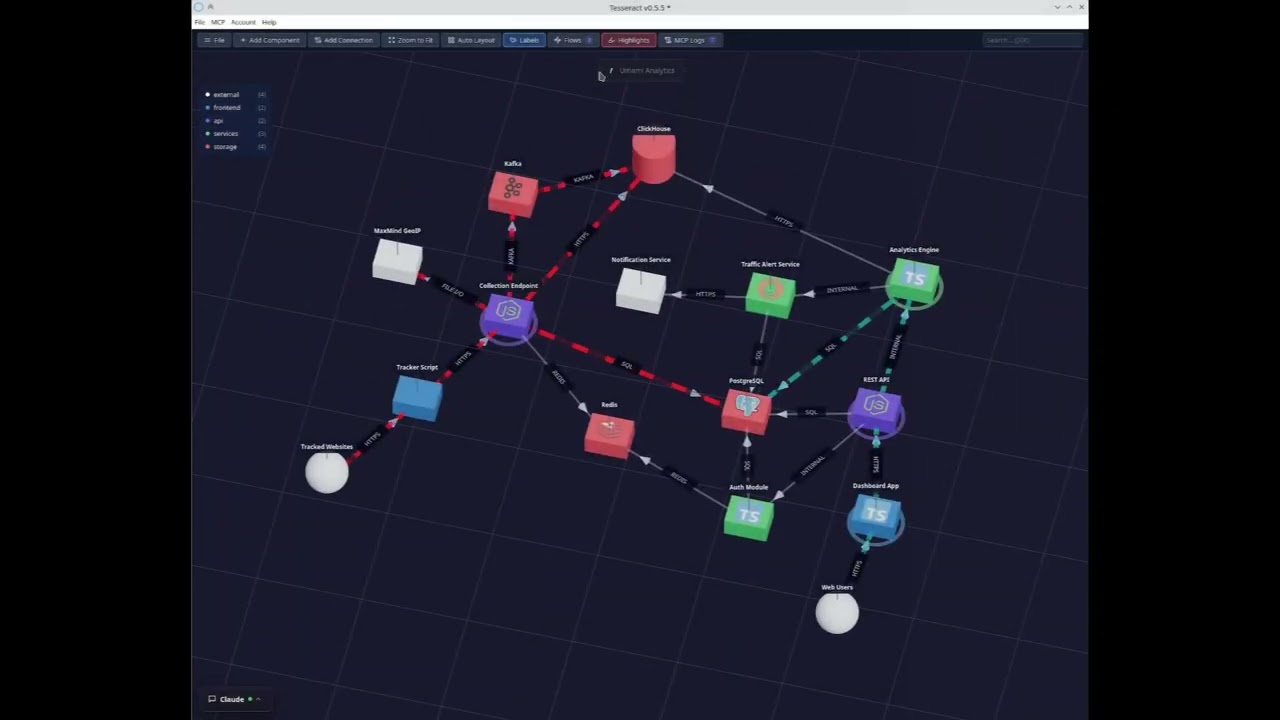
Claude Code plugin for Tesseract — AI-powered 3D architecture editor.
Point your AI at any codebase and generate interactive 3D architecture diagrams directly from Claude Code.
Installation
Via Claude Code plugin system (recommended)
/plugin marketplace add infrastellar-dev/tesseract-skills
/plugin install tesseract@tesseract-skills
Via npx from GitHub (manual fallback)
npx github:infrastellar-dev/tesseract-skills              # install globally
npx github:infrastellar-dev/tesseract-skills --project    # install in current project
What's included
Skills
| Skill | Description |
|---|---|
/arch-codemap | All-in-one architecture mapping — scans the entire codebase and builds the full diagram |
/arch-overview | Generate a high-level architecture diagram from a codebase |
/arch-services | Scan and map services, APIs, and their connections |
/arch-data | Discover databases, caches, and storage systems |
/arch-infra | Map CI/CD, containers, proxies, and cloud infrastructure |
/arch-flow <description> | Trace and visualize a data flow through the architecture (e.g. /arch-flow user login) |
/arch-detail <component> | Drill into a component to reveal its internal structure |
Commands
| Command | Description |
|---|---|
/tesseract-install | Download and launch the Tesseract desktop app |
/tesseract | Launch Tesseract and its MCP server |
MCP server
The plugin auto-configures the Tesseract MCP server at http://localhost:7440/mcp, giving Claude access to all diagram tools (components, connections, layers, flows, screenshots, mermaid export, etc.).
Auto-approve MCP tools
By default, Claude Code asks for confirmation the first time it calls each MCP tool. To approve all Tesseract tools at once, add this to your project's .claude/settings.json:
{
  "permissions": {
    "allow": [
      "mcp__tesseract"
    ]
  }
}
This approves every tool exposed by the Tesseract MCP server. You only need to do this once per project.
Requirements
- Claude Code with plugin support
- Tesseract desktop app (auto-installed via
/tesseract-install)
How it works
- Install the plugin from the marketplace
- The Tesseract MCP server is auto-configured
- Use
/arch-codemapto scan your codebase and build the full architecture - Refine with
/arch-services,/arch-data,/arch-infra - Trace data flows with
/arch-flow user login - Drill into components with
/arch-detail <component>
If Tesseract isn't running, use /tesseract-install to download and launch it automatically.
Community
License
MIT