SciAgent-Skills




Turn your AI coding agent into a life sciences expert — 199 bioinformatics skills for Claude Code covering RNA-seq, single-cell analysis, genomics, proteomics, drug discovery, and more. Boosted BixBench from 65% to 92%. Open source.
SciAgent-Skills is the largest open-source skill library for scientific AI agents. It equips Claude Code (and any markdown-compatible agent) with domain-specific knowledge for computational biology, bioinformatics, cheminformatics, and biostatistics — no fine-tuning required, just plug in and analyze.
Keywords: bioinformatics AI agent, Claude Code skills, scientific computing, RNA-seq analysis, single-cell RNA-seq, drug discovery pipeline, protein structure prediction, computational biology tools, life science automation, BixBench benchmark
Benchmark: 92.0% on BixBench-Verified-50
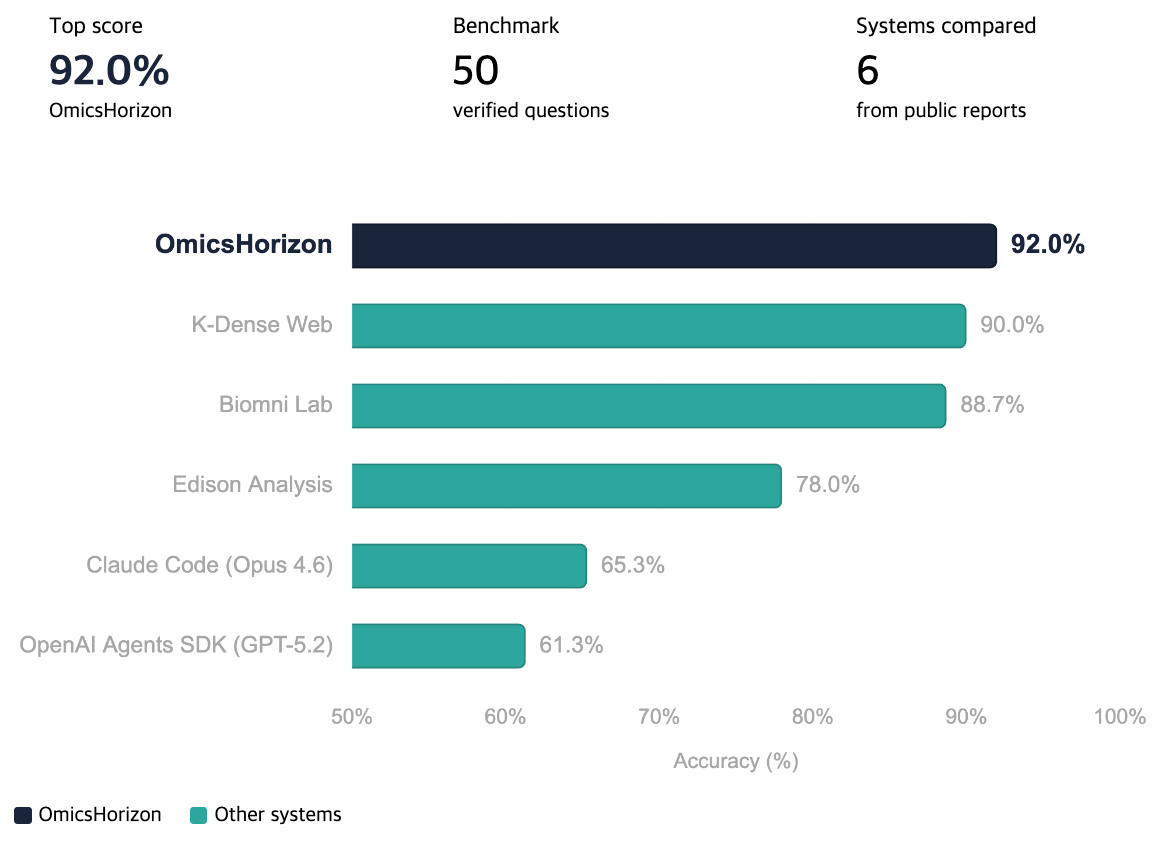
BixBench is a benchmark for evaluating AI agents on real-world bioinformatics tasks. SciAgent-Skills achieved 92.0% accuracy on BixBench-Verified-50, the highest among all tested systems:
| System | BixBench-Verified-50 Accuracy |
|---|---|
| Claude Code (Opus 4.6) + SciAgent-Skills | 92.0% |
| Claude Code (Opus 4.6) baseline | 65.3% |
Simply equipping Claude Code with these domain-specific skills yields a +26.7 percentage point improvement — no fine-tuning, no custom model, just structured scientific knowledge.
Try It Now — HyperLab
Want to try these skills without any setup? HyperLab (하이퍼랩) is the web platform powered by SciAgent-Skills. Sign up and start analyzing your bioinformatics data directly in your browser — RNA-seq, proteomics, drug screening, and more.

199 ready-to-use scientific skills for AI coding agents — covering genomics, proteomics, drug discovery, biostatistics, scientific computing, and scientific writing.
Each skill is a self-contained SKILL.md file with runnable code examples, key parameters, troubleshooting guides, and best practices. Designed for Claude Code, but compatible with any AI agent that reads markdown skill files (setup guides below).
What's Inside
| Category | Skills | Examples |
|---|---|---|
| Genomics & Bioinformatics | 65 | Scanpy, BioPython, pysam, gget, KEGG, PubMed, scvi-tools, Bakta, Roary |
| Structural Biology & Drug Discovery | 26 | RDKit, AutoDock Vina, ChEMBL, PDB, DeepChem, datamol |
| Scientific Computing | 24 | Polars, Dask, NetworkX, SymPy, UMAP, PyG, Zarr, SimPy |
| Cell Biology | 15 | pydicom, histolab, FlowIO |
| Biostatistics | 12 | scikit-learn, statsmodels, PyMC, SHAP, survival analysis |
| Scientific Writing | 21 | Manuscript writing, peer review, LaTeX posters, slides, figure guides |
| Systems Biology & Multi-omics | 11 | COBRApy, LaminDB, Reactome, STRING |
| Proteomics & Protein Engineering | 10 | ESM, UniProt, PyOpenMS, matchms, HMDB |
| Lab Automation | 6 | Opentrons, Benchling |
| Data Visualization | 5 | Plotly, Seaborn |
| Molecular Biology | 3 | CRISPR sgRNA design, gene expression, cloning |
Skill types: 72 toolkits, 53 database connectors, 37 guides, 37 pipelines
Installation
Prerequisites
- An AI coding agent: Claude Code, OpenAI Codex CLI, Cursor, or Windsurf
- Git
- Python 3.12+ (only needed if you want to run validation scripts)
Note: SciAgent-Skills is not an npm package. Skills are plain markdown files read directly by your AI agent — no
npx,npm install, or runtime dependencies needed. Just clone the repository and point your agent at the skill files.
Step 1: Clone the Repository
git clone https://github.com/jaechang-hits/SciAgent-Skills.git
cd SciAgent-Skills
Step 2: Choose Your Setup Method
Method A: Claude Code Plugin (Recommended)
Load SciAgent-Skills as a Claude Code plugin for the current session:
claude --plugin-dir /path/to/SciAgent-Skills
To verify the plugin loaded, run /plugin inside Claude Code and check that sciagent-skills appears in the Installed tab.
Skills become available as /sciagent-skills:<skill-name>:
/sciagent-skills:scanpy-scrna-seq
/sciagent-skills:rdkit-cheminformatics
/sciagent-skills:pymc-bayesian-modeling
Or just describe your task — the agent finds the relevant skill automatically:
"Perform differential expression analysis on this RNA-seq count matrix"
Persistent installation — to load the plugin automatically in every session, use the plugin install command inside Claude Code:
/plugin marketplace add jaechang-hits/SciAgent-Skills
/plugin install sciagent-skills
Method B: Project-Level Integration (Claude Code)
Clone into your project directory:
cd your-project
git clone https://github.com/jaechang-hits/SciAgent-Skills.git .sciagent-skills
Add the canonical guidance to your project's AGENTS.md:
## Scientific Skills
Reference skills in `.sciagent-skills/skills/` for domain-specific analysis.
Registry: `.sciagent-skills/registry.yaml`
If the project does not already have a CLAUDE.md, add this compatibility shim so Claude Code imports the same guidance:
@AGENTS.md
Using with Other Agents
SciAgent-Skills works with any AI agent that can read project files. Clone the repo into your project, then configure the agent to discover skills via registry.yaml.
Method C: OpenAI Codex CLI
cd your-project
git clone https://github.com/jaechang-hits/SciAgent-Skills.git .sciagent-skills
cp .sciagent-skills/integration-templates/AGENTS.md ./AGENTS.md
Codex reads AGENTS.md at the project root automatically. If you already have an AGENTS.md, append the contents from the template.
Method D: Cursor
cd your-project
git clone https://github.com/jaechang-hits/SciAgent-Skills.git .sciagent-skills
mkdir -p .cursor/rules
cp .sciagent-skills/integration-templates/cursor-rules.md .cursor/rules/sciagent-skills.md
Cursor loads rules from .cursor/rules/ automatically. Alternatively, you can use the AGENTS.md template — Cursor supports it as well.
Method E: Windsurf
cd your-project
git clone https://github.com/jaechang-hits/SciAgent-Skills.git .sciagent-skills
mkdir -p .windsurf/rules
cp .sciagent-skills/integration-templates/windsurf-rules.md .windsurf/rules/sciagent-skills.md
Windsurf loads rules from .windsurf/rules/ automatically. Alternatively, you can use the AGENTS.md template — Windsurf supports it as well.
Other agents: If your agent reads project files, clone the repo as .sciagent-skills/ and instruct the agent (via its config mechanism) to read .sciagent-skills/registry.yaml for skill discovery.
Step 3: Install Dependencies
cd SciAgent-Skills
pixi install
Pixi handles the Python environment and all required packages. If you don't have pixi installed:
curl -fsSL https://pixi.sh/install.sh | bash
How Skills Work
Each skill follows a structured template:
skills/<category>/<skill-name>/
  SKILL.md          # Main skill file (300-550 lines)
  references/       # Optional deep-dive reference files
  assets/           # Optional templates, configs
A SKILL.md contains:
- Frontmatter — name, description, license (for agent discovery)
- Overview & When to Use — what the tool does and when to reach for it
- Prerequisites — packages, data, environment setup
- Quick Start — minimal copy-paste example
- Workflow / Core API — step-by-step pipeline or module-by-module API guide
- Key Parameters — tunable settings with defaults and ranges
- Common Recipes — self-contained snippets for common tasks
- Troubleshooting — problem/cause/solution table
The agent reads only the description field during planning. Full skill content is loaded on demand when relevant.
Directory Structure
SciAgent-Skills/
├── .claude-plugin/
│   └── plugin.json        # Claude Code plugin manifest
├── integration-templates/  # Config templates for Codex, Cursor, Windsurf
├── skills/                 # All 199 skills organized by category
│   ├── genomics-bioinformatics/
│   ├── structural-biology-drug-discovery/
│   ├── scientific-computing/
│   ├── cell-biology/
│   ├── biostatistics/
│   ├── scientific-writing/
│   ├── systems-biology-multiomics/
│   ├── proteomics-protein-engineering/
│   ├── lab-automation/
│   ├── data-visualization/
│   └── molecular-biology/
├── templates/              # Skill authoring templates
├── registry.yaml           # Index of all skills
├── AGENTS.md               # Skill authoring guide
└── scripts/
    └── validate_registry.py
Example Use Cases
Single-Cell RNA-seq Analysis (scRNA-seq)
"Load 10X data, QC filter, normalize, cluster, find marker genes, and annotate cell types"
Uses: anndata-data-structure → scanpy-scrna-seq
Bulk RNA-seq Differential Expression
"Run DESeq2-style differential expression analysis on this count matrix, generate volcano plot"
Uses: pydeseq2-differential-expression → matplotlib-scientific-plotting
Drug Discovery Pipeline
"Search ChEMBL for EGFR inhibitors with IC50 < 100nM, filter with Lipinski rules using RDKit, dock top candidates with AutoDock Vina"
Uses: chembl-database-bioactivity → rdkit-cheminformatics → autodock-vina-docking
Protein Structure Prediction & Analysis
"Get the AlphaFold structure for UniProt P04637, assess confidence, find high-confidence binding regions"
Uses: uniprot-protein-database → alphafold-database-access
Bayesian Biostatistics
"Fit a hierarchical Bayesian model to this clinical trial data with patient-level random effects"
Uses: pymc-bayesian-modeling → matplotlib-scientific-plotting
Multi-omics Integration
"Integrate transcriptomics and proteomics data, run pathway enrichment, build a protein interaction network"
Uses: lamindb-data-management → reactome-pathway-analysis → string-protein-interaction
Contributing
Adding a New Skill
- Read
AGENTS.mdfor the full authoring workflow - Classify your topic (pipeline / toolkit / database / guide)
- Pick a category from the table above
- Use the appropriate template from
templates/ - Add the entry to
registry.yaml - Validate:
python scripts/validate_registry.py
Skill Templates
| Template | Use When |
|---|---|
SKILL_TEMPLATE.md | Linear input→process→output pipeline (e.g., DESeq2) |
SKILL_TEMPLATE_TOOLKIT.md | Collection of independent modules (e.g., RDKit) |
SKILL_TEMPLATE_PROSE.md | Conceptual guide, decision frameworks (e.g., statistical test selection) |
Requirements
- Python 3.12+ (for validation scripts)
- No runtime dependencies — skills are markdown files read by the agent
- Individual skills list their own tool-specific prerequisites (e.g.,
pip install scanpy)
Comparison with Other Tools
| Feature | SciAgent-Skills | GPTomics/bioSkills | ClawBio |
|---|---|---|---|
| Total skills | 199 | ~30 | ~20 |
| BixBench benchmark | 92.0% | — | — |
| Skill types | Pipeline, Toolkit, Database, Guide | Pipeline | Pipeline |
| Multi-agent support | Claude Code, Codex, Cursor, Windsurf | Claude Code | Claude Code |
| Claude Code plugin | Yes | No | No |
| Web platform | HyperLab | No | No |
License
CC-BY-4.0 for original content. Individual skills note the license of their underlying tools.
Acknowledgments
This project builds on 50+ open-source scientific Python packages. If you find a skill useful, consider starring the underlying tool's repository and supporting its maintainers.
Related searches: bioinformatics AI agent, Claude Code scientific skills, RNA-seq analysis tool, single-cell RNA-seq AI, drug discovery AI pipeline, protein structure prediction, computational biology automation, life science AI tools, 바이오인포매틱스 AI, 오믹스 호라이즌, 생명과학 AI 에이전트, BixBench benchmark