fetchmcp
A drop-in replacement for the official fetch MCP that actually works on modern web pages.


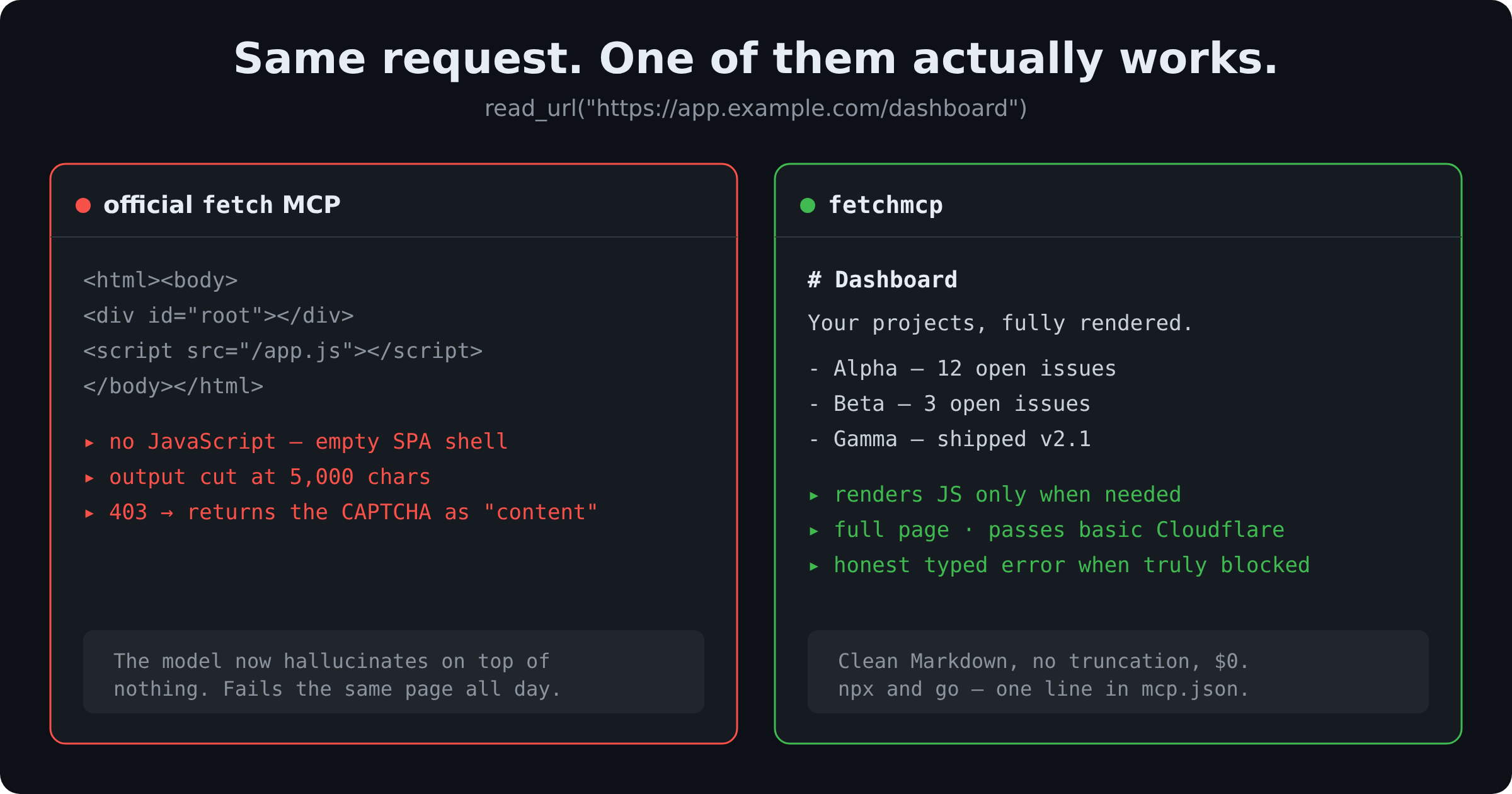
The official fetch MCP is broken on JavaScript-heavy pages, truncates output at 5,000 characters, and ships an unpatched SSRF vulnerability. fetchmcp returns clean, LLM-ready Markdown from any URL — rendering JavaScript when needed, passing basic bot protection without paid proxies, and telling you honestly when a page is blocked instead of hallucinating content. npx and go.
// Replace the official fetch server with this — one line in your MCP config:
"fetchmcp": { "command": "npx", "args": ["-y", "@labtoolsstudio/fetchmcp"] }


Why switch
official fetch | fetchmcp | |
|---|---|---|
| JavaScript pages | ❌ empty / broken | ✅ auto-renders in a real browser |
| Output length | ✂️ truncated at 5,000 chars | ✅ full page, with paging |
| Bot protection (403 / Cloudflare) | ❌ fails silently | ✅ passes mid-tier walls, no paid proxy |
| Blocked page | ❌ returns the CAPTCHA as "content" | ✅ honest typed error, never fakes it |
| SSRF safety | ❌ CVE-2025-65513 (CVSS 9.3) | ✅ private/metadata IPs refused by default |
| Cost | free | free, self-hosted, $0 |
Install
Add to your MCP client config (claude_desktop_config.json, Cursor mcp.json, Cline, etc.):
{
  "mcpServers": {
    "fetchmcp": {
      "command": "npx",
      "args": ["-y", "@labtoolsstudio/fetchmcp"]
    }
  }
}
The install is light — no browser is downloaded up front, and static reading (fetch → Readability → Markdown) works immediately. The first time a page actually needs JavaScript, fetchmcp downloads a stealth Chromium once (~150 MB) automatically, then renders it — still zero-config. To pre-download it at install time, set FETCHMCP_PREINSTALL_BROWSER=1. To stay static-only and never download it, set FETCHMCP_SKIP_BROWSER_DOWNLOAD=1 (JS pages then return an honest needs_js).
Tools
read_url
Fetch any web page as clean Markdown.
| arg | type | description |
|---|---|---|
url | string | the URL to fetch (http/https) |
render | boolean | JS rendering: true = always, false = never, omitted = automatic (only for empty SPA shells) |
raw | boolean | return raw HTML instead of Markdown |
headers | object | extra request headers, e.g. {"Authorization": "Bearer …", "Cookie": "…"} |
max_length | integer | cap characters returned (0 = unlimited, the default) |
start_index | integer | offset for paging through a long page |
read_docs
Same engine, tuned for documentation: strips navigation sidebars, headers, and footers so API docs and guides come back as clean reference text. Takes url, render, headers, max_length, start_index.
Honest statuses
fetchmcp never returns a bot wall, an error page, or a truncated shell dressed up as real content. When it can't read a page it says why, with a typed status: blocked (bot protection, with the vendor), blocked_ssrf, needs_js, http_error, timeout, network_error, unsupported_content, or empty.
Configuration (env vars)
| var | default | meaning |
|---|---|---|
FETCHMCP_TIMEOUT_MS | 30000 | per-request timeout |
FETCHMCP_MAX_RETRIES | 2 | retries on network errors / 429 / 503 (with backoff + Retry-After) |
FETCHMCP_ALLOW_PRIVATE_IP | unset | set to 1 to allow private/localhost IPs (trusted intranet docs) |
FETCHMCP_FLARESOLVERR_URL | unset | self-hosted FlareSolverr endpoint for tougher challenges |
FETCHMCP_SKIP_BROWSER_DOWNLOAD | unset | set to 1 for static-only: never download Chromium; JS pages return needs_js |
FETCHMCP_PREINSTALL_BROWSER | unset | set to 1 to download Chromium at install time instead of on first JS use |
Development & testing
npm install          # installs deps (Chromium downloads on first JS use)
npm run build        # compile TypeScript to dist/
npm test             # unit tests (block detection, SSRF) — no network
npm run test:e2e     # live end-to-end suite against real sites

# Poke at any tool/URL by hand — no need to write a script:
node test/probe.mjs read_url  https://example.com
node test/probe.mjs read_url  https://some-spa.example.com --render
node test/probe.mjs read_docs https://docs.python.org/3/library/json.html
node test/probe.mjs read_url  https://api.example.com --header "Authorization=Bearer x" --max-length 500
node test/probe.mjs read_url  https://example.com --full     # print the whole response
test/probe.mjs --help semantics are documented at the top of that file.
How it works
Three tiers, escalating only as needed:
- Static — plain fetch → Readability → Markdown. Fast path for most pages.
- Browser — lazy patchright (stealth Chromium) when the static HTML is an empty SPA shell, a bot wall, or a
403/429/503. - FlareSolverr (optional) — only if you've configured an endpoint, for challenges the browser can't clear.
Star history
If fetchmcp saved you from one more fetch-returns-nothing moment, a star helps others find it.
License
MIT — see LICENSE.