Claude Code Usage Dashboard



A local, zero-dependency web dashboard for Claude Code (and Codex) token
usage. It layers on top of ccusage for
accurate per-model cost, adds a per-project + per-session breakdown (by
joining session UUIDs to their ~/.claude/projects/<project>/ folder), and
renders charts a terminal view can't.
Everything runs on 127.0.0.1 and reads only your local logs — nothing is
uploaded anywhere.
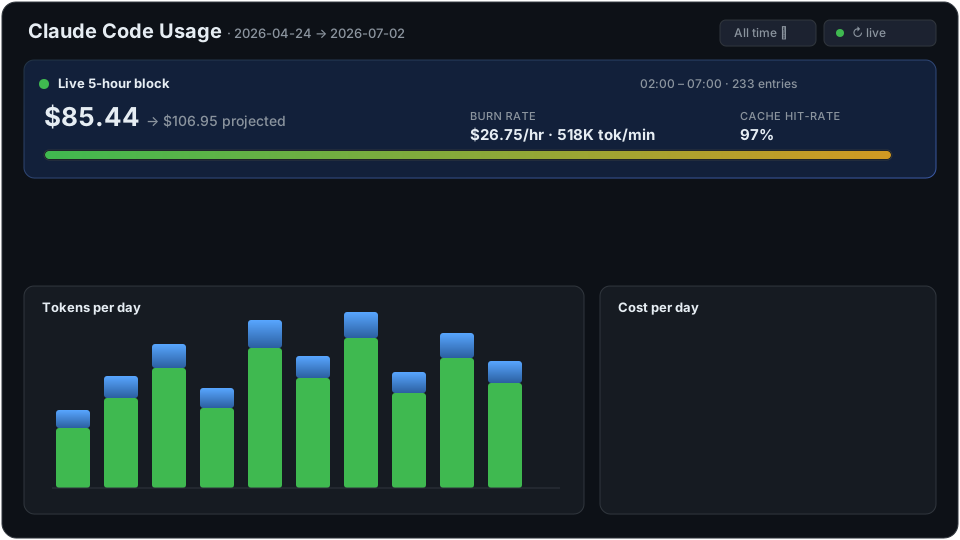
Animated mockup of the UI — your real dashboard renders live from ccusage
and your local logs (numbers above are illustrative).
Replace
physcomin the commands/URLs below with your own GitHub username if you fork or self-host.
What it shows
- Live 5-hour block — cost-so-far → projected total, burn rate ($/hr · tok/min), cache hit-rate, an elapsed/remaining progress bar, and a plan-limit quota bar with time-to-limit at current burn (polls every 20s, ticks 1s).
- Summary cards — total cost, tokens, cache hit-rate, hits vs misses, counts.
- Charts — tokens/day (stacked), cost/day, cache hit-rate/day, cost by model.
- Date-range filter — All time / 7 / 30 / 90 days / custom.
- Projects → sessions tree — real project paths (from each session's logged
cwd), click to expand VS Code-tab-style session names + git branch. - Agent filter — All / Claude / Codex (recomputed client-side, instant).
- Snapshot warehouse — daily aggregates are saved to a local SQLite
(
~/.claude/usage-dashboard.db) on each read, so the time-series / cost / model charts survive Claude's ~30-day log cleanup (per-session/project detail still needs the raw logs). Disable with--no-history.
Requirements
- Python 3.8+ (the dashboard itself has no pip dependencies — stdlib only).
ccusageonPATH. The fastest way:
(If onlynpm install -g ccusagenpxis present, the dashboard falls back tonpx -y ccusage@latest, which is slower on first run.)
Install
Pick whichever ecosystem you already live in. All three run the same dashboard.
1. pip / pipx (Python users)
# isolated CLI (recommended)
pipx install claude-usage-dashboard
# …or straight from GitHub before it's on PyPI:
pipx install "git+https://github.com/physcom/claude-usage-dashboard"

claude-usage                 # serves http://127.0.0.1:8787, opens browser
claude-usage --port 9000 --no-browser
Plain pip install claude-usage-dashboard works too and gives the same
claude-usage command.
2. npm / npx (Node users)
# one-off, no install:
npx claude-usage-dashboard
# …or install globally:
npm install -g claude-usage-dashboard
claude-usage-dashboard --port 9000
The npm package is a thin wrapper that finds Python and runs the bundled app.
3. Claude Code plugin (/usage-dashboard slash command)
/plugin marketplace add physcom/claude-usage-dashboard
/plugin install usage-dashboard@claude-usage-tools
Then inside any Claude Code session:
/usage-dashboard                 # launches the dashboard, prints the URL
/usage-dashboard --port 9000
The plugin bundles the Python app and launches it via ${CLAUDE_PLUGIN_ROOT}, so
you only need Python + ccusage present.
Run from source (no install)
git clone https://github.com/physcom/claude-usage-dashboard
cd claude-usage-dashboard
python src/claude_usage_dashboard/app.py       # or: ./run.ps1  (Windows)
Usage
| Flag | Default | Description |
|---|---|---|
--port | 8787 | Port to serve on |
--host | 127.0.0.1 | Bind address |
--ttl | 120 | Seconds to cache the heavy ccusage snapshot |
--token-limit | auto | 5h-block token limit for the quota bar — a number (e.g. 88000000) or auto (largest prior block) |
--plan | — | pro / max5 / max20 — approximate per-plan caps (input+output tokens). Rough estimates; --token-limit is more accurate |
--no-history | off | Disable the local snapshot warehouse |
--no-browser | off | Don't auto-open the browser |
--version | — | Print version and exit |
Click ↻ Refresh in the UI to force a fresh read (the live block has its own 15s cache and polls independently).
The date range + agent filter live in the URL (?range=30&agent=claude), so any
view is a bookmarkable, shareable link — restored automatically on load. Hit the
🔗 button to copy the current view's link.
How it works
browser ──HTTP──▶ Python stdlib server ──shell──▶ ccusage --json
                        │                              (per-model cost)
                        ├─ /api/data   daily + session aggregation, date-filtered
                        ├─ /api/block  active 5-hour block
                        └─ joins session UUID → ~/.claude/projects/<proj>/<uuid>.jsonl
                           to recover real project path + first-prompt title
- Cost accuracy is inherited from
ccusage(LiteLLM pricing DB) — this tool never hand-computes prices. - Session metadata (title,
cwd, git branch) is read from the top of each*.jsonland memoized by file mtime, so changing the date filter doesn't re-scan unchanged sessions. - The agent filter re-aggregates the loaded snapshot from per-model breakdowns —
no extra
ccusagecalls.
Privacy
Read-only. The server binds to 127.0.0.1, reads only ~/.claude/projects, and
sends nothing over the network. ccusage runs locally too.
Maintainer / release guide
Versions are single-sourced from VERSION in
src/claude_usage_dashboard/app.py. Keep
package.json and .claude-plugin/plugin.json in sync when bumping.
First-time setup
- PyPI: configure Trusted Publishing
for this repo (no secret needed), or add a
PYPI_API_TOKENrepo secret and uncomment the token line inpublish-pypi.yml. - npm: create an automation token and add it as the
NPM_TOKENrepo secret.
Cut a release
# bump VERSION in app.py, package.json, plugin.json + CHANGELOG.md, then:
git tag v0.1.0 && git push --tags
gh release create v0.1.0 --generate-notes
Publishing the GitHub Release triggers both publish-pypi.yml and
publish-npm.yml. The Claude Code plugin needs no publish step — users install it
straight from the repo via the marketplace commands above.
License
MIT © 2026 physcom — see LICENSE.