Agent Factory



Run a fleet of AI coding agents at once — each in its own git worktree, all on one screen.
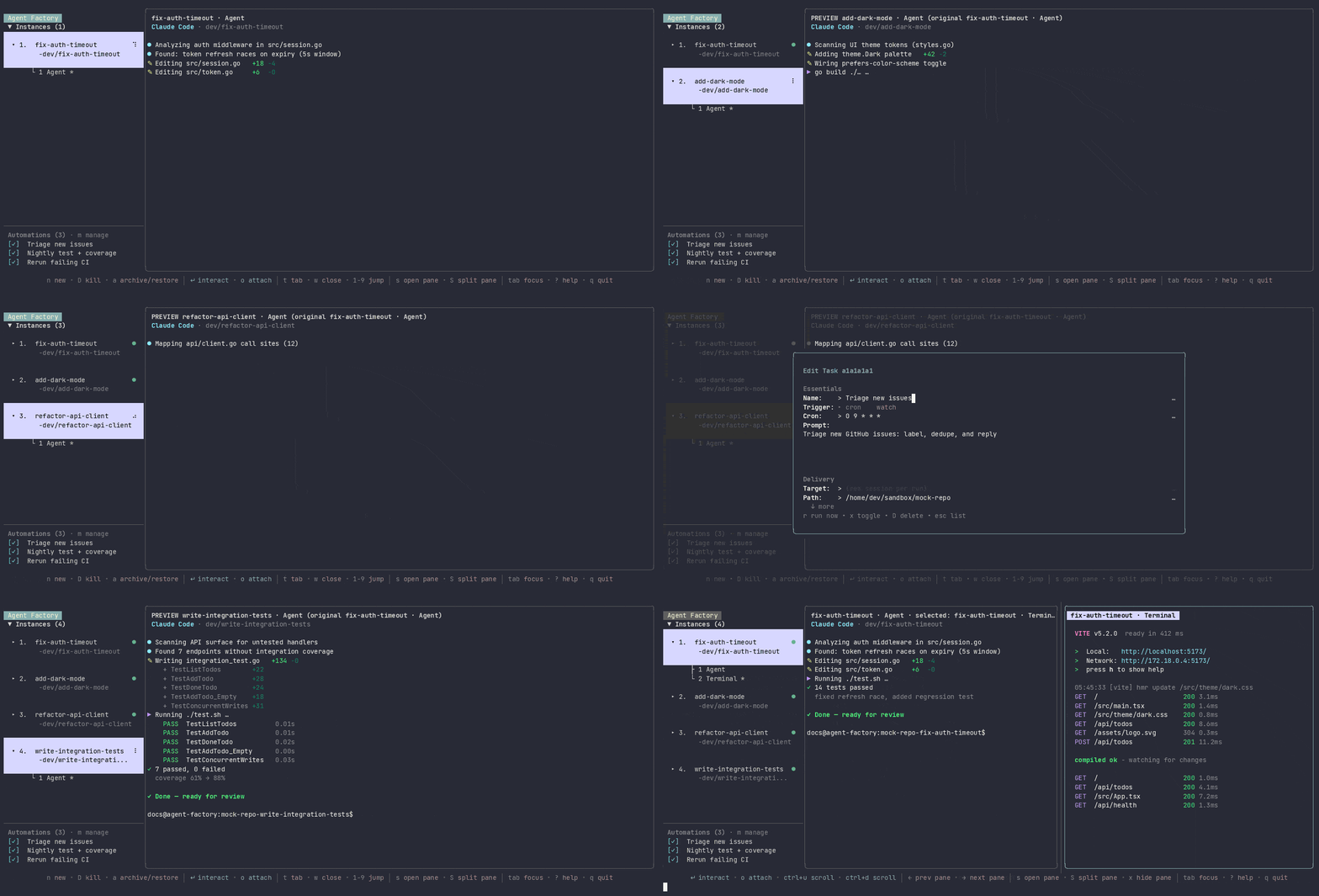
Demo video: MP4 · WebM · GIF fallback

Agent Factory (af) supervises Claude Code, Codex, Aider, Gemini, Amp,
opencode, and Devin. Each session gets a dedicated branch and worktree, so
agents never trample the same checkout.
One agent in one terminal is easy. Several is not — they collide in the same checkout, you lose track of which is working and which is stuck waiting on you, and there is nowhere to look that shows all of them. Agent Factory gives every agent an isolated branch you review like any other, keeps it alive under a background daemon, and puts the whole fleet on one screen — in your terminal or in a browser.
Full docs: sachiniyer.github.io/agent-factory
Install
Prerequisites: tmux, git, and at least one agent CLI on your PATH. No
Go toolchain needed for the prebuilt path.
curl -fsSL https://raw.githubusercontent.com/sachiniyer/agent-factory/master/install.sh | sh
That puts af in ~/.local/bin (override with AF_INSTALL_DIR, pin with
--version). Or build from source with Go 1.25+:
git clone https://github.com/sachiniyer/agent-factory.git
cd agent-factory
./dev-install.sh
Quickstart
cd your-project     # any git repo
af doctor --setup   # verify tmux, git, agent CLIs, storage, daemon health
af                  # open the TUI
Press n to start a session and describe the task — the agent goes to work in a
fresh worktree. Enter interacts with the selected session, Ctrl-] steps back
out, o attaches full-screen and Ctrl-w detaches. ? lists every key, and
af keys prints the effective bindings.
Now open http://localhost:8443 — the same sessions, live, in a browser. The daemon serves the web UI on loopback by default: no token, no login screen.
The mental model
Three ideas carry the whole tool.
- Session — one agent, one worktree. Creating a session cuts a branch and a
git worktree, then launches your agent inside it. The branch stays an ordinary
git artifact you can diff, push, or open a PR from. Pass
--herewhen you deliberately want the agent in your current checkout instead. - Tabs — more than one thing per session. Every session has its agent tab,
and a local session can open more beside it in the same worktree:
tchooses a terminal or VS Code editor, whileaf sessions tab-createadds a named long-running command or web view. Sessions on the docker, ssh, and hook backends run off-box, so their tab list is fixed by the runtime; adding tabs to them isn't supported yet. - Daemon — the thing that actually owns state. A background daemon runs the
sessions, schedules tasks, serves the web UI, and is the single source of
truth. Opening the TUI starts one, as does any enabled task; read-only commands
like
af config listandaf tasks listleave it down. The TUI, the browser, and the CLI are all thin clients reading the same state, so they never disagree.
Three ways to drive it
- TUI —
afin a git repo. The default: a live rail of every session, with in-place interaction and full-screen attach. - Web — http://localhost:8443. The same sessions, tabs, projects, and tasks in a browser, with real terminals. Bundled into the daemon and on by default.
- CLI —
af sessionsandaf tasksemit JSON, so scripts and other agents can drive everything the TUI does.
af sessions create --name fix-auth --prompt "Fix the login redirect loop"
af sessions preview fix-auth
af sessions watch fix-auth      # block until it goes idle
af tasks add --name triage --prompt "Triage open issues" --cron "0 9 * * *"
Highlights
- Web tabs — give a session a browser view:
af sessions tab-create demo --kind web --port 3000. The daemon reverse-proxies loopback targets, so an agent's dev server is visible even when you view the web UI over Tailscale or SSH. Renders as an iframe in the web UI; the TUI shows a placeholder. - VS Code tab —
--kind vscodeopens acode-servereditor rooted at the session's worktree, one per session, viewed in the web UI. Requirescode-server(oropenvscode-server) on yourPATH;afdoes not bundle either. - Tasks — run a prompt on a cron schedule, or on every stdout line of a long-running watch command. Each run can create a fresh session or deliver into an existing one. See tasks.
- Backends — sessions run locally by default. Set a repo's
backendkey todockerto run in a container (withdocker.image), tosshto run on another machine (withssh.host), or tohookto launch on your own infrastructure. See backends. - Agent plugins — install the
agent-factoryskill into Codex, Claude Code, Gemini, or amp (codex plugin marketplace add sachiniyer/agent-factory) and an agentafnever launched knows how to run and schedule af sessions. See agent plugins. - Auto-update —
afupdates itself on launch, at most once every 6 hours, and relaunches into the new build. Pin it withauto_update = false; track early builds withupdate_channel = "preview".af upgradeupdates on demand.
Configuration
TOML. Global defaults in ~/.agent-factory/config.toml; per-repo settings in
.agent-factory/config.toml inside the repository.
default_program = "claude"
worktree_root = "sibling"

[program_overrides]
claude = "/home/me/.local/bin/claude --dangerously-skip-permissions"
Platform support
Linux and macOS are supported; Windows works through WSL2 (keep repos on the
Linux filesystem). Native Windows is not a target. tmux is required everywhere.
A fresh install has no autostart unit — run af daemon install to register one
(a systemd user service on Linux, a launchd agent on macOS) so the daemon starts
at login and task schedules keep running across reboots. Both are user-level
units, so they cover login and reboot, not running while you are logged out.
af daemon status reports whether one is installed and active, whether it owns
the daemon that answered, and whether that daemon has applied the config on disk.
Documentation
- Getting started · Why Agent Factory · How it works
- Concepts: sessions & worktrees · the TUI · the web client · the daemon
- Guides: CLI · configuration · tasks · agent plugins · backends · remote hooks · remote daemon access · usage limits
- Reference: HTTP API · CLI reference · API reference
- Comparison with tmux, manual worktrees, and peers.
Exposing it beyond localhost
The web UI and HTTP API listen on 127.0.0.1:8443 and skip auth on loopback.
Pointing listen_addr at a routable address exposes them to your network, so
set require_token = true or keep it behind a VPN or proxy — the listener is
plain HTTP. Turn the web UI off entirely with listen_addr = "". See
remote daemon access.
Maintenance
This repo is autonomously maintained by Captain Claude, an AI maintainer running on Claude Code. The operating contract lives in CLAUDE.md.
Filing an issue: include repro steps, expected vs. actual, af version, and your
platform. af bug-report bundles versions, daemon health, tasks, redacted
session state, and recent logs into one file.
Agent Factory began as a fork of claude-squad and has diverged substantially since.