Ebert
Agent-authored code review, reviewed by you.
Your agent writes the review. You read it as a real diff and rule on every claim. Your decisions go straight back to the agent as its next instruction.


What it does
An agent that just wrote 1,200 lines will tell you that the code is good. A chat log is a poor place to disagree: you cannot read the diff, and you cannot point at line 42.
Ebert gives that conversation a surface:
- Your agent writes a review as JSON. Ebert can also build one from the current diff.
- Ebert starts a local server and opens the review in your browser.
- You keep, drop, or defer each finding. You can also write your own comments.
- Ebert prints your decisions as markdown. The agent reads them as its next instruction.
What you get from that:
- A diff, not a summary. You read the change itself, with each claim anchored to the line that it is about.
- A decision on every claim. Nothing lands because you skimmed it.
- No prompt to write afterwards.
ebert reviewblocks until you submit, so your comments are the return value of the command that the agent ran. - Silence is not approval. Files that you never opened come back marked as unreviewed.
There is no backend service, no database, and no account. Ebert needs no network at run
time, because fonts, syntax grammars, and themes are all inside the binary. All state is
in ~/.ebert/.
Install
Ebert is one standalone executable. The runtime, the CLI, and the review UI are compiled
into it. Only git must be present on your machine.
Ebert is also a plugin for three agents. Each plugin contains the hooks, the commands, and
the ebert skill. On first use, the plugin downloads the binary for your platform. The
plugin is therefore the complete setup.
Claude Code
/plugin marketplace add samrith-s/ebert
/plugin install ebert
Codex
codex plugin marketplace add samrith-s/ebert
codex plugin add ebert@ebert
To browse the marketplace instead, run /plugins inside Codex.
Cursor
Install Ebert from the Cursor Marketplace. You can also open Customize → Plugins and search for it.
NOTE: The stop hook of Cursor is notification-only, and Cursor reads no data back from
it. The plugin adds a rule that makes the agent run ebert pending on its next turn. Your
comments reach the agent one turn later than in Claude Code and Codex.
As a CLI
To put ebert on your PATH without an agent, run:
npm install -g @samrith/ebert
The command it installs is called ebert. npm brings down the one
ebert-<os>-<arch> package that matches your machine and skips the other four.
To install the binary without npm, run:
curl -fsSL https://raw.githubusercontent.com/samrith-s/ebert/main/bin/ebert-bootstrap.sh \
  | sh -s -- --install
This command writes ~/.ebert/bin/ebert.
Then wire the hooks into your agents:
ebert install --all   # Claude Code, Codex, and Cursor
ebert doctor          # make sure that it worked
ebert install is for a global CLI with no plugin. If you installed the plugin, do not run
it: the plugin already contains its hooks. The command is additive. It replaces only the
entries of Ebert and keeps the rest of your configuration. To see what it writes first, add
--dry-run.
Reading a review
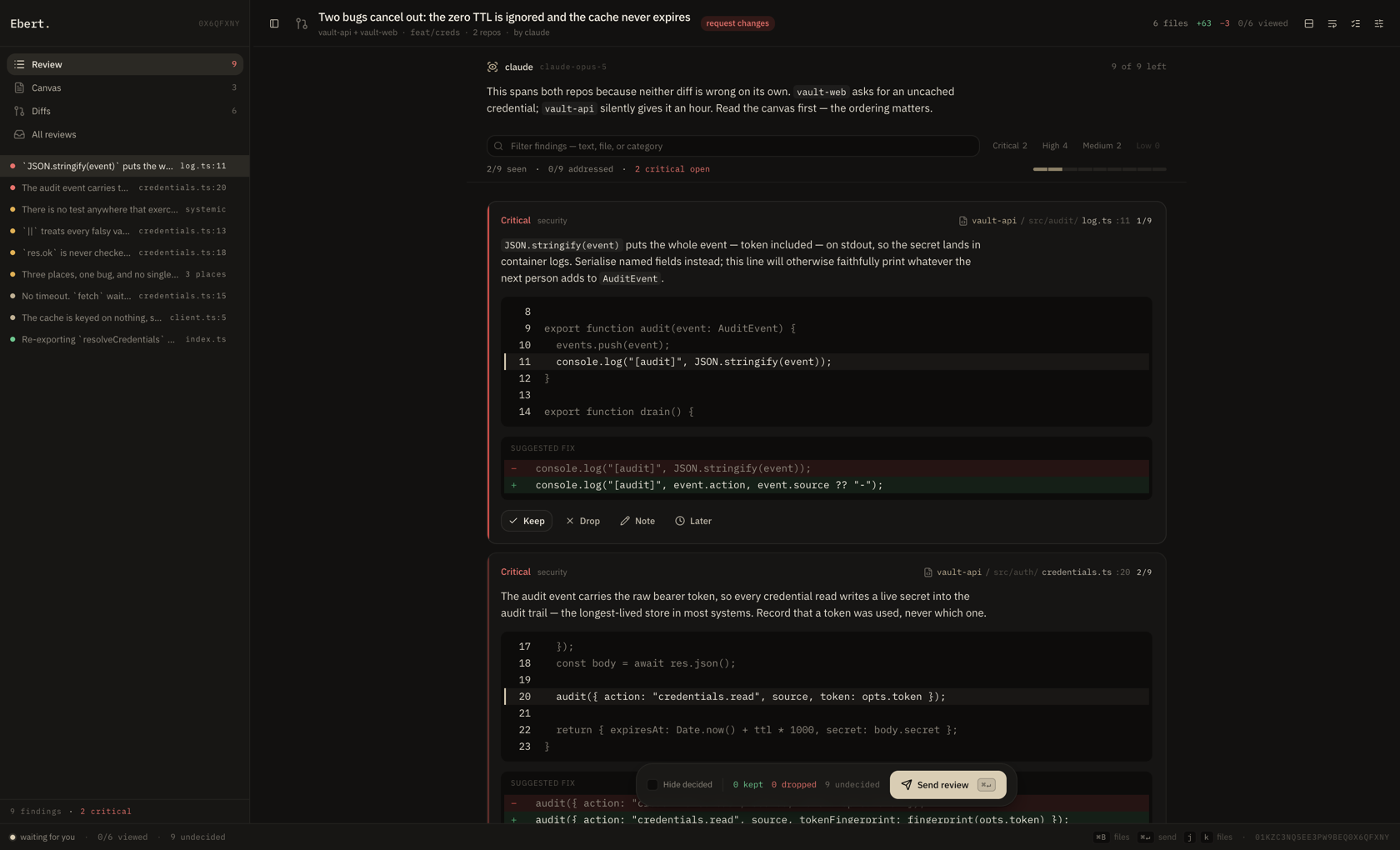
Ebert opens on the findings, not on the diff. You rule on the claims of an agent. When a claim needs more context, you open the diff.
Review
The image at the top of this page shows this screen: every finding in reading order, with blockers first.
Each finding quotes its own code from the patch. The page therefore paints in about 160 milliseconds, instead of mounting a diff viewer for every file.
The left index lists every finding, with a severity dot on the left and your decision on the right.
Diffs
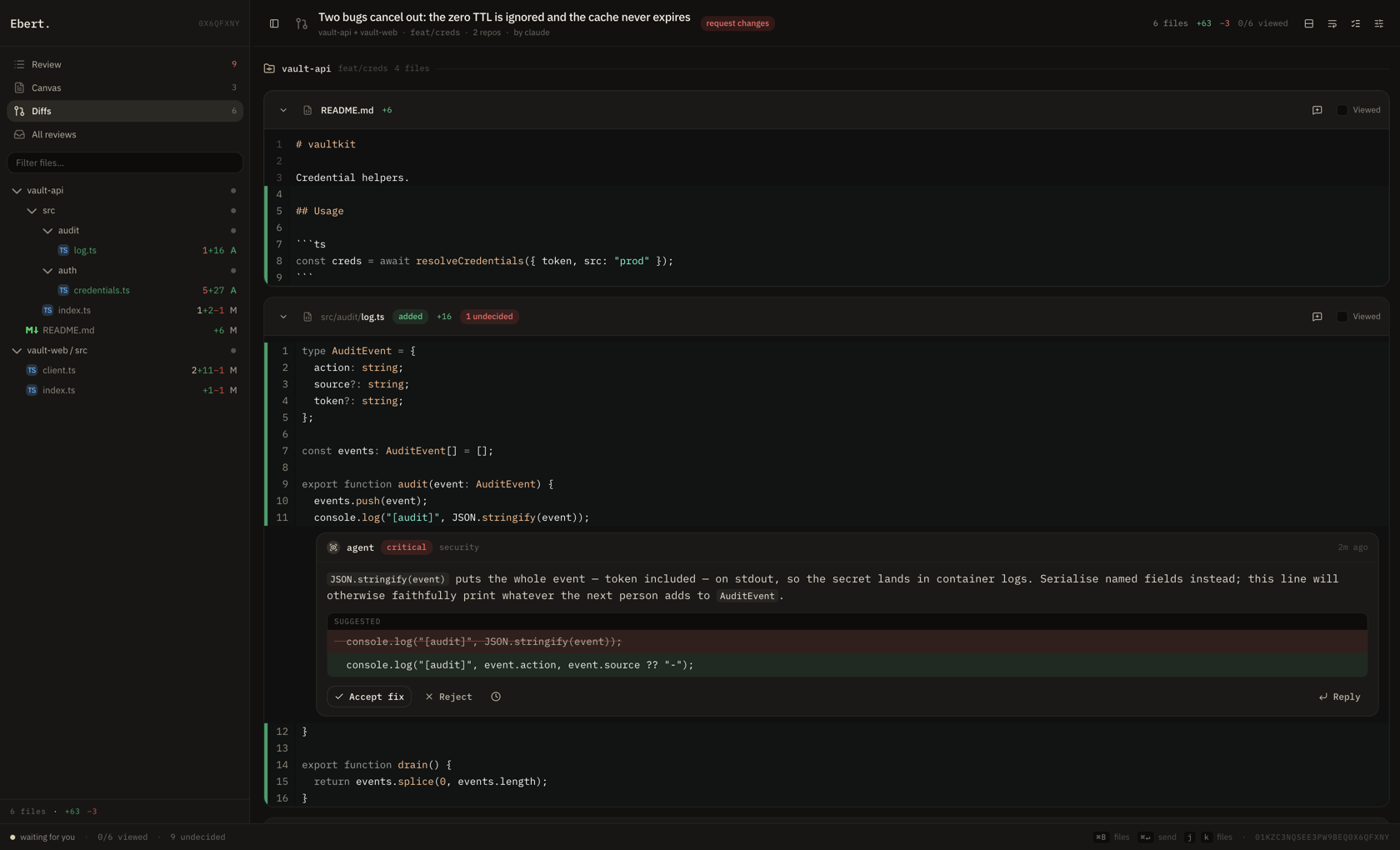
When a finding needs more context than its excerpt gives, open the diff screen. It shows the whole file, and a tree of every file in the change. Read the diff stacked or side by side. To comment on a range of lines, drag the gutter.
Only the files near the viewport mount a diff. An 82-file review opens as fast as a 4-file one.
Docs
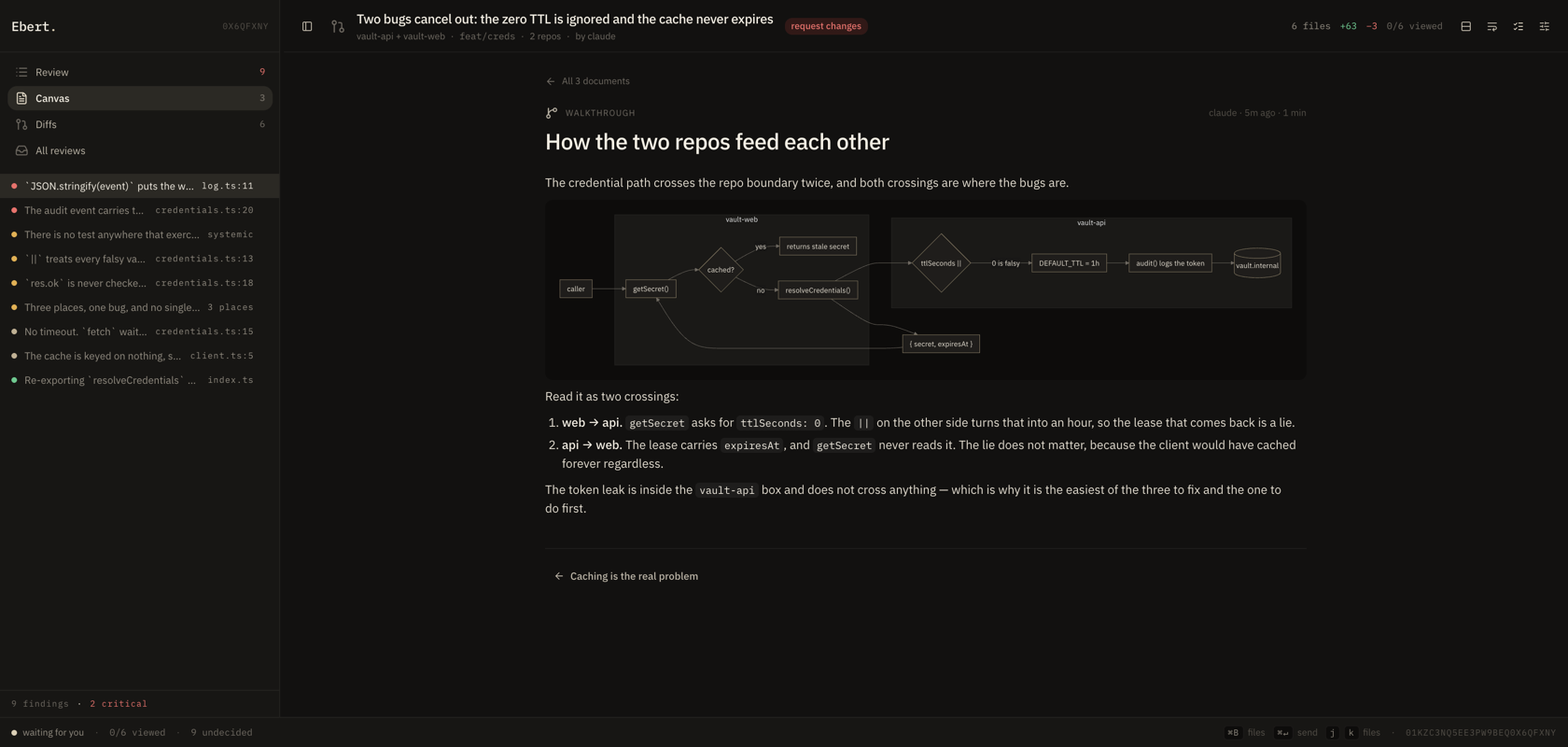
Docs is a reading column for the documents the agent wrote. Kind, reading time, and author sit above the title; the body is typeset like a finding. The pinned document opens first and is labelled start here. The sidebar lists every page.
Gates
If the review carries gate results, the gates screen appears. Failures come first, and blocking failures come above advisory ones. Each result links to the code that caused it.
Keys
| Key | Action |
|---|---|
↑ / ↓ / Tab (or j / k) | Move between findings (Reviews) or files (Diffs) |
a | Keep the finding |
x | Drop the finding |
l | Defer the finding |
o | Open the finding in the full diff |
⌘B | Toggle the sidebar |
⌘↵ | Send the review |
Esc | Cancel a composer |
A decision moves you to the next finding, because triage is a queue.
Ebert writes every action straight to the review file. If you close the tab, you lose nothing.
Try it
git clone https://github.com/samrith-s/ebert.git
cd ebert && bun install
bun run demo         # one repo, 12 findings
bun run demo:multi   # two repos in one review, plus Docs
bun run demo builds a temporary repo that contains real defects. It then opens the review
that an agent wrote for it. The review has 12 findings in four severities.
bun run demo:multi opens one review over two repos, with three Docs pages. It
contains a bug that exists only between the two repos.
The demo changes none of your own state. It works in a temporary directory and redirects
EBERT_HOME. Each run rebuilds everything.
Commands
Reviewing
  ebert review          Build a review, run gates, open it, wait for comments
  ebert open [id]       Serve an existing review and wait
  ebert create          Write a review to disk without opening it
  ebert list            Reviews on this machine, newest first
  ebert show [id]       Print a review as text
  ebert pending         Feedback that no agent has read yet

Setup
  ebert install         Wire into Claude Code, Codex, and Cursor
  ebert config          Read and write ~/.ebert/config.toml
  ebert doctor          Check the install
  ebert serve           Run the server and keep it up
  ebert schema          The review format, for agents
For detail on one command, run ebert <command> --help.
From an agent
ebert review                          # review the current diff, no agent findings
ebert review --json review.json       # show a review that your agent wrote
cat review.json | ebert review --json -
ebert review --base main              # explicit base ref
The command prints the feedback of the human as markdown after they submit.
By hand
ebert review           # read your own uncommitted work in a diff viewer
ebert list             # reviews on this machine, newest first
ebert open <id>        # reopen one — the id can be a prefix, a suffix, or `latest`
ebert show <id>        # print it as text
ebert pending          # feedback that no agent has collected yet
In Claude Code
| Command | Action |
|---|---|
/ebert:review [base] | Read the diff, write a review, open it, act on your comments |
/ebert:reviews [id] | List reviews, then summarize or reopen one |
/ebert:pending | Collect feedback that the agent has not read yet |
What the agent writes
A review is JSON. Only title is necessary. Ebert collects the diff, resolves the repo and
the base ref, and fills in the ids and the timestamps.
{
  "title": "Credentials path writes undefined into the audit event",
  "verdict": "request-changes",
  "threads": [
    {
      "file": "src/auth/credentials.ts",
      "line": 42,
      "severity": "critical",
      "body": "The rename left `source` unset, so the audit event records `undefined`.",
      "suggestion": {
        "old": "const source = opts.src;",
        "new": "const source = opts.src ?? 'default';"
      }
    }
  ]
}
Findings carry a severity from critical to low, and praise is a separate kind. A
finding can point at several lines at once, in one repo or in two. When the claim is about
the whole change rather than one line, a finding can point at nothing at all.
Your agent does not have to learn any of this. The bundled ebert skill teaches it. To read
the format yourself, run ebert schema --example.
What the agent gets back
Ebert returns markdown in sections that an agent can act on:
- Accepted — instructions. The agent must make these changes.
- Rejected — settled. The agent must not argue them again.
- Deferred — left for later.
- New comments from the human — these outrank anything that the agent proposed.
- Not reviewed — files that you never opened. Ebert reports them as unreviewed, not as approved.
The last section is deliberate. Silence is not approval, and Ebert tells the agent so.
Agent integration
| Agent | Mechanism | Feedback arrives |
|---|---|---|
| Claude Code | The Stop hook returns decision: block with your comments | Same turn |
| Codex CLI | The Stop hook returns hookSpecificOutput.additionalContext | Same turn |
| Cursor | The stop hook notifies. The agent then runs ebert pending | Next turn |
For the details and the AGENTS.md snippet that automates the Cursor flow, read
integrations/.
ebert pending works from any agent that can run a shell command. This is the fallback for
agents that are not in the table.
Reviewing several repositories at once
A change that crosses an API and its client is one decision, so it is one review. Two reviews make the human hold the relationship in their head.
ebert review --repo ../vault-api --repo ../vault-web
Each repo resolves its own base ref and runs its own gates. Ebert labels each finding with
the repo that it is in, for example vault-api/src/audit/log.ts:11. The file tree groups
the files by repo. The first repo in the list is the primary repo. It names the review, and
a hook matches against it.
The value shows up on bugs that exist only between repos. In the demo, vault-web asks for
an uncached credential with ttlSeconds: 0. Then vault-api reads that value with ||, so
zero becomes an hour. The client then caches the credential forever. Neither diff is wrong
on its own, so one review must contain both.
A bug like this is one finding with three anchors, not three findings. Three findings take three verdicts. They also make the reviewer reassemble an argument that the agent already made.
Docs
Findings attach to lines. Some information does not: a migration plan, the reason for an
approach, or a walkthrough of an unfamiliar subsystem. Docs is where the agent writes
those pages. Use ebert doc set (or documents[] in the review JSON).
ebert doc set --title "Closing the token leak" --body-file plan.md --kind plan --pin
ebert doc set --title "Caching is the real problem" --body - --kind risk < risk.md
ebert doc list
ebert doc rm --title "Closing the token leak"
--kind takes note, plan, walkthrough, risk, or decision. --pin sorts a document
first and marks it start here. Ebert matches documents on the title, so an agent that
revises its own plan updates the page instead of adding a duplicate. There is no id to
track across turns.
Edits reach an open review live. If a reviewer is on Docs at that moment,
ebert doc set goes through the running server. The page then updates without a reload. If
no server runs, the same change goes to the file on disk.
Diagrams. Documents are markdown. Ebert shows a ```mermaid fence as a diagram in its
own palette: flowchart, sequence, state, ER, class, gitGraph, and timeline. Mermaid is about
1 MB, so Ebert loads it on first use. A review with no diagram never downloads it. Ebert sets
securityLevel: "strict", so a model-authored diagram cannot inject markup. A diagram that
does not parse shows its source instead of nothing.
Gates
A gate is one named, machine-checked assertion about the change. A gate is a command and its exit code, not an opinion.
# .ebert.toml — committed with the code
[[gates]]
id = "types/strict"
command = "bun run typecheck"
blocking = true

[[gates]]
id = "test/unit"
command = "bun test"
blocking = true
timeout = 120

[[gates]]
id = "rust/clippy"
command = "cargo clippy -- -D warnings"
files = ["**/*.rs"]        # skipped unless a matching file changed
Exit code 0 passes. Any other exit code fails, and the tail of stderr becomes the failure
detail. blocking is policy, not status. The repo declares whether a failure stops the
merge. Whether the command succeeded is a fact.
CAUTION: A gate must only read. A gate runs while Ebert builds a review of your working tree, so a command that rewrites files changes the diff under the reviewer. Give your formatter and your linter their check flag, not their write flag.
Gates live in the repo, not in your home directory, because they are what the team agreed
on. They arrive with a clone. ~/.ebert/config.toml keeps only what is yours: theme, diff
layout, and timeouts.
ebert review runs the gates and puts the results in the review. The Gates screen has a
Configure form that writes .ebert.toml, and a Re-run button. If the repo has a
package.json, the form offers a starting set of gates from its scripts.
Gates keep mechanical facts out of your review queue. A failing typecheck is not a matter of opinion, so it must not cost you a decision. Threads are for the calls that need a human. Gates are for the calls that do not.
If you configure no gates, there is no Gates screen. To hide the screen, run
ebert config set ui.gates false. To skip the gates for one run, use ebert review --no-gates.
Configuration
~/.ebert/config.toml holds your preferences. Every setting has a default, so the file is
optional. Team gates go in .ebert.toml, next to the code.
ebert config                       # list every setting and its value
ebert config set ui.diffStyle split
ebert config edit                  # in $EDITOR
The settings people change most are the diff layout, the theme, how long Ebert waits for you, and how many reviews it keeps. The UI writes to the same file, so a change you make during a review applies to the next one.
Contributing
git clone https://github.com/samrith-s/ebert.git
cd ebert && bun install
bun run dev      # web on 5273, api on 5274
bun test
The architecture, the conventions, and the release process are in
AGENTS.md.
Prior art
Plannotator does this for plans. Ebert does it for diffs and owes it the shape of the idea.
Named for a critic who was generous, specific, and never confused liking a thing with it being good.
License
MIT © Samrith Shankar