
cfgd
Declare your entire machine (packages, dotfiles, system settings, secrets) with composable profiles and shareable, cross-platform modules.




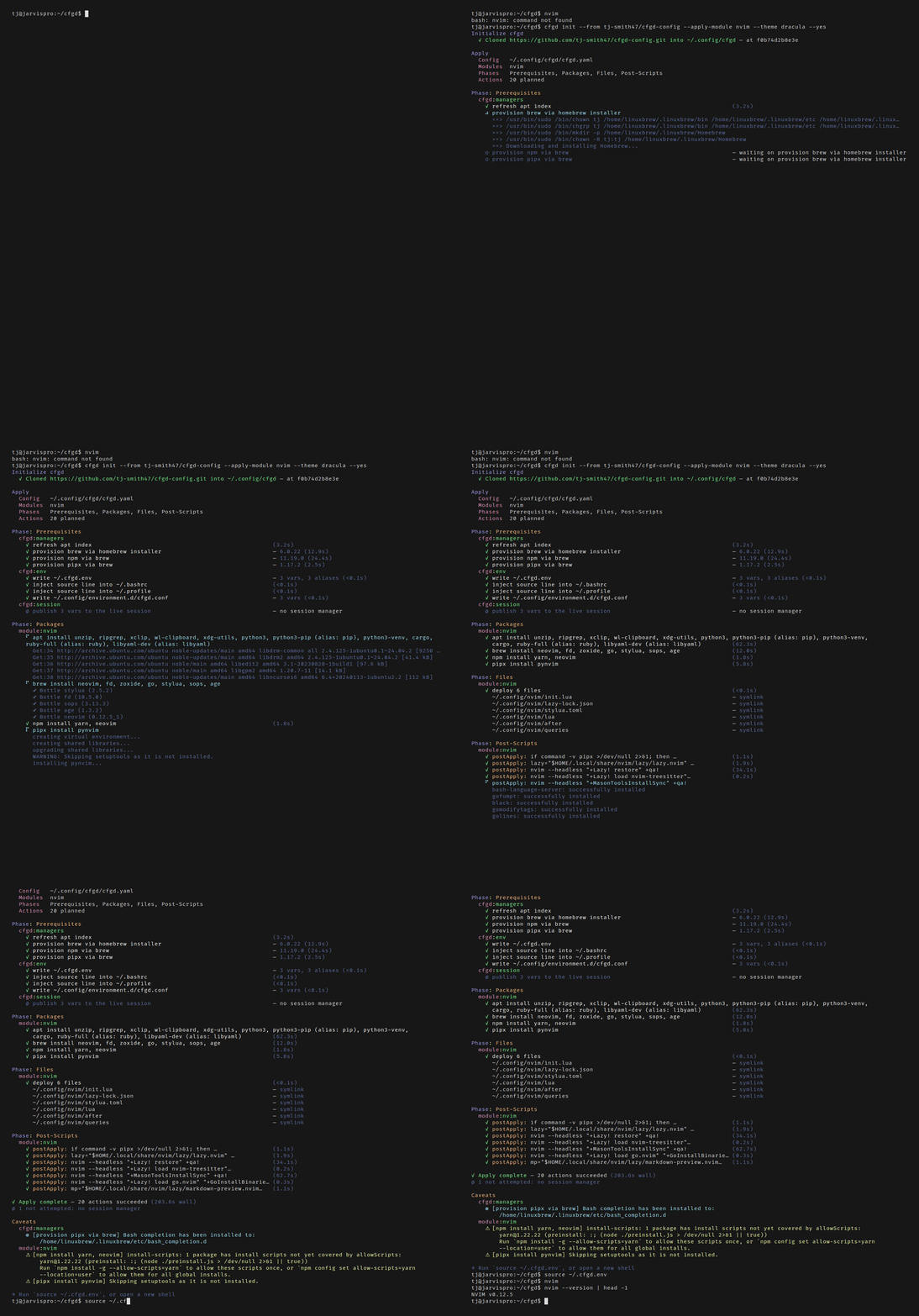
A bare ubuntu:24.04 container with no Neovim, no Homebrew and no config. One cfgd init later, nvim opens a fully configured LazyVim. Recorded with VHS.
Status: Alpha. APIs may change.
- What is cfgd
- How It Works
- Quick Start
- Why cfgd exists
- Shareable Modules
- How cfgd compares
- Features
- Documentation
- Distribution
What is cfgd
Most dotfile managers track files. cfgd enables you to manage your entire machine. You declare packages, files, secrets, and system settings in version-controlled YAML. cfgd diffs what you want against what you have, builds a plan, and reconciles continuously. If something drifts, it's detected and corrected.
How It Works
Profiles declare your machine's desired state: packages, files, system settings. They compose via inheritance: share a common base across machines, then specialize per context. See docs/profiles.md.
             base
            ╱    ╲
        work    personal
       ╱    ╲
  laptop    devcontainer
Modules are shareable, self-contained config packages. Install someone else's dev environment or publish your own. Cross-platform package resolution picks the right manager automatically. See docs/modules.md.
Reconciliation continuously ensures machines match their declared state. Drift is detected, reported, and optionally auto-corrected. Failed actions don't abort; they're logged and skipped. See docs/reconciliation.md.
Quick Start
# Install via Homebrew
brew install tj-smith47/tap/cfgd

# Or via install script
curl -fsSL https://github.com/tj-smith47/cfgd/releases/latest/download/install.sh | sh

# Or via cargo
cargo install cfgd

# Bring your config to a new machine in seconds
cfgd init --from git@github.com:you/machine-config.git

# Or start fresh
cfgd init

# Or let AI scan your system and generate config for you
export ANTHROPIC_API_KEY=sk-...
cfgd generate

# Set up shell completions (add to your shell's rc file)
source <(cfgd completion bash)  # .bashrc
source <(cfgd completion zsh)   # .zshrc
cfgd completion fish | source   # config.fish
Why cfgd exists
I recently switched jobs, and spent the last week of my old job backing up scripts and dotfiles, parsing out company specific info, and composing a tarball to transfer. At the new job, I spent another few days getting my new machine reconfigured. Over time, I gradually discovered things I'd forgotten, as well as some things (e.g., System Settings) that I thought would have been nice to have included in the backup. This all felt very manual and incomplete, and I thought there needed to be a better way; I should just be able to clone a repo and have my entire workstation (packages, scripts, dotfiles, system settings) feel familiar again. And even better, to keep aspects of that feeling in sync between my home and work laptops (parts of it, at least).
Another inspiring aspect had to do with working in devcontainers. At my previous company I had set up custom scripts to inject dotfiles into the devcontainer so a user could replicate their dev environment inside the container once they shell in. At minimum, I wanted my full neovim editor setup available in any ephemeral container without having to modify the devcontainer config in every team's repository I worked in just to accommodate my setup. I needed something that could bootstrap my config into any environment from the outside, regardless of which / whose repo I was working in. Plus, I had some coworkers in need of education about the superiority of vim-motions, and wanted a quick and easy way to share my exact setup, down to the alias.
cfgd borrows from the best ideas across practices:
- Kubernetes: declarative reconciliation loop, KRM resource model
- Terraform: plan/apply workflow, state tracking, drift detection
- Puppet: continuous enforcement via daemon, module ecosystem
- Nix: reproducible machine state from a single source of truth
- Ansible: YAML-driven config management, idempotent task execution
- Kustomize: layered overrides and patches
- chezmoi: dotfile management
Shareable Modules
This is my favorite feature: a single packaged config for a tool that works anywhere.
cfgd module create my-dev-env
cfgd profile update --module community/nvim
A module declares packages with cross-platform resolution, config files, shell environment variables and aliases, and lifecycle scripts:
apiVersion: cfgd.io/v1alpha1
kind: Module
metadata:
  name: nvim
  description: Neovim editor configuration
spec:
  depends: [node, python]
  packages:
    - name: neovim
      minVersion: "0.10"
      prefer: [brew, snap]
      deny: [apt]
    - name: ripgrep
    - name: fd
      aliases:
        apt: fd-find
        dnf: fd-find
    - name: gcc
      aliases:
        apt: build-essential
        dnf: "@development-tools"
      platforms: [linux]
  files:
    - source: files/init.lua
      target: ~/.config/nvim/init.lua
    - source: files/lua
      target: ~/.config/nvim/lua
  env:
    - name: EDITOR
      value: nvim
  aliases:
    - name: v
      command: nvim
  scripts:
    postApply:
      - nvim --headless '+Lazy! sync' '+MasonToolsInstallSync' +qa
See docs/modules.md for the full spec including git file sources, registries, and dependency resolution.
How cfgd compares
| cfgd | chezmoi | Nix Home Manager | Ansible | Puppet | |
|---|---|---|---|---|---|
| Focus | Full machine state | Dotfiles | Dotfiles + packages (Nix) | General automation | Server/infra state |
| Packages | 18 managers | None | Nix only | Any (via tasks) | Any (via providers) |
| Drift detection | Continuous (daemon) | Manual | On rebuild | Manual | Continuous (agent) |
| Cross-platform resolution | Per-package manager mapping | N/A | Nix-only | Per-task conditionals | Per-OS Hiera data |
| Shareable modules | First-class | Templates only | Flakes | Roles (Galaxy) | Forge (server-oriented) |
| Team config | Policy tiers + Crossplane | N/A | Flake inputs | N/A | Puppet Enterprise |
| Infrastructure | Single binary, zero servers | Single binary | Nix daemon | SSH (or AWX) | PuppetServer + PuppetDB + CA |
| Learning curve | YAML + CLI | Go templates | Nix language | YAML + Jinja2 | Puppet DSL (Ruby) |
Puppet is the closest philosophical match: declarative state, continuous enforcement, module ecosystem. If that model clicked for you but standing up a JVM server and writing a Ruby-era DSL to manage your dotfiles in 2026 doesn't, cfgd is what that idea looks like rebuilt from scratch for developer workstations.
cfgd is a good fit when you want: one-liners for cross-platform machine bootstrapping, shareable dev environment modules, continuous reconciliation between machines or subscribed sources, or team config distribution with policy enforcement.
Features
For developers:
- One-command bootstrap:
cfgd init --from <repo> --applyon a new machine - AI-guided generation:
cfgd generatescans your system and builds profiles/modules; MCP server for AI editor integration - MCP server:
cfgd mcpserves the CLI itself as tools, so an assistant can reconcile a machine, not just write config for one - Authoring skills:
cfgd skill installteaches your coding agent (Claude Code, Gemini, Copilot, Codex, Cursor) to author high-quality cfgd resources - Shareable modules: cross-platform dev environment packages with dependency resolution and registries
- 18 package managers: brew, apt, dnf, pacman, cargo, npm, pipx, snap, and more, with automatic platform-aware resolution
- Secrets: SOPS/age encryption + 1Password, Bitwarden, HashiCorp Vault; secret-backed environment variables
- Tera templates: render dotfiles with variables, OS detection, custom functions
- Continuous drift detection: daemon watches for changes, auto-syncs, notifies or auto-corrects
For platform & infrastructure engineers:
- Multi-source config: publish team baselines with policy tiers (locked/required/recommended/optional)
- Kubernetes operator: CRDs for MachineConfig, ConfigPolicy, DriftAlert; admission webhook; device gateway with fleet dashboard
- Node configuration: sysctl, kernel modules, containerd, kubelet, AppArmor, seccomp, certificates
- CSI driver: OCI-based module injection into pods via volumes
- Crossplane integration: TeamConfig XR for self-service team environment distribution
- kubectl plugin:
kubectl cfgd debug/exec/inject/statusfor node inspection
For security & compliance:
- Compliance snapshots: continuous machine state capture with JSON/YAML export for Vanta, Drata, or custom integrations
- Key provisioning: declarative SSH key generation, GPG key management, and git signing configuration
- Encryption enforcement: per-file encryption requirements with SOPS/age backend validation
- Policy enforcement: locked files, required packages, encryption constraints on target paths
- Drift remediation: daemon detects and auto-corrects configuration drift with per-module policies
- Fleet visibility: device gateway aggregates compliance scores across enrolled machines
Documentation
| Document | Description |
|---|---|
| Configuration | Root config (cfgd.yaml), file strategies, aliases, themes |
| Profiles | Profile YAML, inheritance, merge rules, variables |
| Modules | Module spec, cross-platform packages, dependencies, git file sources, registries |
| Reconciliation | Phase ordering, failure handling, state store |
| Packages | All package managers, skip behavior, dry-run |
| Templates | Tera template system, context variables, custom functions |
| Secrets | SOPS/age backends, 1Password, Bitwarden, Vault |
| System Configurators | Shell, macOS defaults, systemd, sysctl, kubelet, and more |
| Sources | Multi-source config, policy tiers, composition, subscriptions |
| Daemon | File watching, reconciliation loop, sync, notifications, service install |
| Operator | CRD-based machine management, device gateway, DaemonSet node agent |
| Team Config | Crossplane-powered team config distribution |
| Safety | Atomic writes, backups, rollback, apply locking, path safety |
| Declarative Backups | spec.backups[] snapshots, hook ordering, retention, restoring |
| CLI Reference | Complete command reference with flags and examples |
| Installation | All install channels (Homebrew, install script, winget, scoop, chocolatey, cargo, direct download) |
| Bootstrap | cfgd init flow, apply options, install script |
| AI Generate | AI-guided config generation, both MCP servers (mcp-server for authoring, mcp for driving the CLI) |
| Authoring Skills | cfgd skill installer, supported agent providers, choosing between generate and skills |
| Releasing | CI-cut release pipeline, pre-release checklist, failure recovery |
| Image Pack | Packing a directory into an OCI image volume, signing, pinning deployments |
| Multi-Tenancy | Namespace isolation and tenant boundaries for the operator |
| Lifecycle Scripts | run: resolution, hook phases, timeouts, interactive scripts |
Distribution
In addition to publishing binaries to GitHub Releases (Linux, macOS, Windows; amd64 + arm64), each release also publishes to:
| Channel | Artifact |
|---|---|
| Homebrew | brew install tj-smith47/tap/cfgd |
| crates.io | cargo install cfgd |
| AUR | yay -S cfgd (Arch Linux; builds from source) |
| GHCR | Docker images: cfgd, cfgd-operator, cfgd-csi |
| Helm | helm install cfgd oci://ghcr.io/tj-smith47/charts/cfgd |
| Krew | kubectl krew install cfgd (the kubectl plugin for node debugging and fleet inspection) |
| OLM | Operator bundle for OLM-managed clusters |
| Crossplane | function-cfgd composition function for team config distribution |
CI/CD integrations:
| Integration | Description |
|---|---|
| cfgd Setup | GitHub Action: bootstrap a runner with a module from your config repo |
| cfgd Plan | GitHub Action: run cfgd plan on PRs, post the diff as a comment |
| GitLab CI | Includable .cfgd-ci.yml template with .cfgd-plan and .cfgd-apply jobs |
| Tekton | cfgd-apply Task for Tekton Pipelines |
# Example: set up your dev tools on a GitHub Actions runner
- uses: tj-smith47/cfgd/ecosystem/github-action-setup@master
  with:
    source: git@github.com:you/machine-config.git
    module: dev-tools
Modules can also be exported as DevContainer Features for injection into devcontainers:
cfgd module export my-tool --format devcontainer
Building from source:
git clone https://github.com/tj-smith47/cfgd.git && cd cfgd
cargo build --release
License
Licensed under either of
- Apache License, Version 2.0 (LICENSE-APACHE or http://www.apache.org/licenses/LICENSE-2.0)
- MIT license (LICENSE-MIT or http://opensource.org/licenses/MIT)
at your option.
Contribution
Unless you explicitly state otherwise, any contribution intentionally submitted for inclusion in the work by you, as defined in the Apache-2.0 license, shall be dual licensed as above, without any additional terms or conditions.