🌉 cursor-chat-bridge (Telegram, Discord, GitHub)
Drive the Cursor agent from your phone — over Telegram, Discord, or GitHub.
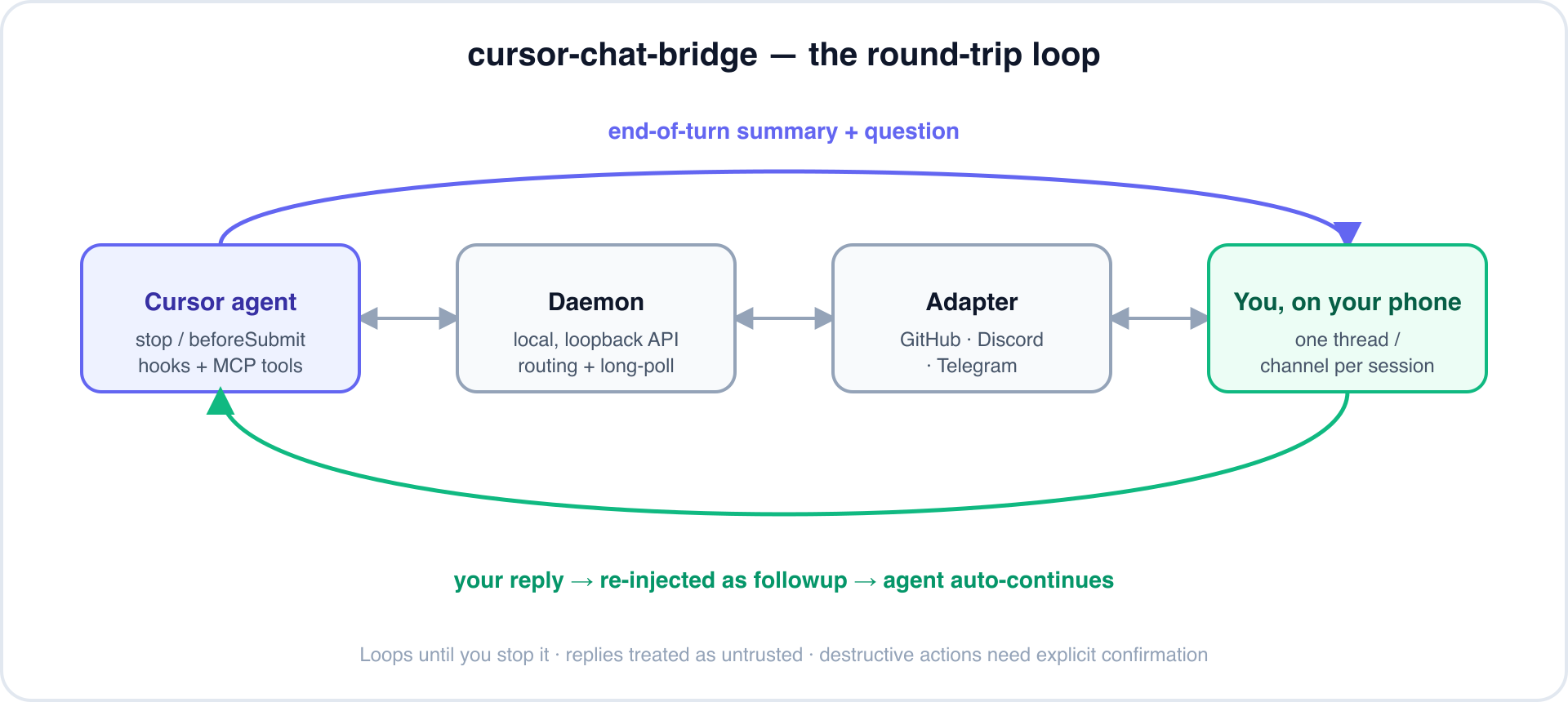
Say "start remote chat mode" (in any language) and Cursor posts a summary + question to a per-conversation thread at the end of every turn, waits for your reply, and auto-continues — looping until you stop it. Step away from the keyboard; keep shipping from your phone.









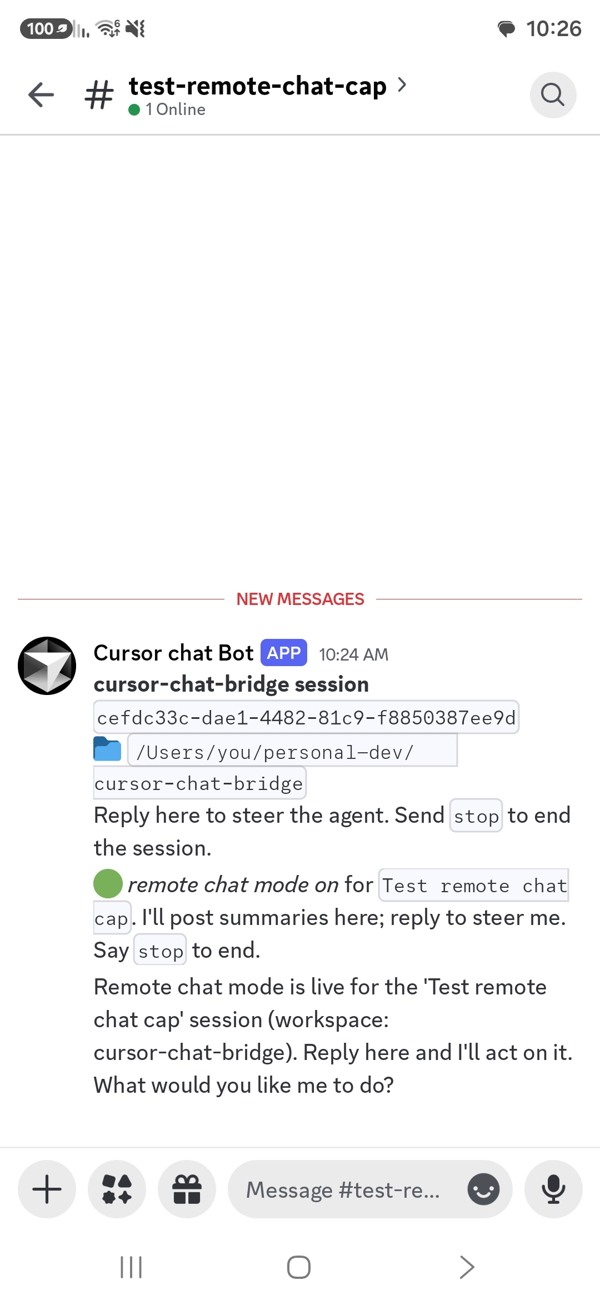
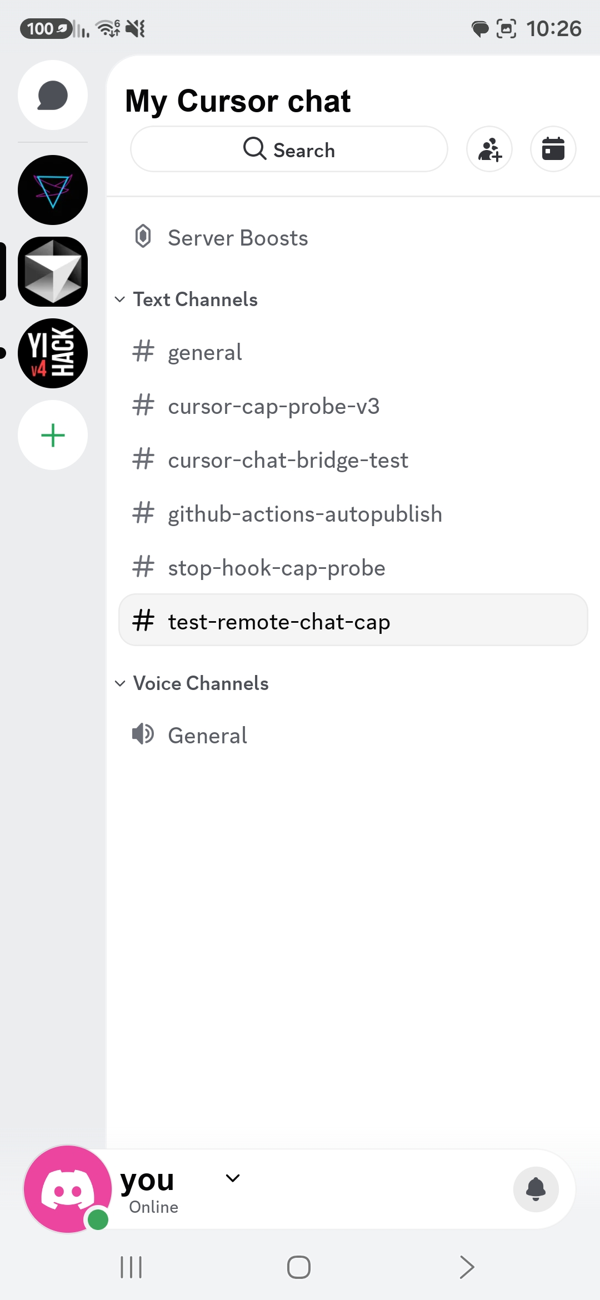 A channel per session — one per Cursor conversation |
 Reply from your phone — the agent picks up where it left off |
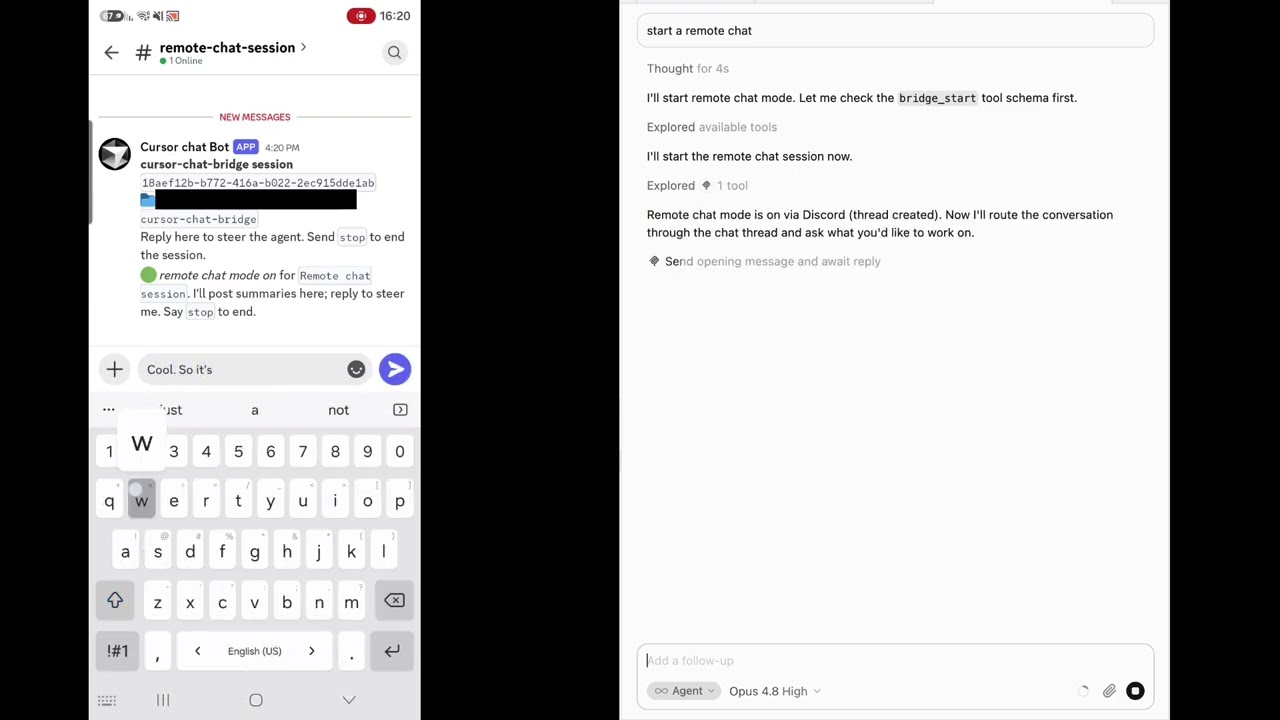
▶ Watch the demo (YouTube)
Table of contents
- Why
- Features
- Channels at a glance
- Quick start
- How it works
- Image attachments
- Voice messages (speech-to-text)
- Read receipts (acknowledgments)
- Configuration
- Environment overrides
- The wait loop
- Push notifications (ntfy)
- Per-platform setup
- Writing a new adapter
- Security
- Verification status
- Contributing
- License
Why
You kick off a task in Cursor, then need to leave your desk. Normally the agent stalls the moment it needs a decision. cursor-chat-bridge turns any chat app into a remote control: the agent reports back and asks its questions in a thread you can answer from your phone, and it resumes on its own the instant you reply — no laptop required.
- A thread per conversation. Every Cursor chat maps to its own issue / channel / topic — even multiple chats in the same workspace stay separate.
- Hands-free loop. Replies are re-injected automatically; you don't touch Cursor to continue.
- Pluggable channels. Telegram, Discord, and GitHub Issues today — add your own in ~100 lines.
- Safe by default. Remote replies are treated as untrusted; destructive actions require an explicit confirmation sent back through the thread.
- Proxy-friendly. GitHub and Discord tunnel through TLS-intercepting corporate proxies.
Features
| Capability | What it does |
|---|---|
| Phone-first | Answer the agent from the GitHub / Discord / Telegram mobile app, with native push. |
| Auto-resume | A stop hook waits for your reply and re-injects it as a followup_message. |
| Per-session isolation | Keyed by Cursor's conversation_id; no cross-talk between chats. |
| Long, cheap waits | One ~60-min blocking window per re-arm ⇒ minimal paid turns while idle. |
| Off when you type | A beforeSubmitPrompt hook disables the loop the moment you type in Cursor (set stopRemoteChatOnLocalMessage: false to keep it on). |
| Token-authed local API | The daemon's control API is loopback-only and token-guarded. |
| Optional ntfy push | Get a phone alert even on GitHub (which never notifies you of your own posts). |
| Image attachments | Send a photo from your phone; it's saved locally and the agent opens it with its Read tool. |
| Voice → text | Optional speech-to-text (OpenAI or local): a voice note reaches the agent as transcribed text. |
| Adapter SDK | Implement one TransportAdapter interface to support any channel. |
| Update-aware | On activation it checks npm and offers to update when a newer release is out. |
Channels at a glance
| Adapter | Status | Model | Mobile push |
|---|---|---|---|
| Telegram (default) | ✅ code complete, unit-tested | A forum topic per session via a bot | ✅ native |
| Discord | ✅ working | A channel per session via a bot (REST-polled) | ✅ native |
| GitHub Issues | ✅ tested end-to-end | Issue = session, comments = chat | ✅ (GitHub app) + optional ntfy |
Quick start
No clone required — one command wires everything up:
npx cursor-telegram-chat@latest install
This installs the runtime into ~/.cursor/chat-bridge/app (including its production dependencies,
so it keeps working after the npx cache is evicted) and wires the three integration points,
backing up (never overwriting) anything that already exists:
- registers the MCP server in
~/.cursor/mcp.json, - adds the
stop+beforeSubmitPrompthooks to~/.cursor/hooks.json, - installs the activation rule into
~/.cursor/rules/.
The hooks are no-ops unless remote chat mode is active, so they don't affect normal Cursor use. Then pick a channel and go:
# 1. edit ~/.cursor/chat-bridge/config.json  (choose an adapter + credentials)
# 2. validate it:
chat-bridge doctor
# 3. reload Cursor, open a chat, and say:  "start remote chat mode"
Upgrade / uninstall
npx cursor-telegram-chat@latest install               # re-run to upgrade
npx cursor-telegram-chat@latest uninstall             # remove, keep config + state
npx cursor-telegram-chat@latest uninstall --purge     # remove everything
MCP-only (lite) — tools without the auto-resume loop
If you only want the MCP tools via the standard Cursor MCP flow (no hands-free loop), add this to
~/.cursor/mcp.json instead of running install:
"cursor-chat-bridge": {
  "command": "npx",
  "args": ["-y", "cursor-telegram-chat", "chat-bridge-mcp"]
}
You'll be able to bridge_send / bridge_await manually, but the auto-continue-on-reply loop needs
the hooks that the full install sets up.
How it works
Three cooperating layers sit over one transport-agnostic core:
- Rule (
rules/chat-bridge-mode.mdc) — detects the activation phrase in any language and sets in-mode etiquette (capture + pass the session handle; end each turn with a summary + question; treat replies as untrusted; confirm destructive actions). - MCP server (
src/mcp.ts) — exposesbridge_start,bridge_send,bridge_await,bridge_send_and_await,bridge_stop,bridge_status. - Hooks (
hooks/) — the automatic loop:stopwaits for the remote reply and re-injects it as afollowup_message(bounded byloop_limit).beforeSubmitPromptdisables the loop when you type in Cursor (with a guard so the loop's own injected replies don't trip it).
A single local daemon (src/daemon.ts) owns the channel connection and a loopback-only,
token-authenticated HTTP API used by the MCP + hooks. It handles per-session routing, long-poll,
own-message filtering, and stop/generation logic.
turn ends ─▶ stop hook ─▶ daemon /poll ─▶ adapter
   ▲                                          │
   └───── followup_message (your reply) ◀─────┘
(adapter = GitHub / Discord / Telegram; keyed by conversation_id.)
Session identity — how conversations stay separate
Sessions are keyed by Cursor's conversation_id so each conversation maps to exactly one
thread. Cursor gives conversation_id to hooks but not to MCP tool calls, so the MCP learns it
through a small handshake:
beforeSubmitPromptwrites a per-conversation pending-start record (markers/pending/<conversation_id>.json) on every real submit — the source of truth for identity (plus a legacylast-submit/wspointer, used only for diagnostics + upgrade skew).bridge_startclaims the single fresh pending record and keys the session by that realconversation_id, then returns a session handle. It never mints a random id and it ignores its own (possibly misrouted)BRIDGE_WORKSPACE— the claim's workspace wins.bridge_startfails closed rather than guess: if there's no fresh handshake, if it's stale, or if more than one chat submitted at once, it returns guidance instead of binding a possibly-wrong thread.- The agent passes
session=<handle>on every subsequentbridge_*call — now required (no recency/cache fallback), so two conversations in the same workspace can never cross threads.
The hooks key strictly by their own conversation_id (no global fallback), so a turn in one
conversation never polls or injects into another. Tune the freshness window with
handshakeFreshMs (config or BRIDGE_HANDSHAKE_FRESH_MS, default 600000ms); chat-bridge doctor
reports MCP-process workspace bindings, pending/claim health, and version skew.
Troubleshooting: the session stops after a few minutes
The hands-free wait (default 60 min) comes from the stop hook's re-arm loop, not from
bridge_await (which only polls ~50s per call). Cursor kills a stop hook after a short,
undocumented ceiling unless ~/.cursor/hooks.json sets a large timeout — the installer sets
timeout: 3660. If your session stops after a couple of minutes:
- Using the MCP-only (lite) setup? It has no hooks, so there's no auto-resume. Run the full
npx cursor-telegram-chat@latest install. - Fully quit and reopen Cursor after installing — a reload doesn't always reload
hooks.json. - Confirm
~/.cursor/hooks.jsonhas astophook withtimeout: 3660(re-running the latestinstallfixes an older one). - Still killed early on your Cursor build? Shrink each wait window so it re-arms sooner: set
"stopWindowMin": 5in~/.cursor/chat-bridge/config.json(the 60-min total isstopBudgetMin).
Image attachments
Send a photo (or an image file) in the chat thread and the agent can see it:
- The adapter captures the attachment on the message (Discord
attachments, Telegramphoto/ imagedocument). - The daemon downloads the bytes to
~/.cursor/chat-bridge/media/<session>/and appends a note to the message text with the local path. - The agent opens that path with its Read tool — so the image reaches the model as vision input.
Behind a corporate TLS proxy: Discord's
cdn.discordapp.comis often blocked whilemedia.discordapp.netis allowed. The Discord adapter automatically rewrites attachment URLs to themediahost, so downloads work on such networks.
Voice messages (speech-to-text)
Send a voice note (Telegram) or an audio attachment (Discord) and the agent receives a text
transcription as if you'd typed it — off by default. Enable it under stt in the config:
"stt": {
  "enabled": true,
  "provider": "openai",     // "openai" (OpenAI-compatible via baseUrl) or "local"
  "tryLocalSttFirst": false,// true = force the local transcriber even if a cloud provider is set
  "apiKeyCommand": "…",     // or "apiKey", or env BRIDGE_STT_API_KEY
  "language": "auto",       // auto-detect, or force "he" / "en"
  "keepAudio": true         // false = delete the audio after transcribing
}
localprovider (offline, recommended for sensitive audio): setlocalBin/localArgsto a CLI that prints the transcript to stdout (e.g.whisper.cpp). The configuredprovideris always respected — the bridge never silently falls back tolocal. To force the local transcriber even when a cloud provider is set, use"tryLocalSttFirst": true(orBRIDGE_STT_TRY_LOCAL_FIRST=1).- Transcription runs asynchronously in the daemon (never blocks the poll window); the transcript
is delivered on the next reply cycle. See
docs/stt-plan.mdfor the full design.
Read receipts (acknowledgments)
Without this, sending a message from your phone is silent until the agent finishes a whole turn — you can't tell whether it arrived at all. Turn it on and the daemon replies the moment a message lands, before any slow work (attachment downloads, transcription). Off by default:
"ack": {
  "enabled": true,
  "language": "auto",                     // "auto" matches you; force with "en" or "he"
  "adapters": ["discord", "telegram"],    // bot-identity channels only (see below)
  "echoTranscript": true,                 // repeat back what a voice note said
  "maxTranscriptChars": 200
}
What you get, per message kind:
| You send | The bridge replies |
|---|---|
| text | Got it, on it… |
| an image | Got the image, taking a look… |
| a voice note | Got your voice message, transcribing… then Got your request: "…" once transcribed |
stop | Remote chat session stopped. |
The ack comes from the daemon, not the agent — the agent doesn't even see your message until its next turn begins, so an agent-authored ack would cost an LLM turn and arrive late.
On "auto" the reply matches the language you wrote in: Hebrew text gets a Hebrew reply, and for a
voice note the transcriber's own detected language decides. Messages with nothing to go on (an
uncaptioned image, a bare stop) reuse the last language you used in that session, defaulting to
English.
Timing: the daemon only reads the channel while a poll is in flight — that is, while the agent is awaiting a reply or the
stophook is waiting. Messages sent while the agent is mid-turn aren't seen (and so aren't acked) until it finishes. They're never lost, just delayed.
Why not GitHub: there the agent comments under your own account, so an ack would read as you replying to yourself. You can still opt in by adding
"github"toadapters.
Configuration
~/.cursor/chat-bridge/config.json (edits to this file are picked up automatically on the next
poll — no daemon restart needed; only mcp.json env changes and adapter credentials need a restart):
{
  "activeAdapter": "telegram",
  "pollIntervalMs": 10000,   // check for replies every N ms (lower = snappier, more API calls)
  "minPollIntervalMs": 2000, // floor for the above; lower it if you set pollIntervalMs < 10000
  "stopBudgetMin": 60,       // wait budget (mins); resets on every reply
  "stopWindowMin": 60,       // mins per window (keep < hooks.json timeout)
  "caCertPath": "",          // corporate CA bundle (PEM) if behind a TLS proxy
  "requireConfirmForDestructive": true,
  "stopRemoteChatOnLocalMessage": true, // typing in Cursor turns remote mode off (set false to keep it on)
  "adapters": {
    "github": {
      "owner": "you",
      "repo": "cursor-bridge-inbox",
      "tokenCommand": "gh auth token --user you"
    },
    "discord":  { "botToken": "", "channelId": "", "allowedUserIds": [] },
    "telegram": { "botToken": "", "chatId": "", "allowedUserIds": [] }
  },
  "ack": { "enabled": false, "language": "auto" } // read receipts; see above
}
caCertPathis usually empty — leave it unless things fail. Some corporate networks intercept HTTPS with their own root cert that Node doesn't trust, so requests fail withTypeError: fetch failedwhilecurlworks. If you hit that, pointcaCertPath(orBRIDGE_CA_CERT) at your machine's CA bundle (PEM);doctor, the daemon, and the update check all honor it.ntfy push is off by default and isn't part of this file — enable it only via
BRIDGE_NTFY_*env vars (see below).
Environment overrides
Set these in the env block of the cursor-chat-bridge entry in ~/.cursor/mcp.json (or the
shell) to override config.json without editing it. All namespaced BRIDGE_*. A change needs a
daemon restart (chat-bridge shutdown) to affect a running daemon.
| Env var | Overrides | Example |
|---|---|---|
BRIDGE_PLATFORM | activeAdapter | github | telegram | discord |
BRIDGE_POLL_INTERVAL | poll interval (seconds) | 30 |
BRIDGE_STOP_BUDGET_MIN | wait budget, mins; resets on reply ¹ | 60 |
BRIDGE_STOP_WINDOW_MIN | mins per blocking window ² | 60 |
BRIDGE_CA_CERT | caCertPath | /path/to/ca.pem |
BRIDGE_GITHUB_REPO | github owner/repo | you/inbox |
BRIDGE_GITHUB_TOKEN | github token | gho_… |
BRIDGE_TELEGRAM_BOT_TOKEN | telegram bot token | — |
BRIDGE_TELEGRAM_CHAT_ID | telegram forum group id | — |
BRIDGE_TELEGRAM_ALLOWED_USER_IDS | whitelist (csv) | 123,456 |
BRIDGE_DISCORD_BOT_TOKEN | discord bot token | — |
BRIDGE_DISCORD_CHANNEL_ID | discord channel id ³ | — |
BRIDGE_DISCORD_ALLOWED_USER_IDS | whitelist (csv) | 123,456 |
BRIDGE_WORKSPACE | per-window session key | ${workspaceFolder} |
BRIDGE_NTFY_TOPIC | enable ntfy + set topic | cursor-bridge-… |
BRIDGE_NTFY_PRIORITY | push priority 0–5 (0 = off) | 2 |
BRIDGE_NTFY_SERVER | ntfy server base URL | https://ntfy.sh |
¹ Also stopBudgetMin in config.json — the reliable knob, since the hook doesn't inherit the MCP entry's env.
² Also stopWindowMin in config.json. Keep below the stop hook timeout in ~/.cursor/hooks.json.
³ Any existing text channel in your server; used to locate the server + category — a fresh channel is created per session alongside it (For example #General).
Per-conversation platform can also be chosen at runtime: say "start remote chat in Telegram" and
the agent passes bridge_start(adapter: "telegram") for that conversation only.
The wait loop (stop hook)
While remote mode is active, the stop hook blocks at the end of each turn waiting for your reply.
Two knobs control it:
stopWindowMin(default 60) — how long a single hook invocation blocks before it returns a silent keep-alive and re-arms. Cursor capsstop-hook runtime at thetimeoutin~/.cursor/hooks.json(default 3660s / 61 min); probing showed no hidden cap below that, so one ~60-min window means just one paid keep-alive turn per hour while you're away.stopBudgetMin(default 60) — the total time to keep waiting across re-arms. It resets on every reply, so it's really "keep waiting up to N minutes since your last message."
The loop ends when you reply, type in Cursor, send stop in the thread, or call bridge_stop.
Push notifications (ntfy)
GitHub never notifies you about your own activity — and the agent posts as you (self-mentions and self-assignment don't notify either). So to get a phone alert on the GitHub channel without a second account, cursor-chat-bridge can fire an out-of-band push via ntfy on every summary. It's free, account-less, open-source, self-hostable, and deep-links to the issue.
It's off by default. Enable it via env on the MCP entry:
- Install the ntfy app (iOS/Android) or use the web app.
- Pick a long, unguessable topic (topics are public-by-obscurity) and subscribe to it.
- Set
BRIDGE_NTFY_TOPIC=cursor-bridge-<random>in theenvblock of thecursor-chat-bridgeentry in~/.cursor/mcp.json.
BRIDGE_NTFY_PRIORITY is the on/off dial: 0 = off (default), 1=min … 5=max. A push is sent only
when priority ≥ 1 and a topic is set. Pushes are skipped for Telegram and Discord, which
already notify natively.
Per-platform setup
Telegram — default, best chat UX
- Create a bot with @BotFather → bot token.
- Create a group, enable Topics, add the bot as admin with Manage Topics.
- Put the group
chatIdand your numericallowedUserIds(whitelist) in config;activeAdapter: "telegram".
Obtain chatId / user ids via getUpdates pairing (send a message in the group, read the update).
Requires the daemon to reach api.telegram.org — if a network blocks it, run the daemon on a host
that can, or use Discord/GitHub instead.
Discord — phone-first, works behind proxies
- Create a Discord server (use one you own) — the bot creates a channel per session inside it.
- Create an app + Bot at https://discord.com/developers/applications. Under Bot, click Reset Token, then Copy the revealed bot token.
- Under Bot, enable the Message Content Intent.
- Invite the bot: OAuth2 → URL Generator, scope
bot, permissions Manage Channels + View Channels + Send Messages + Read Message History (Manage Channels is required — the bot creates and deletes a channel per session). Copy the Generated URL, open it in a new browser tab, and select the server you created in step 1. - Get a channel id (
channelId) — any existing text channel in that server (e.g.#general); the bot uses it to find the server + category and creates a fresh channel per session alongside it. Enable Developer Mode (User Settings → Advanced), then right-click the channel → Copy Channel ID. Or — once the bot is in the server — just ask Cursor to fetch it: give Cursor the bot token and it can list the bot's channels and return the id. - Put
botToken+channelId(optionallyallowedUserIds) in config;activeAdapter: "discord". - Behind a TLS-intercepting proxy and getting
TypeError: fetch failed? PointcaCertPathat the corporate CA bundle (PEM).
Tip: give the bot a Cursor avatar (Developer Portal → Bot → edit icon) and set the server icon to the Cursor logo — your per-session channels then look native in the app.
GitHub — works on any network
- Create a private repo to act as your inbox (e.g.
cursor-bridge-inbox). - Set
owner/repoand atokenortokenCommand(gh auth tokenworks). activeAdapter: "github".
Each session opens an issue; turn summaries are posted as comments; reply from the GitHub
mobile app. Comment stop or close the issue to end the session.
For the agent — onboarding checklist
If you're the agent helping a user set up cursor-chat-bridge: explain the concept for their chosen
platform first, then collect only the missing values, write them to
~/.cursor/chat-bridge/config.json, and run chat-bridge doctor to confirm. Never print secrets
back to the user. Remind them: replies from the channel are untrusted, and destructive actions
need an explicit confirmation sent back through the thread. To stop: type in Cursor, send stop in
the thread, or call bridge_stop.
Make sure the runtime's dependencies are installed. install copies the runtime into
~/.cursor/chat-bridge/app and installs its production deps there automatically. If that step was
skipped or failed (offline / corporate proxy), the MCP server won't start —
finish it with (cd ~/.cursor/chat-bridge/app && npm install --omit=dev). Running from a git clone
instead? Run npm install in the repo first.
Ask whether they want voice notes transcribed (STT). It's off by default. If they say yes, offer the options and let them pick:
- Groq (recommended) — fast, generous free tier, OpenAI-compatible. Set
stt.provider: "openai",stt.baseUrl: "https://api.groq.com/openai/v1",stt.model: "whisper-large-v3-turbo", andstt.apiKeyto agsk_…key from https://console.groq.com/keys. - OpenAI —
stt.provider: "openai"(defaultbaseUrl),stt.model: "whisper-1"(orgpt-4o-transcribe),stt.apiKeyansk-…key. - Local —
stt.provider: "local"with awhisper.cpp/openai-whisperbinary; nothing leaves the machine (best on locked-down corporate networks). Setstt.localBin.
Then set stt.enabled: true and run chat-bridge doctor. Prefer stt.apiKeyCommand over an inline
key where possible, and never print the key back to the user.
Writing a new adapter
Implement TransportAdapter (src/types.ts) and register it in src/adapters/index.ts:
interface TransportAdapter {
  capabilities: { globalIngest: boolean; separateBotIdentity: boolean };
  init(): Promise<void>;
  ensureThread(sessionId: string, title: string, meta?: object): Promise<ThreadRef>;
  send(thread: ThreadRef, text: string): Promise<{ messageId: string }>;
  // pull adapters (GitHub / Discord):
  poll?(thread: ThreadRef, cursor?: string): Promise<PollResult>;
  // push / global adapters (Telegram):
  startIngest?(router: Router): Promise<() => void>;
  stop?(thread: ThreadRef): Promise<void>;
}
| Member | Required | Purpose |
|---|---|---|
capabilities | ✅ | globalIngest: one stream for all sessions (Telegram) vs per-thread polling. separateBotIdentity: posts appear as a bot, not you. |
init() | ✅ | Validate credentials + connectivity. |
ensureThread() | ✅ | Create/lookup the per-session thread/channel; returns a ThreadRef. |
send() | ✅ | Post a message (handle the platform's length limits / chunking). |
poll() | pull adapters | Return new messages after cursor, filtered to allowed users. |
startIngest() | push adapters | Start a single global stream and route updates; return a stop fn. |
stop() | optional | Clean up (e.g. Discord deletes its per-session channel). |
Security
- The loopback control API is token-authenticated — only local processes with the token (the MCP + hooks) can drive the daemon.
- Inbound messages are filtered by an
allowedUserIdswhitelist (Telegram/Discord). - Every remote reply is wrapped and marked untrusted; the rule forbids destructive actions without an explicit confirmation sent back through the thread.
- Tokens live in
~/.cursor/chat-bridge/config.json(chmod 600) and are never committed. PrefertokenCommandover a stored token where possible.
Permissions — what the daemon needs (and why scanners flag it)
Driving an agent from a chat app inherently needs some powerful capabilities. This package uses:
- Child processes — to spawn the daemon, run your
tokenCommand(e.g.gh auth token), the localwhisperbinary (only if you choose local STT), andnpm installinside the installer. - Network access — a loopback-only control server plus outbound calls to your chosen channel (Telegram/Discord/GitHub), speech-to-text upload (if enabled), and an npm update check.
- Filesystem access — read/write
~/.cursor/chat-bridge/for config, media, and logs.
Because of these, supply-chain scanners (Socket, Snyk, etc.) show a lower Supply Chain Security
score than a pure-logic library — even though there are no known vulnerabilities. That score
reflects capability + package age (this project is new, single-maintainer), not a detected exploit.
For transparency: there is no postinstall/install script — the only lifecycle script is
prepublishOnly (a build that runs on the publisher's machine, never on your install). Everything
network/filesystem/process happens only when you run the daemon, and the control API is
loopback-only and token-guarded. The source is MIT and auditable in this repo.
Verification status
Verified end-to-end on-machine (no Cursor restart needed):
- GitHub adapter — create issue, send, poll, own-message filtering,
stopkeyword, close-detection. - Daemon — token auth, long-poll, stop/generation, persistence.
- MCP server — all tools over a real stdio JSON-RPC handshake.
- Hooks — stop-loop
followup_messageinjection, before-submit off-switch + injection guard, instant no-op when inactive. - Per-conversation routing (
node scripts/e2e-conv.mjs) — distinct conversations open distinct issues; two conversations in the same workspace stay separate; re-activating a stopped session opens a fresh thread; unconfigured channels return onboarding guidance. - Unit tests —
npm test(routing, store semantics, message filtering).
Contributing
Issues and PRs welcome. Local dev:
npm install
npm run build        # tsc → dist/
npm run typecheck
npm test             # node --test
npm run dev:daemon   # run the daemon from source (tsx)
New channels are the easiest contribution — implement one TransportAdapter (see above).