claude-math
Make math in Claude Code and Codex legible.
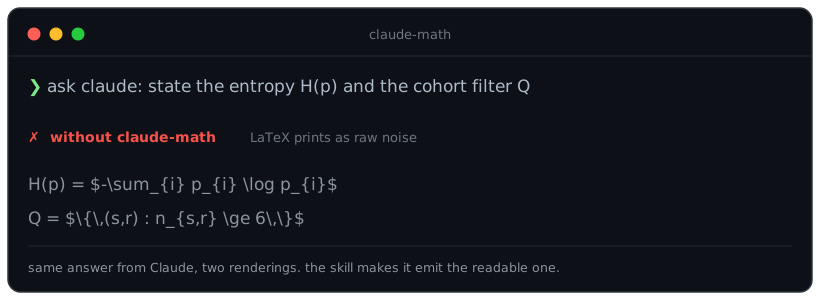
Terminal coding agents do not render LaTeX. In both Claude Code and
OpenAI Codex CLI, a formula like $f(x) = \sum_{i=1}^n x_i$ appears as raw
dollar signs and backslashes, exactly the noise you wanted formatting to
remove. This project ships a single skill (math-unicode) that instructs the
model to emit math as Unicode glyphs inline. Unicode-capable terminals with a
suitable font render these glyphs directly. It installs as a Claude Code plugin
and, via the identical SKILL.md, as a Codex skill (claude-math install --codex).
Before / after
Before:  The qualifying cohort is $Q = \{ (s,r) \in T : n_{s,r} \geq 18 \wedge p^0_{s,r} < 0.9 \}$,
         with $|Q| / |T| \approx 17.3\%$.

After:   The qualifying cohort is Q = { (s,r) ∈ T : n_{s,r} ≥ 18 ∧ p⁰_{s,r} < 0.9 },
         with |Q| / |T| ≈ 17.3 %.
Install
The quickest install is through the plugin marketplace (see below). The npm and manual paths also work.
via npm
npm install -g claude-math
claude-math install
Symlinks the package into ~/.claude/plugins/local/claude-math, registers it
in installed_plugins.json, and enables it in settings.json (atomically;
both files get a .claude-math.bak backup on first touch). Restart Claude
Code and the skill loads.
npx claude-math install also works: the CLI auto-detects an npx-cache
install path and copies rather than symlinks (since the cache directory
is ephemeral). Prefer the global install if you want updates via
npm update -g claude-math to propagate automatically.
Other commands:
claude-math status        # report target, validity, settings state, next-install mode
claude-math uninstall     # remove symlink/dir, deregister, disable
claude-math --help        # full flag list, env overrides
Flags: --force overrides safety checks (foreign symlinks, non-plugin
directories at the target). --copy forces a real copy instead of symlink.
Manual install
git clone https://github.com/vladimirrott/claude-math \
  ~/.claude/plugins/local/claude-math
Then add "claude-math@local": true under enabledPlugins in
~/.claude/settings.json and a matching entry in
~/.claude/plugins/installed_plugins.json. The CLI does both; running it
once is the easiest path.
Via Claude Code's plugin marketplace (recommended)
/plugin marketplace add vladimirrott/claude-math
/plugin install claude-math@vladimirrott
The skill normally activates for mathematical output. To load the complete
rule set explicitly in Claude Code, run /math-unicode before the request.
Codex CLI
claude-math works in OpenAI Codex CLI too — the skill uses the same name + description SKILL.md frontmatter Codex reads. Two install paths:
Native Codex plugin (recommended — no npm):
codex plugin marketplace add vladimirrott/claude-math
codex plugin add claude-math@vladimirrott
Codex installs the plugin (manifest: .codex-plugin/plugin.json) and loads its math-unicode skill. Restart Codex if it does not appear; invoke with /skills or by mentioning $math-unicode. Remove with codex plugin remove claude-math@vladimirrott.
Via npm (drops just the skill file):
npm install -g claude-math
claude-math install --codex
This copies the skill into ~/.agents/skills/math-unicode/ (the current Codex user-skills dir; the older ~/.codex/skills/ path is deprecated but still read for backward compatibility). Use claude-math status --codex to check and claude-math uninstall --codex to remove. Set CLAUDE_MATH_CODEX_SKILLS_DIR to target a non-default skills directory.
Use one path or the other, not both — installing via the plugin and the CLI would load two copies of the same skill.
Hacking on this repo
Working from a clone (before or after publish):
git clone https://github.com/vladimirrott/claude-math && cd claude-math
node bin/claude-math.js install     # uses the cloned directory directly
node --test test/                   # run the test suite
CLAUDE_CONFIG_DIR=/tmp/somewhere claude-math install lets you test against
a sandbox without touching your real ~/.claude state, useful for
contributing.
The math-unicode skill auto-triggers any time the model (Claude or Codex)
writes or explains math. No configuration required.
Graphical rendering (sixel / kitty): not inside the chat
Rendering math as an actual image (sixel or kitty graphics) is not possible inside the Claude Code chat. The TUI repaints its own screen buffer on every update and overwrites any graphics escape sequences a plugin emits, and its line accounting does not know an image's height. So in-chat output stays Unicode, which is the point of this skill.
Graphics belongs in the host, not in a plugin, and that work is now underway
upstream: openai/codex#18906
has two working fork branches rendering LaTeX through the Kitty graphics
protocol (one via typst + mitex, one via latex + dvipng), and the emerging
consensus there is Unicode-first as the first milestone with a graphics backend
second. A renderer inside the host can do something this skill structurally
cannot: convert only at display time and keep the exact LaTeX in the
transcript, so nothing is lost on resume, export or copy.
This skill is therefore the stopgap for terminals and hosts that do not render math yet. When native rendering lands where you work, prefer it.
Why Unicode by default?
| Path | Works in plain terminal | SSH / tmux | CI logs | Copy-paste | Install cost |
|---|---|---|---|---|---|
| Unicode (this skill) | ✓ | ✓ | ✓ | ✓ | 1 file |
| Sixel / kitty graphics | ✗ (not in chat) | partial | ✗ | ✗ images | native host support |
| Pipe through external viewer | ✗ TUI breaks | n/a | ✓ if --print | ✓ | shell wrapper |
Unicode is the only approach that preserves text across the distribution channels a Claude Code session commonly uses, and the only one whose output stays selectable and greppable: a graphics placement is an image, so you cannot search or copy the equation out of it. That is why a Unicode path stays useful even after hosts gain a graphics backend.
Related issues & prior art
- anthropics/claude-code#44479: native LaTeX in terminal output (open)
- anthropics/claude-code#80702: Markdown escaping corrupts LaTeX source before it can be rendered (open)
- openai/codex#18906: Markdown math rendering in the Codex TUI (open; claude-math covers the gap today via
claude-math install --codex) - warpdotdev/warp#9677: same gap on Warp
markless: terminal Markdown viewer with Typst math and kitty/sixel imagesmdviewer,glowm,mdterm: adjacent viewers
License
MIT.