Samong 🧠




A local-first knowledge base for the notes already in your repositories
You solved it once and wrote it down. Six months later the note is still in the
repo and you cannot find it. Point Samong at a project root and the .md files
you would commit become searchable and linked — and readable by the AI tools you
already work with. Plain Markdown,
Obsidian-compatible ([[wikilink]] /
[[wikilink|alias]]), no account, no cloud, one binary.
Why Samong
- 📁 A note is a
.mdfile you would commit. Point it at a repository, not at a special notes folder..gitignoreis respected and dependency directories are always skipped, so a project root indexes your ADRs, runbooks and design docs without dragging innode_modules— andsamong doctortells you exactly what counted and what did not. - 🤖 Your notes become an agent's memory.
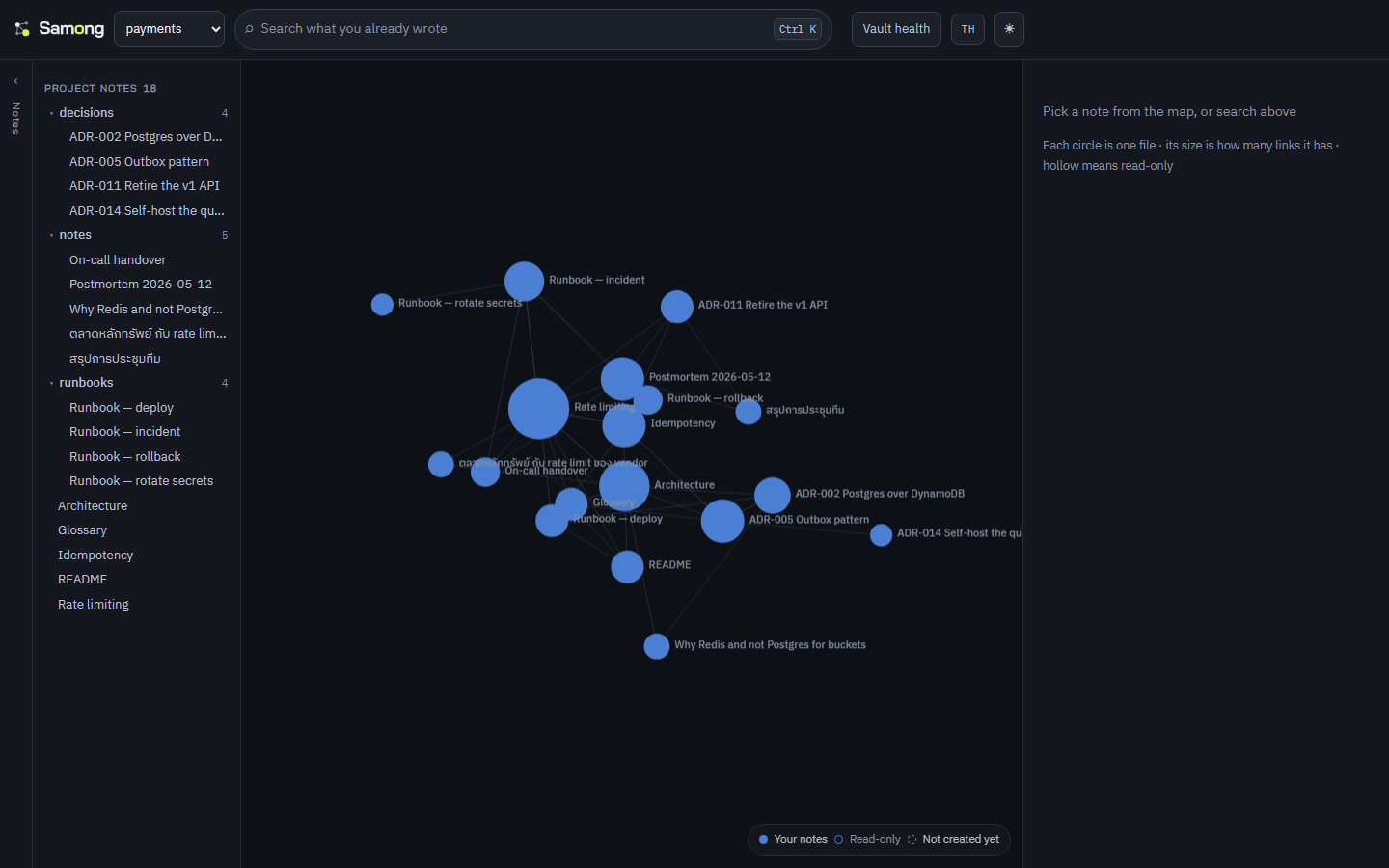
samong-mcpspeaks MCP, so Claude Code and Claude Desktop search, read and write the same knowledge base you do. No pasting context back in every session (setup). - 🗺 The graph is the workspace, not a novelty tab. A vault is a shape; typing dims everything that does not match, so a query becomes a place.
- 🔎 Notes are addressed by path, not by title. One repository holds twenty
files called
README.md. A title cannot tell them apart, and an index keyed on titles silently collapses them — so search results, the API and the MCP tools all carry the real path. - 📚 Learn from documentation you never commit.
.gitignoreanswers "what do I distribute?"; a knowledge base has to answer "what do I learn from?".scope.includepulls a dependency's own docs in as read-only reference notes — one project, one brain, no second vault. - 🔗 One repository per vault, links across all of them.
[[other-vault/note]]resolves across every registered vault, and backlinks come back the other way without any cross-vault index to keep in sync. - 🧭 Ranked by relevance and connectedness. When the words cannot tell two notes apart, the one the rest of your notes point at comes first. Capped at a 25% boost, so a popular note never outranks one that plainly matches better.
- 🧠 Semantic search, optional and local. Build with
--features semanticand runsamong embedto rank by meaning as well as by words, with a multilingual model that never leaves your machine. Off by default on purpose: see below. - ⚡ Fast, and yours. Link graph in redb,
search in tantivy, incremental
reindexing that only touches changed files. Every index lives in
<vault>/.brain/and can be rebuilt from the.mdfiles at any time — there is nothing to lock you in.
Install
Four ways in, in the order that costs you least trouble.
1. A package manager
macOS and Linux — waanvar/homebrew-samong:
brew tap waanvar/samong
brew install samong
Windows — waanvar/scoop-samong:
scoop bucket add samong https://github.com/waanvar/scoop-samong
scoop install samong
Once the winget submission is accepted this becomes winget install Waanvar.Samong
with nothing to add first, since winget ships with Windows. The manifests are in
packaging/winget/ and CI installs from them on every push; the pull request to
Microsoft is the only step left. If you are on Windows and want to avoid the
SmartScreen warning below, this section is the answer — not the download links.
Arch Linux — paru -S samong-bin, once the package is submitted. Until then
packaging/aur/ builds it: cd packaging/aur && makepkg -si.
No Gatekeeper prompt, no SmartScreen warning. Both fetch the archive
themselves and verify it against the SHA-256 published beside it. Nothing arrives
through a browser, so macOS never sets the com.apple.quarantine attribute it
would otherwise refuse to open, and Windows has no download reputation to weigh.
Each tap's CI installs on a real runner and asserts this rather than assuming it.
2. With Rust already installed
cargo install samong
Builds all four binaries with the web UI inside them; needs Rust 1.88 or newer. Compiling locally, there is likewise no download for either OS to object to.
3. Download and double-click
Download, extract, double-click:
| Windows | Open Samong.exe |
| macOS | Samong.app |
| Linux | samong-app (copy samong.desktop to ~/.local/share/applications/ for a menu entry) |
No terminal, no configuration, no account. On the very first run it makes a
vault at Documents/Samong with two notes in it, indexes them, and opens
your browser. Everything after that is your own folder of Markdown files.
The ⏻ button in the top right stops it — the server outlives the browser tab,
so closing the tab is not the same as quitting.
Already have notes somewhere? Use + Add vault… in the vault menu and point it at that folder. Nothing is moved or converted.
Two environment variables exist for the awkward cases, because a double-clicked
program has no arguments: SAMONG_PORT when 3000-3011 are all taken by
something that stays, and SAMONG_NO_OPEN=1 to start without a browser.
If the launcher fails it writes ~/.config/samong/launcher.log and opens it.
4. Download the binaries and run them yourself
Grab one from Releases, extract,
run. Direct links that always point at the newest release:
Linux ·
Windows ·
macOS Apple Silicon ·
macOS Intel. No Rust or Node needed — the web UI is already inside the binary. Four
platforms: x86_64-linux, x86_64-windows, aarch64-macos (Apple Silicon),
x86_64-macos (Intel).
Verify what you downloaded against the .sha256 published beside it:
sha256sum -c samong-x86_64-linux.tar.gz.sha256
⚠️ Downloaded binaries are not code-signed
This applies to options 3 and 4 above — anything that arrives through a browser.
A package manager and cargo install are unaffected: neither leaves a download
for the OS to be suspicious of.
Samong has no code-signing certificate, so the OS gets in the way:
macOS — Gatekeeper refuses to open it (not merely a warning). Either
right-click Samong.app → Open, which asks once, or clear the flag:
xattr -dr com.apple.quarantine Samong.app samong samong-server samong-mcp
Windows — SmartScreen warns and names the publisher as unknown; choose More info → Run anyway. The executables do carry an embedded icon and version information, so the dialog names Samong rather than a bare filename, but that is as far as it goes without a certificate.
Both happen to any open-source project without a paid certificate and are not a sign that something is wrong with the file — but do check the checksum above, and only download from the official Releases page.
Buying a certificate would not remove the Windows warning, which is worth saying because it looks like it should. A certificate replaces "Unknown publisher" with a name; the warning itself is driven by SmartScreen reputation, and since 2024 not even an EV certificate grants that on sight. Reputation is also tied to the certificate's thumbprint, so it resets when the certificate is renewed — at most every 459 days under the rules that took effect in February 2026.
Option 1 avoids all of this, today and for free. Scoop, Homebrew and winget fetch and verify the archive themselves, so there is no browser download for either OS to weigh.
Or build from source
Needs Rust (stable) and Node.js 20+ (Node only if you want the web UI, which is embedded into the binary at build time — without it you get the CLI + API).
git clone https://github.com/waanvar/samong.git
cd samong
cd web && npm install && npm run build   # build the web UI first (it gets embedded)
cd .. && cargo install --path .          # installs samong / samong-server / samong-mcp
Order matters: build the web UI before
cargo build/cargo install—samong-serverembeds the web UI into the binary, so it ships as a single file with no UI folder alongside it. (To build without installing, usecargo build --release; binaries land intarget/release/.)
Update to the latest version later with samong update (see Updating below).
Quickstart
mkdir my-vault && cd my-vault
samong new "My First Note"         # create + index
samong vault add my-vault .        # register in ~/.config/samong
samong-server start               # opens http://127.0.0.1:3000 in your browser
samong-server start serves the embedded web UI and opens your browser — no UI
files needed alongside it. Change the port with --port 8080, skip the browser
with --no-open (the old samong-server --port 8080 form still works).
CLI commands
| Command | What it does |
|---|---|
samong new <title> | Create a note + index it |
samong edit <title> | Open in $EDITOR, reindex on close |
samong rename <old> <new> | Rename + rewrite every [[wikilink]] pointing at it |
samong delete <title> | Delete + warn about dangling backlinks |
samong links <title> [--all-vaults] | Forward links + backlinks (incl. cross-vault) |
samong orphans / samong broken | Unlinked notes / links to missing notes |
samong search <q> [--vault <name>|--all-vaults] [--limit N] | Full-text search |
samong graph [--all-vaults] | Link-graph edges |
samong list | List every note |
samong reindex [--full] | Sync the index (changed files only / everything) |
samong embed [--reference] | Embed notes for semantic search (needs --features semantic) |
samong pack <dir> [--include-reference] | Copy the publishable part of the vault out — notes and manifest, never the index |
samong watch | Watch the vault, keep the index fresh |
samong vault add/list/remove | Manage the central registry |
samong vault install <git-url> | Install someone else's vault as read-only reference notes |
samong vault update [name] | Pull the latest content for installed vaults |
samong vault verify [name] [--require-signature] | Check installed vaults are what their publishers published |
samong doctor | Report what counts as a note, what was skipped, and any ambiguous titles |
samong update [--check] | Update to the latest GitHub release (--check only reports) |
samong-app | The double-click launcher: finds or creates a vault, serves, opens the browser |
What counts as a note (vault scope)
One rule: a note is a .md file you would commit. Point samong vault add
straight at a project root — no configuration needed. Samong will:
- respect
.gitignore, sonode_modules/,dist/andtarget/never get indexed - always skip dependency directories even when they are not gitignored
(
node_modules,vendor,site-packages,__pycache__,Pods,bower_components) - skip every dot-directory (
.git,.obsidian,.brain)
samong doctor shows what that adds up to:
samong doctor
# vault: /home/me/myproject
# gitignore: respected
# 4 note(s) in scope
# skipped 90 .md file(s) not tracked as notes (web 90)
To adjust it, add samong.toml at the vault root — commit it, so every
machine and any central server reads the same rules. Every field is optional:
[vault]
name = "myproject"        # the name used in [[myproject/note]] links

[scope]
notes_dir = "docs"        # only scan this subtree (default ".")
exclude = ["archive/**"]  # extra rules, gitignore syntax
include = []              # directories to index anyway (see below)
follow_gitignore = true   # turn off to index gitignored files too
max_depth = 0             # 0 = unlimited
If your repo gitignores its own notes, .samongignore brings them back. Same
syntax as gitignore, negation included:
!notes/
drafts/
Learning from documentation you never commit (scope.include)
.gitignore answers "what do I distribute?". A knowledge base has to answer
"what do I learn from?" — not the same question. The clearest case is
documentation shipped inside a dependency: Next.js puts 400-odd Markdown files
in node_modules.
[scope]
include = ["node_modules/next/dist/docs"]
Those become reference notes — same vault, same index, so [[installation]]
from your own note resolves. One project, one brain; no second vault.
.samongignorewith!node_modules/...cannot do this. Dependency directories are pruned before the walker looks inside them, so there is nothing for a negation to match, and gitignore itself cannot re-include a path whose parent is excluded.scope.includeis the right lever.
Two things to know:
- Reference notes are machine-local.
samong.tomltravels with git;node_modulesdoes not. A machine that has not installed dependencies — or a server holding only git history — will not find them. That is not an error: Samong skips them and prints one warning line, andsamong doctorreports which roots are present. - Reference notes are read-only.
save_note/PUT/delete/renamerefuse them: the file belongs to a dependency and any edit would be erased on the next install. This matters most for agents —save_note("installation")must not overwrite a framework's own docs page.
exclude applies to the main scan only. To leave part of an include root out,
point include at a narrower directory.
Deliberately ignored: the global gitignore (
~/.config/git/ignore),.git/info/exclude, and.gitignorefiles above the vault. Those are per-machine, and honoring them would make one repo index differently on two laptops.
Installing a vault someone else published
A vault can be handed to another person. samong pack copies out the
publishable part — notes and manifest, never the index — and the reader installs
the result straight from git:
samong vault install https://github.com/someone/sre-handbook.git
That clones into vendor/sre-handbook, adds it to scope.include, adds it to
your .gitignore, and reindexes. The notes land as reference notes by the
rules above: same graph, same search, [[Runbook]] from your own note resolves
into them — and read-only, because an edit would be erased by the next
samong vault update.
The .gitignore line is written for you, with the reason attached:
# installed vaults (samong vault install)
# Someone else's notes. Committing them here would redistribute
# content that is not yours to redistribute.
/vendor/sre-handbook/
Results say whose they are. A hit from an installed vault carries that vault's name and licence, in the CLI, the web UI, the API and the MCP tools:
vendor/sre-handbook/Runbook.md: When the queue backs up, drain it before …
  ↳ from SRE Handbook · CC-BY-4.0
The moment worth protecting is not search, it is the paragraph somebody copies
out of a result into work of their own — after which nothing records where it
came from. A vault that states no licence is reported as
licence not stated rather than left blank: that is an answer, not a gap.
Proving a vault is the publisher's (samong vault verify)
Integrity is not the missing piece — an installed vault is a git checkout, and
every byte is already covered by the commit hash. A SHA256SUMS beside the
content would restate that, and restate it weaker: whoever can change a note can
change the checksum file next to it.
What is missing is authenticity, which is a signature. Publishers should sign
commits, not release tags — samong vault update follows a branch, so
readers take commits between tags and a tag signature says nothing about the
commit they just pulled:
git config commit.gpgsign true
Readers get that key pinned at install, the way SSH pins a host key: whoever gave you the URL is the authority the first time, and every update afterwards is checked against it.
samong vault verify                       # who signed each one, and has anything changed
samong vault verify --require-signature   # fail on unproven, not only on wrong
- An update signed by a different key — or suddenly not signed at all — is
refused before the merge, so nothing reaches your working tree or your index.
(Dropping the signature is the cheapest attack on pinning, so it counts as
changing it.) Accept a genuine key change deliberately:
git -C vendor/<name> config --unset samong.signer. - Local changes are reported, including untracked files. A stray
.mddropped into an installed vault would be indexed and would show up in search attributed to its publisher. - Unsigned vaults pass by default. Almost every vault in the world is
unsigned today, and a check that always fails is a check nobody runs;
--require-signatureis there for anyone who has decided otherwise.
Nothing about who published what is stored outside the checkout. The clone is its own provenance, and a record kept elsewhere could only drift away from it.
Updating
samong update downloads the latest GitHub release and replaces all three
binaries (samong / samong-server / samong-mcp) in place — including the embedded
web UI. samong update --check reports whether a newer version exists without
installing, and samong-server start prints a one-line notice when an update is
available (best-effort; never blocks, never fails offline).
A published GitHub release is required first (
git tag v0.1.0 && git push origin v0.1.0triggers the workflow that builds binaries for all three OSes) beforesamong updatecan find anything.
Semantic search (optional)
Lexical search only finds notes that use the words you typed. When you cannot remember the words you wrote, it finds nothing. Semantic search fixes that by comparing meaning — and it is off by default, which is a decision, not an oversight.
cargo install --path . --features semantic
samong embed              # your notes; run it again after you write a lot
samong embed --reference  # also the vendored docs from scope.include (slow)
samong search "how do we stop repeated requests"
What it costs you. The feature pulls in ONNX Runtime, and the first embed
downloads intfloat/multilingual-e5-small from Hugging Face into
~/.config/samong/models — 465 MB on disk, measured, not estimated: a 470 MB
float32 ONNX graph plus a 17 MB tokenizer. Your notes and your queries still never
leave the machine, and nothing needs a network after that download. But "one
binary, nothing to fetch" stops being true, and that promise is why people choose
this over a cloud tool — so it is yours to opt into, not ours to impose.
Embedding is the slowest thing the program does. A real measurement: 430 notes, most of them vendored Next.js documentation, took 11m 25s on a laptop CPU. That is also why reference notes are excluded unless you ask for them — they were 95% of that time.
The model is multilingual on purpose. The nearest comparable project embeds with an English-only model, which quietly makes its semantic search useless for anyone whose notes are not in English. This one covers 100+ languages.
How the two rankings combine. Reciprocal Rank Fusion, not a weighted sum of scores: BM25 is unbounded and cosine similarity is −1 to 1, so mixing the raw numbers needs a calibration that drifts with every vault. Fusing positions needs none. A note ranked well by both wins; a note ranked first by only one still places.
Notes are chunked (~900 characters, split at paragraph breaks) so a long document
is matched by its relevant section rather than its first page, and each note
scores as its best chunk. Vectors live in <vault>/.brain/vectors.redb, stamped
with the same content hash the reindexer uses, so re-embedding skips unchanged
notes. Delete that file and the vault is exactly what it was.
samong doctor reports how many notes have vectors, so "semantic search did not
help" can be told apart from "nothing was embedded".
Web UI
An original design, not an Obsidian clone. The whole UI is embedded into the
samong-server binary (rust-embed) — ships as one file, runs instantly, and
the fonts are bundled so it works offline.
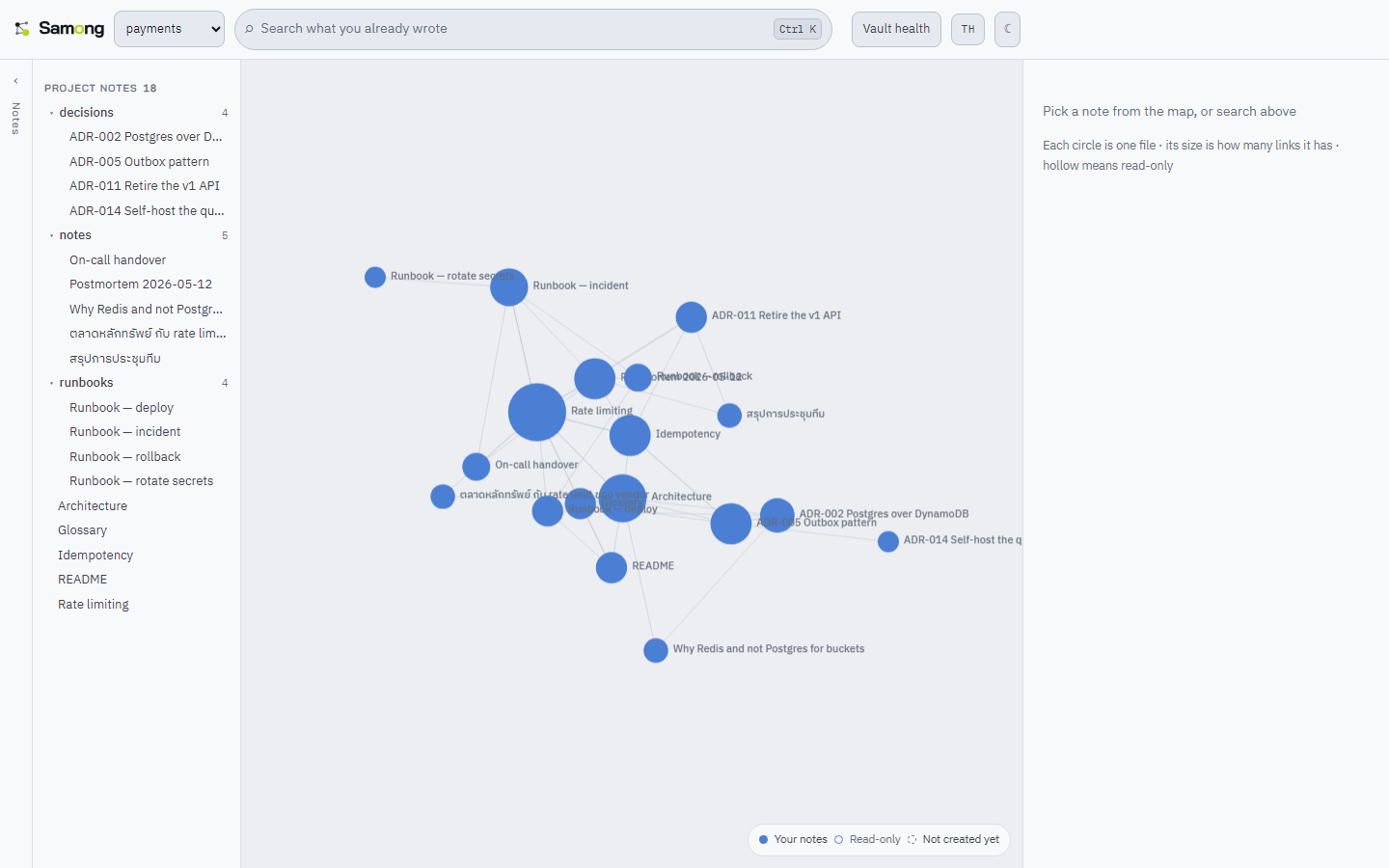
- The graph is the workspace, painted to canvas (d3-force for layout) so it survives a vault of several hundred notes. Node size is its link count, colour is its vault.
- Search is the way in:
Ctrl+Kfocuses the field in the frame — there is no palette to open. Typing dims every node that does not match, so a query becomes a place;Escbrings the whole map back. - Selecting a node opens it beside the graph, with its links as chips that say whether they resolve. Reading full screen is a state on top of the map.
- Type
[[for note autocomplete across vaults; click wikilinks to follow (missing notes are created on the spot) - English or Thai, from
?lang=, your saved choice, or the browser, and switchable in the header. English is the default. - Dark/light themes, autosave, real-time over WebSocket — edit a file in Obsidian or any editor and the page updates itself
- Vault health reports what was indexed and what was skipped, so four notes where you expected ninety is a visible answer rather than a mystery
UI development: cd web && npm run dev (Vite proxies to samong-server on
port 3000).
API (samong-server)
Binds to 127.0.0.1 only (local-first, no auth).
| Endpoint | Purpose |
|---|---|
GET /api/vaults | Registered vaults |
POST /api/vaults | Register a vault ({name, path}) — no terminal needed |
GET /api/vaults/{vault}/notes | Notes in a vault: {key, title, reference} |
GET /api/vaults/{vault}/doctor | The same scope report as samong doctor |
GET/PUT/DELETE /api/notes/{vault}/{path} | Read / write / delete markdown, addressed by path |
GET /api/links/{vault}/{path} | Forward + backlinks + cross-vault |
GET /api/search?q=&vault=&limit= | Search (omit vault for all vaults) — results include the file path |
GET /api/graph?vault= | Nodes + edges as JSON |
WS /ws | Events when .md files change |
AI agents (samong-mcp)
samong-mcp is an MCP server over stdio. Agents get these tools:
search_notes, read_note, save_note, get_links,
list_notes, list_vaults — deliberately no delete tool; erasing knowledge
stays a human action.
// .mcp.json in your repo
{ "mcpServers": { "samong": { "command": "samong-mcp" } } }
Full setup and a CLAUDE.md recipe: docs/AI-AGENT.md
Architecture
<vault>/
  *.md            ← source of truth (Obsidian-compatible)
  .brain/
    graph.redb    ← forward/backlinks + mtimes + index version (redb)
    tantivy/      ← full-text index (tantivy), dictionary-segmented
~/.config/samong/
  registry.redb   ← vault name -> path, for cross-vault links
Delete .brain/ any time — samong reindex rebuilds everything from the
Markdown files. When the schema/tokenizer version changes, stale indexes are
rebuilt automatically.
Development
cargo test                              # unit + integration tests
cargo clippy --all --all-targets -- -D warnings
cargo fmt --all -- --check
Note: run
cd web && npm run buildbefore the firstcargo testso the embedded-UI tests exercise a real build (they self-skip the UI part otherwise).
Changing the web UI means reinstalling
The UI is embedded into the binary at compile time (rust-embed), so editing
anything under web/ and then running an already-installed samong-server still
serves the old UI. Build, then install over it:
cd web && npm run build && cd ..
cargo install --path . --force
While working on the UI, use cd web && npm run dev (hot reload, proxied to the
API) or cargo run --bin samong-server -- start, which always picks up the
latest web/dist — much faster than reinstalling on every change.
Roadmap
Done since the first public release: binaries for four platforms, an "add vault" button in the web UI, connectedness-aware ranking, and optional local semantic search.
- A similarity floor for semantic search. Rank fusion currently admits the top semantic hit unconditionally, so an unremarkable match can still reach position two. The threshold has to be measured against real vaults, not guessed.
- A smaller embedding model. 465 MB is a lot to ask; a quantised build of the same model would cut it substantially.
- A user dictionary, for words the bundled segmentation dictionary does not know.
- Package as a desktop app via Tauri.
- A central server that indexes git — a team's vaults, searchable together, ingested from repositories rather than synced. Never a sync protocol of our own: git already solved conflicts, history, offline and auth.
- Cross-device sync and AI features (note summaries, ask-your-vault) — later, as an open-core layer.
License
Apache-2.0 — free to use, modify, and ship commercially, including inside your own closed-source software. Keep the copyright notice and give attribution.
All third-party components are credited in THIRD-PARTY.md —
the words_th.txt segmentation dictionary comes from
PyThaiNLP (Apache-2.0).
Name and logo
"Samong" and the logo are not covered by Apache-2.0. Fork the code, change it, sell it — but please pick a different name for anything you ship separately, so users are never confused about who maintains which version. Referring to this project, comparing against it, or saying you are compatible with Samong needs no permission.
The exclusion is written out in site/brand/LICENSE, beside the files it applies to, because the root LICENSE would otherwise read as covering them: Apache-2.0 withholds trademark rights but grants broad rights over artwork, and a clone of this repository has no way to guess that those six SVGs are different. That file also lists what you may do without asking — which is most things.