Awaitless



Stop polling long-running jobs and scarce resources from your coding agent.
Awaitless turns local, SSH, and Slurm commands into durable tasks: submit once, disconnect, and collect the exit code, bounded logs, and JSON results later. Named queues can also wait until local or SSH capacity is available before starting. Your workload stays on infrastructure you already own.
简体中文 · Documentation · Benchmarks · PyPI
Measured on real agent workloads
| Result | Plain tmux / polling | Awaitless |
|---|---|---|
| Median tool calls in 20 paired Agent cases | 7 | 2 (71.4% fewer) |
| API usage tokens per correct job | 25,974.2 | 3,820.8 (85.3% fewer) |
| Agent-visible calls in a real SSH polling workload | 13 | 2 |
The Agent results used the same DeepSeek model, prompt, workload, and seed on 2026-08-10. Awaitless returned the correct task state, exit code, Artifact, and log contract in 20/20 cases; one empty final model response made the strict end-to-end score 19/20. A strong 319-line tmux wrapper also reached two calls and used 9.2% fewer tokens than Awaitless—the value there is the built-in, maintained protocol rather than a universal token advantage.
Read the full Agent report, the benchmark methodology, and the separate SSH polling experiment with raw results.
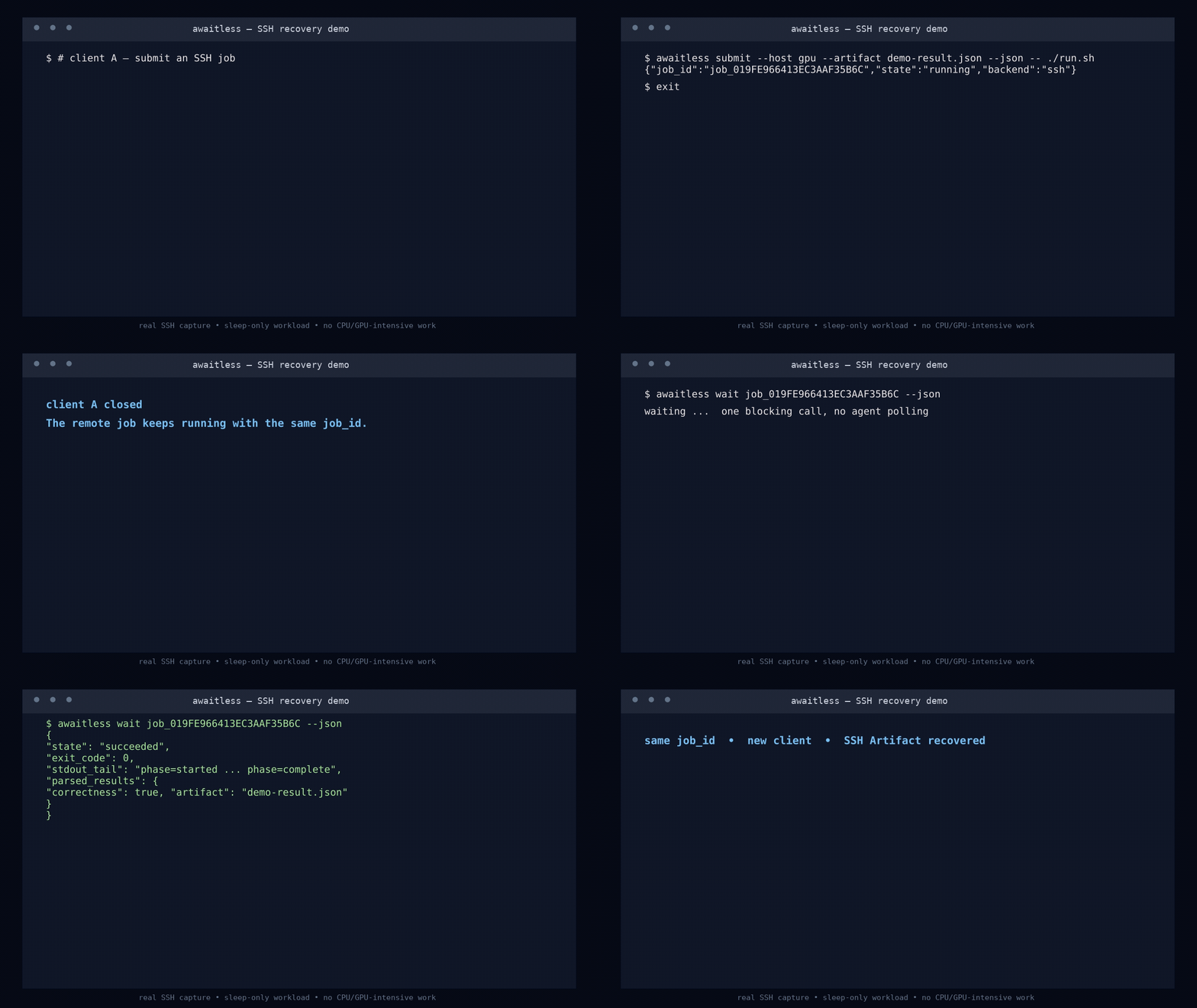
The polling loop you can delete
Without Awaitless, an agent starts a job and repeatedly pulls the same growing log back into its context:
ssh gpu 'run_benchmark > job.log 2>&1 &'
ssh gpu 'tail -n 200 job.log'  # again...
ssh gpu 'tail -n 200 job.log'  # and again...
With Awaitless, it submits once and waits once:
awaitless submit --json --host gpu --artifact results.json -- ./run_benchmark
# {"job_id":"job_019F...","state":"running","backend":"ssh"}

awaitless wait job_019F... --json
# {"state":"succeeded","exit_code":0,"parsed_results":{...}}
Interrupt the waiter, close the MCP client, or start a fresh agent session. The job keeps running; the stable ID is enough to recover its result.
Submit work before the resource is free
Create a durable FIFO queue once, then submit every command immediately:
awaitless queue create gpu0 --concurrency 1

awaitless submit --queue gpu0 -- python train_a.py
awaitless submit --queue gpu0 -- python train_b.py
awaitless submit --queue gpu0 -- python train_c.py
The first command runs and the others report queued. Each starts automatically
when capacity becomes available. There is no priority or preemption: Awaitless
uses fixed concurrency and FIFO admission, and never kills running work to make
room for a later job.
Try the recovery story in 30 seconds
Linux, Python 3.10+, and Bash are required. Run the built-in demo without a persistent install:
uvx --from awaitless-runner awaitless demo --json
The demo submits a local job, terminates its first waiting client, reconnects from a new client using only the job ID, and verifies a JSON Artifact.
For regular CLI use:
uv tool install awaitless-runner
awaitless doctor --json
pip install awaitless-runner works too.
Give it to your coding agent
Add one stdio MCP server to your client's configuration (adapt the outer key to your client):
{
  "mcpServers": {
    "awaitless": {
      "command": "uvx",
      "args": ["awaitless-runner"]
    }
  }
}
Then ask the agent to run a long command with Awaitless. Tasks-aware clients
receive a durable MCP Task handle immediately; other clients use submit_job
followed by wait_for_job. Retrying an expensive submission with the same
client_request_id cannot launch a duplicate job.
For direct CLI use, the whole loop is:
awaitless submit --json --name tests -- python -m pytest -q
# Save the returned job_id, then:
awaitless wait <job-id> --json
One interface, three places to run
| Backend | What Awaitless adds |
|---|---|
| Local | Durable process-group tracking, cancellation, bounded logs, and transactional named queues. |
| SSH | The same job contract plus queues coordinated on the target host, with no remote daemon. |
| Slurm | Real sbatch scheduling plus durable Slurm IDs, queue/accounting state, exit codes, logs, cancellation, and Artifacts. |
Use --backend, --host, or configuration defaults to switch targets without
changing how the agent submits and collects work.
Why not just use a shell or tmux?
| Tool | Best at | What the agent still has to build |
|---|---|---|
| Blocking shell call | Short commands | Nothing—use it when disconnect recovery and a free tool slot do not matter. |
Shell polling / nohup | Keeping a basic command alive | IDs, status, exit-code recovery, bounded logs, cancellation, deduplication, and result parsing. |
tmux | Humans detaching from interactive shells, REPLs, and TUIs | A reliable non-interactive job protocol and wrapper glue. |
| Awaitless | Agent-run builds, tests, benchmarks, remote jobs, and cluster work | Only the command and, optionally, the JSON Artifact to return. |
Awaitless does not replace interactive terminals or Slurm. It gives coding agents durable fixed-concurrency queues on local/SSH machines and delegates cluster resource scheduling to Slurm.
How it works
flowchart LR
    A["Coding agent"] -->|"submit once"| B["Awaitless MCP / CLI"]
    B --> C[("SQLite job record")]
    B --> Q{"Named queue?"}
    Q -->|"capacity available"| D{"Backend"}
    D --> L["Local process"]
    D --> S["SSH host"]
    D --> H["Slurm allocation"]
    A -. "reconnect with stable ID" .-> C
    C -->|"state + exit code + bounded logs + Artifacts"| A
There is no Awaitless daemon, HTTP service, or hosted sandbox. Each invocation opens the same SQLite store; submitted runners and scheduler jobs outlive the stdio server that created them. Full logs remain on disk while only bounded tails enter the agent context.
Documentation
- Documentation index
- CLI, configuration, SSH, Slurm, persistence, Artifacts, and troubleshooting
- MCP Tasks protocol and compatibility
- Benchmark definitions, methodology, and interpretation
- Real MCP → Slurm disconnect evidence
- Architecture and design rationale