Enforced multi-agent pipelines with mechanical guardrails for AI-assisted software development.
Works with Claude Code and OpenAI Codex.
Getting Started · Interactive Demo · Pipeline Runs · Changelog
v7.0.9 · MIT · macOS + Linux
What is APD?
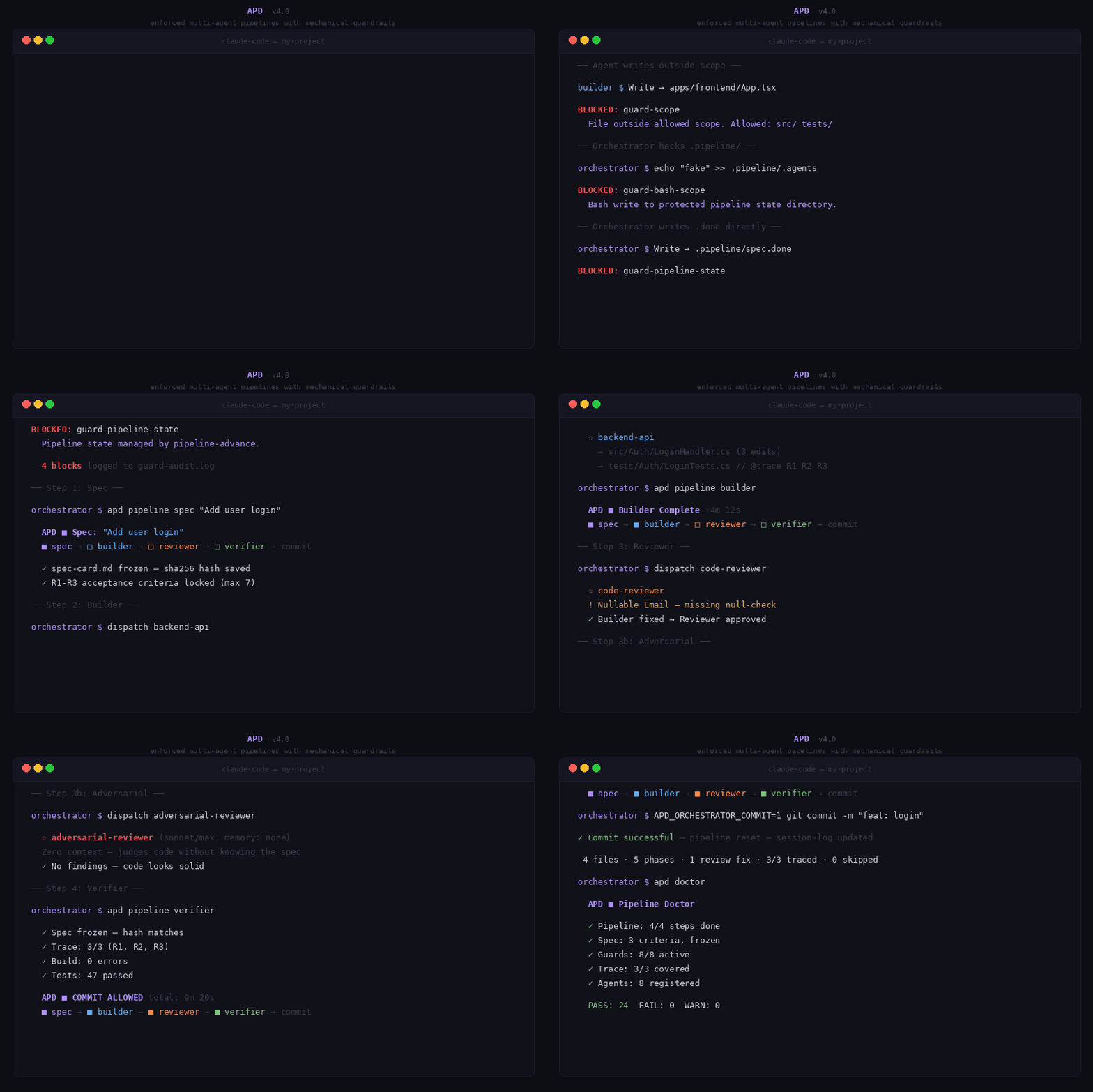
APD enforces a disciplined workflow where specialised agents build code through a gated pipeline. Every step is mechanically enforced — hooks block violations, not documentation.
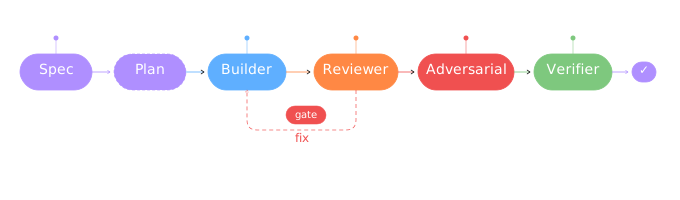
Spec → Builder → Reviewer → [Adversarial] → Verifier → Commit
- Agent — work divided among specialised agents with scoped permissions
- Pipeline — gated flow with mechanical enforcement at every step
- Development — one feature = one pipeline cycle = one commit
Quick start
Claude Code:
/plugin marketplace add zstevovich/claude-apd          # one time
/plugin install claude-apd@zstevovich-plugins          # per project
/apd-setup                                             # configure
bash .claude/bin/apd verify                            # check setup
Codex (OpenAI) — preferred, via plugin marketplace (validated on Codex 0.124):
# Prerequisites: brew install uv jq   (codex_hooks is stable on 0.124, no feature flag needed)
codex plugin marketplace add zstevovich/claude-apd             # one time, pulls latest main
printf '\n[plugins."apd@codex-apd"]\nenabled = true\n' >> ~/.codex/config.toml   # enable
cd <your-project> && codex                                     # open TUI in target project
# On first user prompt in the fresh session, APD auto-scaffolds
# .codex/ + .apd/ + AGENTS.md and MCP tools become available
# (apd_ping, apd_doctor, apd_guard_write, ...).
Codex — alternative, direct-drop (no marketplace):
git clone https://github.com/zstevovich/claude-apd ~/apd && \
    export PATH="$HOME/apd/bin:$PATH"                  # live source at ~/apd
apd cdx init                                           # scaffold .codex/ + .apd/ + AGENTS.md
apd cdx agents add code-reviewer                       # populate agents
apd cdx agents add backend-builder src/ config/
apd cdx skills install                                 # symlink phase skills into ~/.codex/skills/
apd cdx doctor                                         # audit setup
codex                                                  # start session; "run apd_ping"
Upgrading
Claude Code:
/plugin update claude-apd@zstevovich-plugins                  # pulls latest from main
# Restart the CC session — skill slash commands re-register on session start
Codex — marketplace install (Git source):
codex plugin marketplace upgrade codex-apd                    # pulls latest main, replaces cache atomically
# Open a new TUI session — first user prompt picks up the new version
To pin the upgrade to a specific tag or branch (e.g. for pre-release testing):
codex plugin marketplace remove codex-apd
codex plugin marketplace add zstevovich/claude-apd@v7.0.9     # or @<branch> for a feature branch
Codex — direct-drop install:
bash .codex/bin/apd update                                    # git pull --ff-only + idempotent re-init
# --check-only      # dry-run, don't pull or write
# --skip-pull       # only re-run install-codex-config locally
Codex SessionStart quirk (upstream). Per openai/codex#15269, Codex 0.124 fires the TUI
SessionStarthook when the user submits the first prompt, not at banner display. Practically: gap-analysis runs on first turn, not at open. MCP tools are available immediately.
See Getting Started for both walkthroughs.
Five roles
| Role | Model | Effort | Responsibility |
|---|---|---|---|
| Orchestrator | opus | max | Coordinates pipeline, writes spec, dispatches agents, commits |
| Builder | sonnet | xhigh | Implements code per spec, scoped to specific files |
| Reviewer | opus | max | Finds bugs, security issues, edge cases (read-only) |
| Adversarial Reviewer | sonnet | max | Context-free review — no spec knowledge, fresh perspective |
| Verifier | — | — | Script: build + test + spec traceability check |
Model and effort per agent are per-project settings — and since v6.16 they are switchable as named profiles.
Model profiles — economy vs quality
The model raises the average. APD guarantees the floor. The profile chooses what the average costs.
One command switches every pipeline agent's model/effort between named profiles:
| Profile | Builders / Reviewer | Adversarial | When |
|---|---|---|---|
burn | claude-fable-5 / high | opus / max | Launch-critical features — maximum quality, cost ignored |
cruise | opus / xhigh | sonnet / max | Daily default — strong builders, balanced cost |
eco | sonnet / xhigh | sonnet / max | Small, well-scoped tasks, copy fixes, Lean runs |
apd profile list              # profiles + role mappings
apd profile status            # current agents vs declared profile (flags drift)
apd profile cruise            # apply, then /reload-plugins
Or just run /apd-profile and pick. After a switch APD blocks subagent dispatch until you reload (the orchestrator can't run /reload-plugins itself) — so a forgotten reload is a clear block, not a silent stale-model run. Clear it with apd reload-done (or restart).
Design notes baked into the defaults:
- Builders carry the tier — they hold the context, so they get the strongest model the profile pays for. The adversarial reviewer may sit one tier below: its value is positional (fresh, context-free perspective), not model-tier.
- Every switch is recorded (
MODEL_PROFILEin the APD config + an audit-log entry), so each pipeline run carries model attribution — economy vs quality becomes a measurable trade-off, not a feeling. - Profiles are data, never enforcement. The mapping lives in
model-profiles.conf(per-project override supported); new model generations are a one-line table edit. No profile can loosen a gate or guard — the quality floor is not for sale, only the average is.
Parallel work — roles and worktrees
Profile is one axis (how strong a brain). Role is the other — which domain, and which workspace. A role is a generic, tech-agnostic developer responsibility — and it is not an agent: one role runs a full pipeline that dispatches many agents.
Eight roles ship as data (roles.conf), in two classes:
| Producer — own git worktree | Operator — main checkout |
|---|---|
| backend · frontend · mobile · backoffice · reporting | devops · debug · master |
Governing principle: a worktree belongs to producers of an artifact, not to integrators or operators. A producer role works in its own worktree — a feature branch + folder + isolated APD pipeline — so several run in parallel without colliding. Operators (devops/debug/master) run in the main checkout; a worktree would only cut them off from the shared state they manage.
run-role --launch enters a Claude Code session as the role: it injects the role's charter — scope + boundary + profile, built automatically from roles.conf — so the session knows what it is and what it may touch, without you typing a prompt. Producers launch in their worktree; operators charter-launch in the main checkout (no worktree, same charter).
apd roles list                 # the 8 roles + scope / boundary
apd run-role backend --launch  # producer: own worktree + dev-env, enter CC with backend's charter
apd run-role devops  --launch  # operator: enter CC in the main checkout with devops's charter (no worktree)
apd sync-role                  # (from inside the worktree) merge develop in — surface conflicts early
apd merge-role backend         # read-only gate: is backend-work ready to merge into develop?
Lifecycle: run-role opens the workspace → you work in the isolated worktree → sync-role periodically pulls the integration branch in (conflicts surface small and early, in context — a conflict is a signal, not a failure) → merge-role checks readiness (ahead / clean / idle / in-sync) and prints the exact git merge. sync-role merges the integration branch into your worktree (reversible, runs the merge); merge-role never runs the merge into the integration branch — that's irreversible and unguarded, so you pull that trigger. APD advises; you merge.
A worktree isolates code + pipeline state, not shared external resources — a local DB, Redis, or fixed ports are shared across worktrees. Parallel producers that write the same database must coordinate, or isolate it in a tracked, idempotent .apd/dev-env-setup the worktree runs on creation. CC only (worktrees need git; Codex has no --worktree).
Pipeline flow
Pipeline commands
apd pipeline spec "Task name"     # Start task (requires spec-card.md with R* criteria)
apd pipeline builder              # Advance after builder (requires implementation-plan.md)
apd pipeline reviewer             # Advance after review
apd pipeline verifier             # Run verification (spec traceability + build + test)
apd pipeline status               # Show current state
apd pipeline rollback             # Undo last step
apd pipeline reset                # Clear pipeline (start fresh)
apd pipeline metrics              # Performance dashboard
apd pipeline stats                # Skip log
apd doctor                        # Full diagnostics
apd verify                        # Setup verification (50+ checks)
All commands via bash .claude/bin/apd <command> (CC) or bash .codex/bin/apd <command> (Codex) — the shortcut each runtime's installer scaffolds. User-facing framework messages auto-select the correct path.
Pipeline report
Full pipeline recap — available after any run or on demand:
apd report              # Current/last run
apd report --history    # All runs with trends and stats
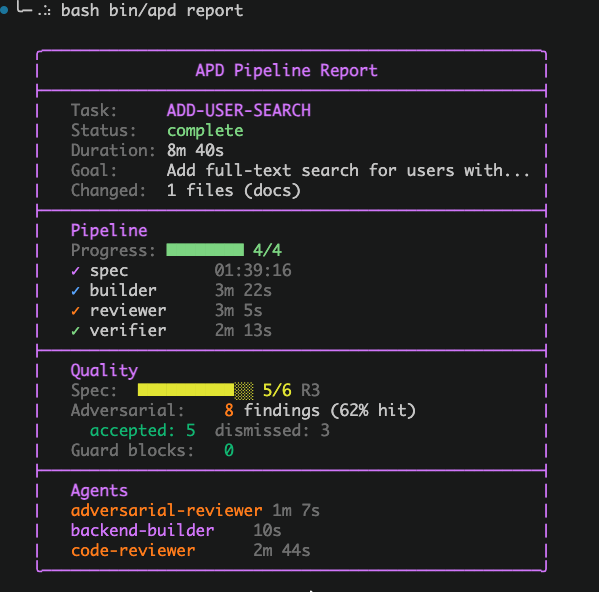
Shows task info, step timing, spec coverage bar, adversarial findings, guard blocks, and agent durations. History mode adds success rate, trend analysis, session stats, and adversarial insights.
Mechanical enforcement
Every rule is backed by a hook script that blocks violations — the agent cannot talk its way past them, because they are not part of the conversation.
What this defends against, stated honestly. The threat model is drift, not intent. An agent under pressure to finish reaches for the shortest path — writing the summary itself, committing without the review, editing the spec to fit what it built. Every guard below stops that, and the pipeline records what actually happened rather than what the agent says happened.
It is not a security boundary. Whoever runs the session owns the machine: .apd/config can be deleted, the plugin can be toggled off, a guard can be edited. APD makes those moves deliberate and visible — apd toggle off mid-pipeline is itself blocked without a written reason, and lands in the audit log — but it does not, and cannot, make them impossible. Read the table as "the natural shortcut is closed", not "the door is welded".
| What is blocked | Guard |
|---|---|
| Commit without all 4 pipeline steps | pipeline-gate |
| Orchestrator writes code files directly | guard-orchestrator |
| Agent writes outside its scope | guard-scope |
| Bash writes to pipeline state (.done, .agents) | guard-bash-scope + guard-pipeline-state |
| Direct Write/Edit to .apd/pipeline/ state files | guard-pipeline-state |
git commit without APD_ORCHESTRATOR_COMMIT=1 | guard-git |
git add . / mass staging | guard-git |
--no-verify / force push / destructive git ops | guard-git |
| Lock file modification | guard-lockfile |
| Access to sensitive files (.env, .pem, credentials) | guard-secrets |
| Superpowers agents replacing APD roles | pipeline-advance (agent type check) |
| Spec modified mid-pipeline | pipeline-advance (sha256 hash freeze) |
| More than 7 acceptance criteria per spec | pipeline-advance (forces decomposition) |
| Spec advance without the pipeline-guide marker | pipeline-advance (guide gate, no skip flag) |
| Builder dispatch without implementation plan | pipeline-advance (hard block) |
| Pipeline step forgery | Compiled Go binary creates HMAC-signed .done files — orchestrator cannot forge signatures |
| SendMessage during pipeline | guard-send-message blocks — must use Agent() for tracked dispatch |
Spec traceability
Acceptance criteria get R* IDs. Builders add @trace R* markers in test files. Verification blocks commit if any criterion lacks test coverage.
# .apd/pipeline/spec-card.md
**Acceptance criteria:**
- R1: Login endpoint returns JWT
- R2: Invalid credentials return 401
- R3: Password compared via bcrypt
// @trace R1 R2
test('login returns JWT on valid credentials', () => { ... });
test('login returns 401 on invalid credentials', () => { ... });

// @trace R3
test('password verified via bcrypt', () => { ... });
Implementation plan
Orchestrator writes .apd/pipeline/implementation-plan.md before dispatching builder — lists files to change with 1-2 sentences each, plus ### Agents section.
## Implementation Plan: Add user login

### Agents
- backend-api

### Files to create
- `src/Auth/LoginHandler.cs` — POST endpoint, validates credentials, returns JWT

### Files to modify
- `src/Auth/AuthModule.cs` — register the new endpoint
Project structure
Plugin (installed via /plugin install)
${CLAUDE_PLUGIN_ROOT}/                # = repo root for CC; CC auto-discovers hooks/ + skills/ here
├── .claude-plugin/plugin.json        # CC plugin manifest
├── .claude-plugin/marketplace.json   # CC marketplace manifest
├── .agents/plugins/marketplace.json  # Codex marketplace manifest → ./plugins/apd
├── hooks/hooks.json                  # CC plugin hooks (auto-discovered)
├── skills/                           # 8 CC skills (brainstorm, tdd, debug, finish, setup, audit, github, miro)
└── plugins/apd/                      # Plugin payload — single source of truth for both runtimes
    ├── .apd-version                  # CC version constraints (MIN_CC_VERSION, FUNC_CC_VERSION)
    ├── .codex-plugin/plugin.json     # Codex plugin manifest
    ├── .mcp.json                     # Codex MCP self-registration (cwd: ".", 9 tools)
    ├── VERSION                       # Plugin version (read by every script + MCP server)
    ├── bin/
    │   ├── apd                       # Single entry point
    │   ├── core/                     # Pipeline + guard + verify scripts
    │   ├── adapter/cc/               # CC-specific guards + post-commit
    │   ├── adapter/cdx/              # Codex install + doctor + skills + agents
    │   ├── compiled/                 # Go binaries (validate-agent)
    │   └── lib/                      # resolve-project.sh + style.sh
    ├── mcp/apd_mcp_server.py         # Codex MCP server (9 tools)
    ├── rules/workflow.md             # Pipeline workflow rules (copied to project on init)
    ├── templates/                    # Agent + project templates (CC + Codex scaffold)
    └── skills/                       # 7 Codex skills (brainstorm, tdd, debug, finish, audit, github, miro)
Path semantics. CC hook commands resolve via ${CLAUDE_PLUGIN_ROOT}/plugins/apd/bin/.... The MCP server resolves its plugin root as Path(__file__).resolve().parent.parent → plugins/apd/, so it sees bin/, templates/, rules/, VERSION as siblings without any path arithmetic. The Codex plugin cache contains exactly the contents of plugins/apd/, so plugin-shipped .mcp.json self-registration with cwd: "." works end-to-end.
Your project — CC install (generated by /apd-setup)
my-project/
├── CLAUDE.md                      # Project instructions
├── .claude/
│   ├── agents/                    # One .md per agent with scoped hooks
│   ├── bin/apd                    # Shortcut to plugin entry point
│   ├── scripts/verify-all.sh      # Build + test commands (project-specific)
│   ├── rules/                     # workflow.md + principles.md
│   └── memory/                    # Session log, status, metrics
├── .apd/
│   └── pipeline/                  # Ephemeral pipeline state (gitignored)
└── docs/adr/                      # Architecture Decision Records
Your project — Codex install (generated by apd cdx init)
my-project/
├── AGENTS.md                      # Codex project-context (analogue of CLAUDE.md)
├── .codex/
│   ├── config.toml                # Codex feature flags + plugin trust (NO mcp_servers.apd block in v6.0+; the MCP server self-registers via plugin .mcp.json)
│   ├── hooks.json                 # PreToolUse Bash → guard-bash-scope
│   └── bin/apd                    # Shortcut to plugin entry point
├── .apd/
│   ├── config                     # Activation marker (PROJECT_NAME, STACK)
│   ├── .apd-version               # Plugin version tag
│   ├── rules/workflow.md          # Pipeline workflow (paths rewritten to .codex/)
│   ├── memory/                    # MEMORY.md, status.md, session-log.md
│   ├── agents/                    # Populated with `apd cdx agents add <name>`
│   └── pipeline/                  # Ephemeral pipeline state (gitignored)
└── docs/adr/                      # Architecture Decision Records
Hybrid projects (both runtimes on one repo) keep the CC layout intact — the Codex installer detects .claude/ and skips the .apd/ scaffold.
Integrations (optional)
| Integration | What it does | Setup |
|---|---|---|
| GitHub Projects | Auto-syncs pipeline steps to board columns (Spec → In Progress → Review → Testing → Done) | Configure .mcp.json + gh auth login |
| Figma | Frontend builders get design context via MCP | Configure Figma MCP server |
| Miro | Orchestrator reads boards for spec input, pushes pipeline dashboard | claude mcp add --transport http miro https://mcp.miro.com |
Human gate
User MUST approve before: API changes, database migrations, auth/role logic, deploy to production.
Agent scope example
# .claude/agents/backend-api.md
hooks:
  PreToolUse:
    - matcher: "Write|Edit"
      hooks:
        - type: command
          command: "bash ${CLAUDE_PLUGIN_ROOT}/plugins/apd/bin/adapter/cc/guard-scope src/ tests/"
Agent writing to apps/frontend/App.tsx:
BLOCKED: File apps/frontend/App.tsx is outside the allowed scope.
Allowed paths: src/ tests/
Skills (Claude Code)
| Skill | When | Required? |
|---|---|---|
/apd-pipeline-guide | Before EVERY spec — pipeline operating manual, writes the gate marker | Mandatory (no skip) |
/apd-brainstorm | Before the guide — vague or complex task clarification | Recommended when scope is unclear |
/apd-tdd | During builder implementation | Mandatory |
/apd-debug | On verifier failure or critical review finding | Mandatory |
/apd-finish | After successful commit | Mandatory |
/apd-setup | Project initialization and maintenance | On setup |
/apd-audit | Qualitative framework audit | Optional |
/apd-github | GitHub Projects board sync | Optional |
/apd-miro | Miro board dashboard sync | Optional |
/apd-profile | Switch agent model profile (burn/cruise/eco — economy vs quality) | Optional, between tasks |
Codex adapter surface
| Command | Purpose |
|---|---|
apd cdx init | Scaffold .codex/ + .apd/ + AGENTS.md on the project |
apd cdx agents list | Show available templates and installed agents |
apd cdx agents add <name> [scope ...] | Scaffold an agent definition (5 templates available) |
apd cdx doctor | Runtime-aware audit of the pure-Codex setup |
apd cdx test | E2E smoke test (~75 checks, runs without Codex CLI) |
Codex uses an MCP server (mcp/apd_mcp_server.py) that exposes the pipeline as 8 MCP tools: apd_ping, apd_doctor, apd_advance_pipeline, apd_guard_write, apd_verify_step, apd_adversarial_pass, apd_list_agents, apd_pipeline_state. The orchestrator on Codex plays all roles inline — there is no sub-agent dispatch like on CC — and scope enforcement happens through apd_guard_write(apd_role, file_path), which reads each role's scope server-side from the agent registry instead of trusting client arguments.
Real-world results
See Pipeline Runs for tracked production results with metrics.
Plugin compatibility
APD mechanically blocks superpowers:* agents — the two pipelines are incompatible. APD includes its own equivalents: brainstorming, TDD, debugging, code review, verification, and finish workflows.
Other plugins (Figma, context7, etc.) work alongside APD without conflicts.
License
MIT — Zoran Stevovic